Minecraft version
Back to mods 
CurseForge · Minecraft mod
InfoPlus+ 📑
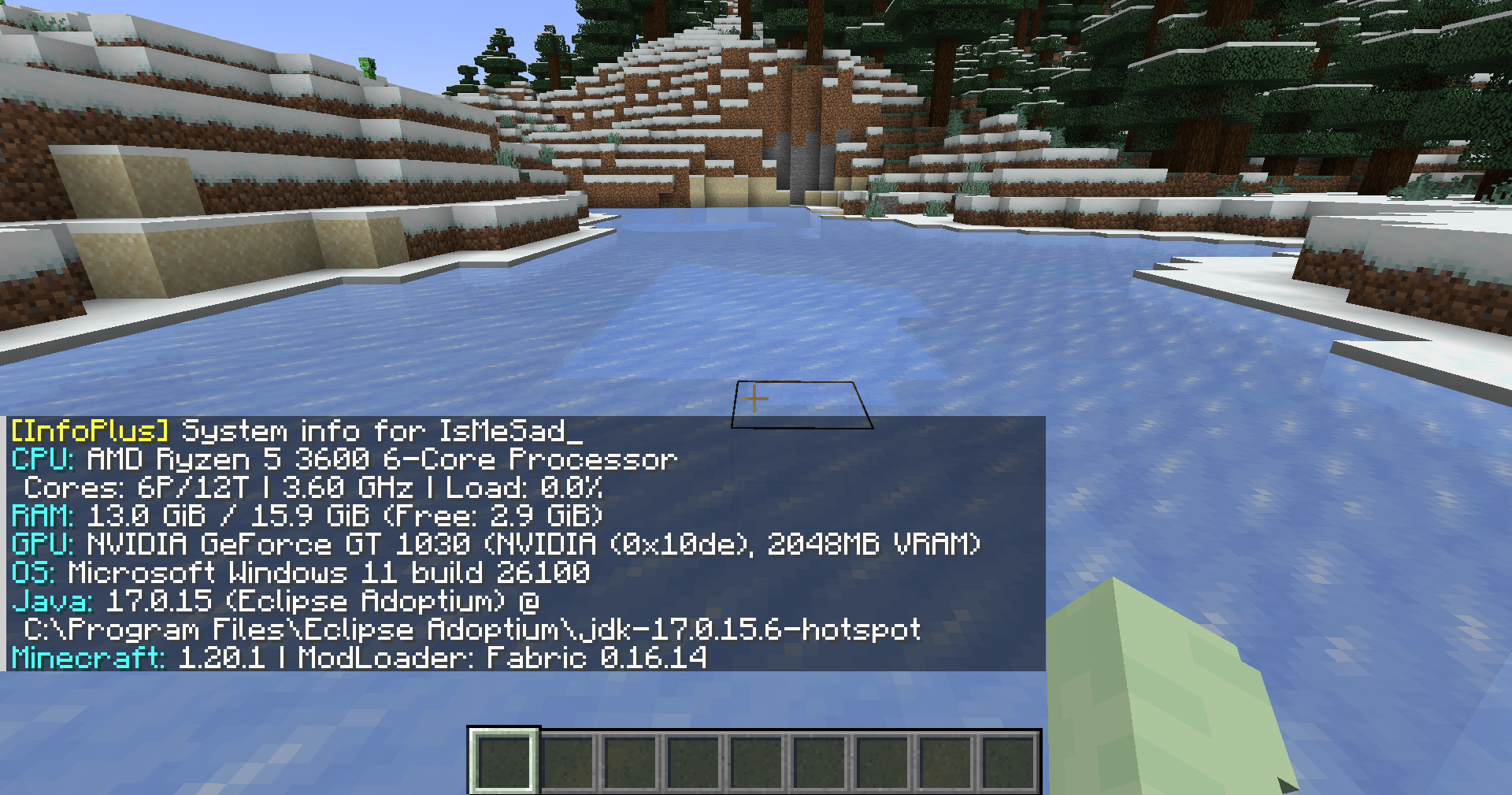
Displays detailed server system info (CPU, RAM, GPU, OS, Java, Minecraft, Loader) directly in-game. Useful for debugging, tech support, and verifying server/client environments
Choose a version Pick your version below, then grab the matching file.
Quick answer
Which InfoPlus+ 📑 release should I use?
Latest stable file infoplus-forge-2.0.0-1.20.1.jar
Game version 1.20.1, 1.20
Loader Forge
InfoPlus+ 📑 infoplus-forge-2.0.0-1.20.1.jar targets 1.20.1, 1.20 with Forge. The project page does not say whether this file belongs on the client, dedicated server, or both. No extra mods listed for this file.
Where it goes
Is InfoPlus+ 📑 required on the client, server, or both?
The project page does not say whether this file belongs on the client, dedicated server, or both.
Client Source doesn’t say
Dedicated server Source doesn’t say
Loader for this release Forge
Required install it here Optional supported, not mandatory Not supported do not install here Source doesn’t say do not assume
The source does not explicitly classify this release as client-only or server-only.
What else does InfoPlus+ 📑 infoplus-forge-2.0.0-1.20.1.jar need?
infoplus-forge-2.0.0-1.20.1.jar. Change the file and its required mods may change too.
This file does not list any required mods. Do not add a library just because a different file uses it.
This file does not list any required or optional mods.
Before you install it
Add InfoPlus+ 📑 without breaking your instance.
Built for InfoPlus+ 📑 infoplus-forge-2.0.0-1.20.1.jar. Pick another file and the loader, install side or required mods may change.
- 01
Stick to this file
Use infoplus-forge-2.0.0-1.20.1.jar. It targets 1.20.1, 1.20 with Forge; another release may have different loader, side or dependency requirements.
- 02
Bring the mods it needs
This file does not list any required mods. Do not add a library just because a different file uses it.
- 03
Put it on the correct side
The project page does not say whether this file belongs on the client, dedicated server, or both.
- 04
Pick the file you checked
Use the “Get this file” button beside infoplus-forge-2.0.0-1.20.1.jar. It opens that exact file at the source.
About this project
What does InfoPlus+ 📑 add?

InfoPlus
Show detailed system information directly in Minecraft chat.
View CPU, RAM, GPU, OS, Java, Minecraft, and Loader details.
Built for debugging, player support, server checks, and modpack troubleshooting.
Features
- View CPU information, including model, vendor, cores, threads, frequency, and usage
- View RAM usage, including total, used, available, and swap/virtual memory
- View GPU details, including model, vendor, VRAM, device ID, and version info
- View operating system information, uptime, process count, and boot time
- View Java runtime information, Minecraft version, loader name, and loader version
- View disk, network, battery, firmware, motherboard, and file system information when using full mode
- Supports both local client checks and multiplayer player checks
- Outputs information in a clear chat-friendly format
Screenshot
Usage
Local system info
Run the command in Minecraft chat:
/info
Basic system information:
/info basic
Full system information:
/info full
You can also use the alias:
/infoplus
Multiplayer player info
Request system information from another player:
/info <player>
Request basic information from another player:
/info <player> basic
Request full information from another player:
/info <player> full
Alias:
/infoplus <player> full
Server-side player requests require permission level 2.
Command Summary
| Command | Description |
|---|---|
/info |
Shows your basic system information |
/info basic |
Shows your basic system information |
/info full |
Shows your full system information |
/info <player> |
Requests basic system information from a player |
/info <player> basic |
Requests basic system information from a player |
/info <player> full |
Requests full system information from a player |
/infoplus |
Alias for /info |
Privacy Notice
InfoPlus can display hardware and runtime information such as CPU, RAM, GPU, operating system, Java version, Minecraft version, loader version, and other system details.
Full mode may include more detailed information depending on the enabled options. Server-side player requests are limited to users with the required permission level.
Use this mod responsibly and avoid sharing sensitive system information publicly.
Requirements
- Minecraft 1.20.1
- Fabric Loader
- Fabric API
- Java 17
Download
Source Code
The source code is available on GitHub:
https://github.com/TamKungZ/infoplus
License
This project is licensed under the MIT License.
See the LICENSE file for more details.
Project description from CurseForge.
Pick your setup
InfoPlus+ 📑 by Minecraft version and loader
Choose the version and loader you play, then open the matching release.
Minecraft version
1.21.6
1 loader buildMinecraft version
1.21.5
1 loader buildMinecraft version
1.21.4
1 loader buildMinecraft version
1.21.1
1 loader buildMinecraft version
1.21
1 loader buildMinecraft version
1.20.6
1 loader buildMinecraft version
1.20.5
1 loader buildMinecraft version
1.20.1
2 loader buildsMinecraft version
1.20
2 loader buildsCheck the dependencies, then try the file in a copied instance before changing a world you care about.
Recent files
InfoPlus+ 📑 versions and loaders
infoplus-forge-2.0.0-1.20.1.jar
28 Jun 2026
Client Source doesn’t say Server Source doesn’t say Dependencies No extras listed Listed on Release listing
Check the 1.20.1 · Forge setup 1.20.1Forge1.20 release
infoplus-fabric-2.0.0-1.20.1.jar
28 Jun 2026
Client Source doesn’t say Server Source doesn’t say Dependencies No extras listed Listed on Release listing
Check the 1.20.1 · Fabric setup Fabric1.20.11.20 release
infoplus-1.0.1-1.20.1-forge.jar
9 Jul 2025
Client Source doesn’t say Server Source doesn’t say Dependencies No extras listed Listed on Release listing
Check the 1.20.1 · Forge setup 1.20.1Forge release
infoplus-1.0.0-1.21.6-rc1-fabric.jar
9 Jul 2025
Client Source doesn’t say Server Source doesn’t say Dependencies No extras listed Listed on Release listing
Check the 1.21.6-snapshot · Fabric setup 1.21.6-snapshotFabric1.21.6 release
infoplus-1.0.0-1.20.6-fabric.jar
9 Jul 2025
Client Source doesn’t say Server Source doesn’t say Dependencies No extras listed Listed on Release listing
Check the 1.20.6 · Fabric setup 1.20.5Fabric1.20.6 release
infoplus-1.0.0-1.21.5-fabric.jar
9 Jul 2025
Client Source doesn’t say Server Source doesn’t say Dependencies No extras listed Listed on Release listing
Check the 1.21.5 · Fabric setup 1.21.5Fabric1.21.4 release
infoplus-1.0.0-1.21.1-fabric.jar
9 Jul 2025
Client Source doesn’t say Server Source doesn’t say Dependencies No extras listed Listed on Release listing
Check the 1.21.1 · Fabric setup 1.21Fabric1.21.1 release
infoplus-1.0.0-1.20.1-fabric.jar
9 Jul 2025
Client Source doesn’t say Server Source doesn’t say Dependencies No extras listed Listed on Release listing
Check the 1.20.1 · Fabric setup Fabric1.20.11.20 release
Looking for an older file? The official CurseForge project page is in Resources.
 mod
CurseForge + Modrinth · Minecraft
Adventure Item Names
Unique names for weapons, tools, armour and items found throughout your world.
 mod
CurseForge · Minecraft
TouhouLittleMaid Self Talk
A mod that adds self-talk / welcome greetings to Touhou Little Maid maids.
 mod
CurseForge · Minecraft
Better Search JEI
Improve daily quality of life by adding better search logic to JEI