Minecraft version
Back to mods 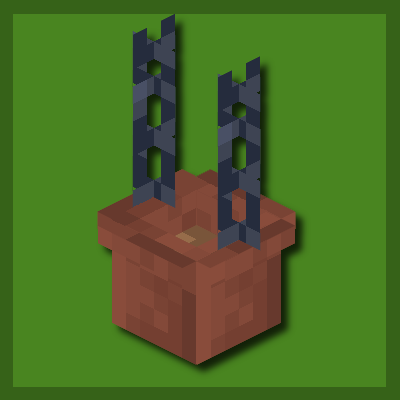
CurseForge · Minecraft mod
Oaks Bits and Bops
A decoration mod to add details
Choose a version Pick your version below, then grab the matching file.
Quick answer
Which Oaks Bits and Bops release should I use?
Latest stable file oaksbits-1.2.1-neoforge-1.21.1.jar
Game version 1.21.1
Loader NeoForge
Oaks Bits and Bops oaksbits-1.2.1-neoforge-1.21.1.jar targets 1.21.1 with NeoForge. The project page does not say whether this file belongs on the client, dedicated server, or both. No extra mods listed for this file.
Where it goes
Is Oaks Bits and Bops required on the client, server, or both?
The project page does not say whether this file belongs on the client, dedicated server, or both.
Client Source doesn’t say
Dedicated server Source doesn’t say
Loader for this release NeoForge
Required install it here Optional supported, not mandatory Not supported do not install here Source doesn’t say do not assume
The source does not explicitly classify this release as client-only or server-only.
What else does Oaks Bits and Bops oaksbits-1.2.1-neoforge-1.21.1.jar need?
oaksbits-1.2.1-neoforge-1.21.1.jar. Change the file and its required mods may change too.
This file does not list any required mods. Do not add a library just because a different file uses it.
This file does not list any required or optional mods.
Before you install it
Add Oaks Bits and Bops without breaking your instance.
Built for Oaks Bits and Bops oaksbits-1.2.1-neoforge-1.21.1.jar. Pick another file and the loader, install side or required mods may change.
- 01
Stick to this file
Use oaksbits-1.2.1-neoforge-1.21.1.jar. It targets 1.21.1 with NeoForge; another release may have different loader, side or dependency requirements.
- 02
Bring the mods it needs
This file does not list any required mods. Do not add a library just because a different file uses it.
- 03
Put it on the correct side
The project page does not say whether this file belongs on the client, dedicated server, or both.
- 04
Pick the file you checked
Use the “Get this file” button beside oaksbits-1.2.1-neoforge-1.21.1.jar. It opens that exact file at the source.
About this project
What does Oaks Bits and Bops add?
Updating and Porting Information
1.21.4 = 100%
1.21.5 = 0%
Oak’s Bits adds small decorative blocks to enhance your Minecraft world, to help make builds feel more alive and detailed.
This mod is intended as a full replacement for Oak’s Decor, which I’ve decided to retire due to its outdated design and limitations. Oak’s Bits is being rebuilt from the ground up to focus on cleaner code, better performance, and more creative flexibility for players and builders alike.
Current Features
- Hanging Pots - Connect to chains and supports blocks tagged "minecraft:small_flowers" and "minecraft:saplings"
- 16 Window Shutters - each with its design, can be stacked up infinitely and will dynamically open and close.
- 16 Checked Tiles - Perfect for your kitchens and bathrooms.
- 11 Wooden Wall Shelves
- 11 Countertops - dynamically adjust to their placements
- Terrarium - supports blocks tagged "minecraft:small_flowers" and "minecraft:saplings"
This mod is designed to fit perfectly with Oaks Delight
Project description from CurseForge.
Pick your setup
Oaks Bits and Bops by Minecraft version and loader
Choose the version and loader you play, then open the matching release.
Minecraft version
1.21.1
1 loader buildCheck the dependencies, then try the file in a copied instance before changing a world you care about.
Recent files
Oaks Bits and Bops versions and loaders
oaksbits-1.2.1-neoforge-1.21.1.jar
19 Oct 2025
Client Source doesn’t say Server Source doesn’t say Dependencies No extras listed Listed on Release listing
Check the 1.21.1 · NeoForge setup NeoForge1.21.1 release
oaksbits-1.2.0-neoforge-1.21.1.jar
16 Oct 2025
Client Source doesn’t say Server Source doesn’t say Dependencies No extras listed Listed on Release listing
Check the 1.21.1 · NeoForge setup NeoForge1.21.1 release
oaksbits-1.1.0-neoforge-1.21.4.jar
23 Jul 2025
Client Source doesn’t say Server Source doesn’t say Dependencies No extras listed Listed on Release listing
Check the 1.21.4 · NeoForge setup 1.21.4NeoForge release
oaksbits-1.1.0-neoforge-1.21.1.jar
23 Jul 2025
Client Source doesn’t say Server Source doesn’t say Dependencies No extras listed Listed on Release listing
Check the 1.21.1 · NeoForge setup NeoForge1.21.1 release
oaksbits-1.0.0-neoforge-1.21.1.jar
18 Jul 2025
Client Source doesn’t say Server Source doesn’t say Dependencies No extras listed Listed on Release listing
Check the 1.21.1 · NeoForge setup NeoForge1.21.1 release
Looking for an older file? The official CurseForge project page is in Resources.
 mod
CurseForge + Modrinth · Minecraft
Call Your Horse
Horse whistle: use a goat horn to teleport your horse to you from anywhere, even from unloaded chunks
 mod
CurseForge + Modrinth · Minecraft
Bigger Stack Size
Stack all items to 64: potions, ender pearls, totems, buckets, signs, tools and more. You choose which items stack
 mod
CurseForge · Minecraft
KasHub
Powerful in‑game scripting engine for Minecraft automation. VSCode‑style editor, 40+ high‑level commands, themes, debugging tools, and multi‑tasking — perfect for automating farms, utilities, and server‑side workflows.