Fabric API Needed by Simple AutoPickup autopickup-fabric-1.4.20+26.3.jar
requiredMatching file found Matched file: [26.3] Fabric API 0.165.0+26.3

CurseForge · Minecraft mod
Instantly collect items from mined blocks directly into your inventory with the Auto Pickup mod. Mob loot & more configurable!
Quick answer
Simple AutoPickup autopickup-fabric-1.4.20+26.3.jar targets 26.3 with Fabric. The project page does not say whether this file belongs on the client, dedicated server, or both. All 1 required mods have matching files.
Where it goes
The project page does not say whether this file belongs on the client, dedicated server, or both.
The source does not explicitly classify this release as client-only or server-only.
autopickup-fabric-1.4.20+26.3.jar. Change the file and its required mods may change too.
Install Fabric API first. We found matching files for this game-version and loader setup. 2 come through another mod in the chain.
2 extra mods were pulled in by other dependencies. Indented rows show who needs each one. We only count dependency files that match this setup. A file for another loader does not fill the gap.
Before you install it
Built for Simple AutoPickup autopickup-fabric-1.4.20+26.3.jar. Pick another file and the loader, install side or required mods may change.
Use autopickup-fabric-1.4.20+26.3.jar. It targets 26.3 with Fabric; another release may have different loader, side or dependency requirements.
Install Fabric API first. We found matching files for this game-version and loader setup. 2 come through another mod in the chain.
The project page does not say whether this file belongs on the client, dedicated server, or both.
Use the “Get this file” button beside autopickup-fabric-1.4.20+26.3.jar. It opens that exact file at the source.
About this project


AutoPickup is a highly configurable server-side mod that automates the collection of items and experience orbs. It features session tracking, a multi-tier permission system, and extensive mod compatibility to ensure drops are attributed to the correct players, even when using high-speed mining mods or engaging in group combat.
<details open> <summary>
</summary>

</details>
<details> <summary>
</summary>
AutoPickup uses a flexible three-tier permission system:
You can configure your personal preferences via the menu. Use Mod Menu for a easy access on Fabric. Otherwise, use /autopickup gui
Settings available:
Note: Your client settings only apply if the server admin has enabled the corresponding "Allow" setting for that feature.

Everyone can run /autopickup and /autopickup gui. Changing the global configuration, or another player's settings, requires being a server operator.
| Command | Description |
|---|---|
/autopickup |
Display the server's settings and, for a player, their own (see below) |
/autopickup gui |
Open the configuration menu (needs the client mod) |
A player sees three columns; the console sees only the first two:
Feature              | Server                       | You
Master Toggle        | CLIENT DECIDE (default: ON)  | ON  (server default)
Mob XP               | CLIENT DECIDE (default: OFF) | OFF (server default)
Mob Loot             | OFF                          | ON  (admin override)
CLIENT DECIDE means players may choose that setting; the default is what they get until they do. You is the value that applies to you and where it comes from: admin override, your setting or server default.
/autopickup global <key> <true|false> [silent] sets one global value. Keys are not case sensitive; silent suppresses the confirmation message.
| Key | Description | Default |
|---|---|---|
master |
Master toggle: disables the mod entirely if false | true |
blocks |
Autopickup items from broken blocks | true |
blockXp |
Autopickup experience from broken blocks | true |
mobLoot |
Autopickup loot from killed mobs | false |
mobXp |
Autopickup experience from killed mobs | false |
splitMobLoot |
Share mob loot among nearby attackers | false |
splitMobXp |
Share mob XP among nearby attackers | false |
allow_master |
Let players choose the master toggle themselves | true |
allow_blocks |
Let players choose block item pickup | true |
allow_blockXp |
Let players choose block XP pickup | true |
allow_mobLoot |
Let players choose mob loot pickup | true |
allow_mobXp |
Let players choose mob XP pickup | true |
allow_splitMobLoot |
Let players choose mob loot splitting | true |
allow_splitMobXp |
Let players choose mob XP splitting | true |
When an allow_* key is false, the server value applies to every player who has no override.
/autopickup setPlayerConfig <targets> <key|all> <true|false|reset> [silent]
reset removes it.allow_* key is true. This sets their own preference, never an override. It is saved, so it lasts across restarts; this is how players without the mod choose. A player's preference is simply the last value they set, by this command or with the mod's config menu. When the menu's settings replace one set by command, the player is told "Your AutoPickup settings were updated from your client".Keys are the same as above without the allow_ ones; all applies to every setting at once.
The mod's client also uses a few internal commands (
ap_config_sync,check_perm,query_global,query_player) to sync with the server. They are not meant to be typed.
Server Config: config/AutoPickup/global_config.json
{
   "autoPickup": true,
   "autoPickupBlocks": true,
   "autoPickupBlockXp": true,
   "autoPickupMobLoot": false,
   "autoPickupMobXp": false,
   "autoPickupSplitMobLoot": false,
   "autoPickupSplitMobXp": false,
   "allowMaster": true,
   "allowBlocks": true,
   "allowBlockXp": true,
   "allowMobLoot": true,
   "allowMobXp": true,
   "allowSplitMobLoot": true,
   "allowSplitMobXp": true
}
Client Config: config/AutoPickup/client_default.toml (or per-server profiles in presets/)
# AutoPickup Client Configuration
master = true
blocks = true
blockXp = true
mobLoot = false
mobXp = false
splitMobLoot = false
splitMobXp = false
Player Preferences: config/AutoPickup/preferences/<player-uuid>.json, one file per player (in singleplayer, config/AutoPickup/worlds/<world>/preferences/). Holds only the settings that player chose, with the mod's config menu or setPlayerConfig on themselves:
{
   "mobXp": true
}
Player Overrides: config/AutoPickup/player_overrides.json
{
   "player-uuid-here": {
      "overrideMaster": true,
      "overrideBlocks": null,
      ...
   }
}
</details>
<details> <summary>
</summary>
AutoPickup hooks into core Minecraft mechanics and works seamlessly with most mods out of the box.
| Mod | Status | Notes |
|---|---|---|
| VeinMiner | Full | Whole vein chain collected with XP, at any length (see note below) |
| TreeHarvester | Full | Logs/leaves collected; saplings auto-replanted if enabled |
| Traveler's Backpack | Full | Items route to backpack filter first (If the Auto Pickup upgrade is there it works) |
| FallingTree | Full | Tree items handle the different break modes |
| Panda's Falling Trees | Full | Tree items are handled by AutoPickup after fall animation |
| RightClickHarvest | Full | Right-click crop harvests (including tall sugarcane) picked up automatically |
| LiteMiner | Full | Whole vein chain collected with XP, at any length |
| FTB Ultimine | Full | Ultimined blocks, merged drops and right-click crop harvests collected with XP |
| Butchery | Full | Carcasses dropped by player-killed mobs go to the killer as mob loot |
| General Block Breakers | Compatible | Any mod or mechanic that breaks blocks and attributes the break to the player |
VeinMiner is handled in one of two ways depending on the Minecraft version. VeinMiner 2.12.1+ breaks each vein block through the vanilla player path (
ServerPlayerGameMode.destroyBlock), so AutoPickup catches it automatically like any general block breaker, so no dedicated code needed. Current Minecraft versions of AutoPickup run against 2.12.1+ and rely on this implicit support, so the explicit compatibility mixin has been removed in favor of it. Older Minecraft versions, where VeinMiner has only been updated up to 2.12.0, keep AutoPickup's dedicated VeinMiner compatibility mixin. Either way, whole vein chains are collected with XP.
AutoPickup intercepts drops at these injection points:
Block.dropResources() - Primary block drop handlingServerPlayerGameMode.destroyBlock() - Tracks the player's own block break and marks their break as "on the stack," so drops caused synchronously by that break (chain-mining, plant-column collapse) are attributed while independent farm drops are notLevel.destroyBlock() - Non-player breaks from mods/vanilla (chain-miners like LiteMiner, and bamboo/sugarcane/cactus columns collapsing after their base is broken)ServerLevel.addFreshEntity() - Item entity spawning and falling-block entity tracking (FallingTree and any mod that spawns drops directly)LivingEntity.dropFromLootTable() - Mob loot generationLivingEntity.die() - Scopes a player kill so drops spawned directly during the death (equipment, mods like Butchery spawning carcasses from the death event) count as mob loot. The corpse is then tracked until its next tick, so the lead a leashed mob drops then is collected tooLivingEntity.dropExperience() - Mob XP orbsBlock.popExperience() - Block XP orbsExperienceOrb.award() - Captures XP spawned directly by block-breaking mods that bypass the vanilla XP pipelineServerPlayerGameMode.useItemOn() - Right-click harvesting (sweet berries, jukebox disc ejection, crops via the RightClickHarvest mod, etc.)ItemFrame.hurt() / hurtServer() - Items removed from item frames by left-clickingMob.interact() / ShearsItem.interactLivingEntity() - Shearing drops (wool, snow golem pumpkins, mooshroom mushrooms)BrushableBlockEntity.dropContent() - Brushing suspicious sand/gravelLivingEntity.dropFromEntityInteractLootTable() - Brushing armadillos for scutesOn 1.12.2, block and mob drops come from Forge's HarvestDropsEvent, LivingDropsEvent and LivingExperienceDropEvent, and the rest from the 1.12.2 equivalents of the hooks above (PlayerInteractionManager.tryHarvestBlock() / processRightClickBlock(), World.destroyBlock(), WorldServer.spawnEntity(), Block.dropXpOnBlockBreak(), EntityItemFrame.attackEntityFrom(), ItemShears.itemInteractionForEntity()). EntityLivingBase.onDeath() is scoped from its call in attackEntityFrom(), so drops that horses, donkeys, llamas and pigs make after the drops event (inventory, chests, saddles) count as mob loot too, and leads dropped by the corpse on its next tick are collected the same way. The mod compatibility above does not apply there.
This broad compatibility means most mods work automatically without explicit support.

</details>
<details> <summary>
</summary>
When Split Mob Loot or Split Mob XP is enabled, rewards from mob kills are shared among participants:
Player A (killer), B, and C all damaged a zombie. Settings:
Result: Only A and B receive split loot. Player C gets nothing because they disabled splitting.
</details>
<details> <summary>
</summary>
Gradle:
dependencies {
   compileOnly(files("libs/autopickup-platform-x.x.x.jar"))
}
import com.lukarbonite.autopickup.AutoPickupApi;

public class QuestRewards {

   public void giveReward(Player player, List<ItemStack> items, int xp) {
      if (!isModLoaded("autopickup")) {
         // Fallback: manual drops
         items.forEach(stack -> player.dropItem(stack, false));
         player.addExperience(xp);
         return;
      }

      // AutoPickup handles:
      // - Inventory insertion
      // - Traveler's Backpack routing
      // - Config checks (Master, Blocks, etc.)
      List<ItemStack> remaining = AutoPickupApi.tryPickup(player, items);

      // Drop items that didn't fit
      remaining.forEach(stack -> player.dropItem(stack, false));

      // AutoPickup handles:
      // - Mending calculations
      // - Config checks
      AutoPickupApi.tryPickupBlockExperience(player, xp);
   }

   // For mob-related rewards
   public void giveMobReward(Player player, List<ItemStack> loot, int xp) {
      List<ItemStack> remaining = AutoPickupApi.tryPickupFromMob(player, loot);
      remaining.forEach(stack -> player.dropItem(stack, false));

      AutoPickupApi.tryPickupMobExperience(player, xp);
   }
}
| Method | Description |
|---|---|
tryPickup(PlayerEntity, List<ItemStack>) |
Pickup items from blocks (respects Master + Blocks settings) |
tryPickupFromMob(PlayerEntity, List<ItemStack>) |
Pickup items from mobs (respects Master + MobLoot settings) |
tryPickupBlockExperience(PlayerEntity, int) |
Give block XP (respects Master + BlockXP settings) |
tryPickupMobExperience(PlayerEntity, int) |
Give mob XP (respects Master + MobXP settings) |
isMasterEnabled(PlayerEntity) |
Check if autopickup is enabled for player |
isBlocksEnabled(PlayerEntity) |
Check block item pickup setting |
isBlockXpEnabled(PlayerEntity) |
Check block XP pickup setting |
isMobLootEnabled(PlayerEntity) |
Check mob loot pickup setting |
isMobXpEnabled(PlayerEntity) |
Check mob XP pickup setting |
Note: All
try*methods return lists of items that could not be picked up (full inventory).
</details>
<details> <summary>
</summary>
This project is licensed under the GNU Affero General Public License v3.0 (AGPL-3.0).
You are free to:
See the LICENSE file for full details.
</details>
Project description from CurseForge.
Pick your setup
Choose the version and loader you play, then open the matching release.
Showing the newest 12 of 13 game versions. Older files are in the list below.
Check the dependencies, then try the file in a copied instance before changing a world you care about.
Recent files
20 Oct 2026
20 Oct 2026
20 Oct 2026
20 Oct 2026
20 Oct 2026
20 Oct 2026
20 Oct 2026
20 Oct 2026
20 Oct 2026
20 Oct 2026
20 Oct 2026
20 Oct 2026
Looking for an older file? The official CurseForge project page is in Resources.
 mod
modHandy ComputerCraft: Tweaked peripherals for Create: Aeronautics on NeoForge
 mod
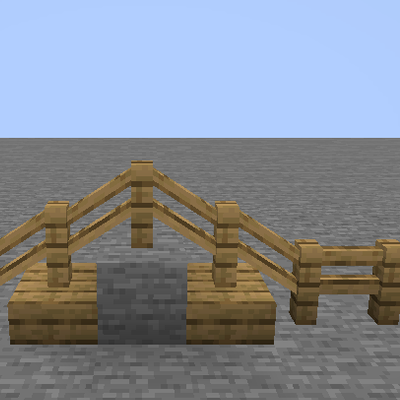
modFences placed on a bottom slab sit on the slab, and fences half a block apart join with a sloped bar. Works with every fence, vanilla or modded.
 mod
modAdds a sleep mechanic to Minecraft by taking saturation and giving hp after sleeping. Sleeping in familiar places are more beneficial.


