Minecraft version
Back to mods 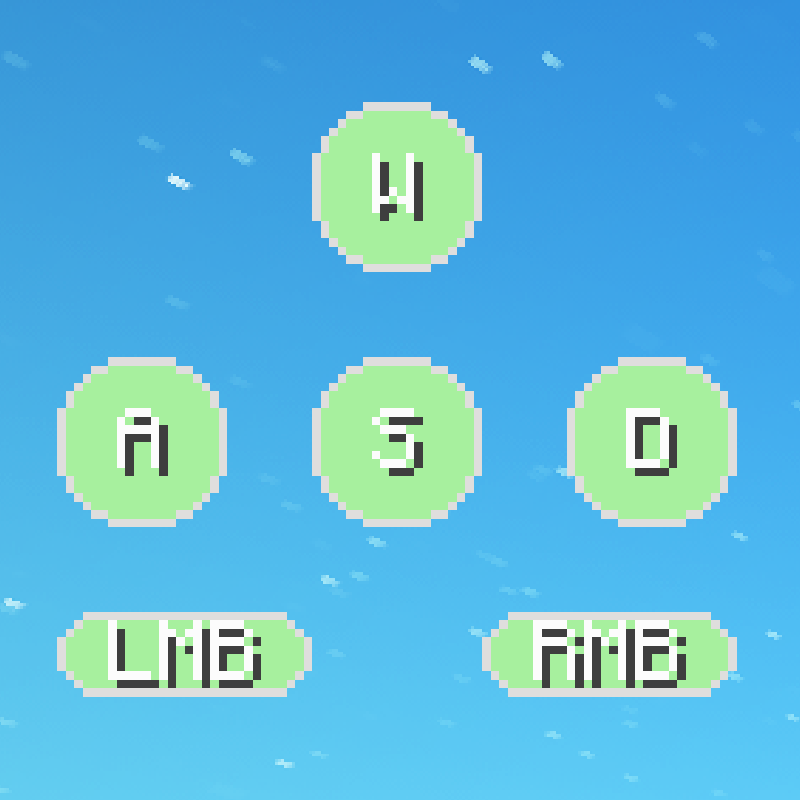
CurseForge · Minecraft mod
Yet Another Keystrokes Overlay
A customizable keystrokes overlay that lets you style each key to your heart’s content.
Choose a version Pick your version below, then grab the matching file.
Quick answer
Which Yet Another Keystrokes Overlay release should I use?
Latest stable file yet-another-keystrokes-overlay-1.4.1.jar
Game version 1.20.1
Loader Fabric
Yet Another Keystrokes Overlay yet-another-keystrokes-overlay-1.4.1.jar targets 1.20.1 with Fabric. The project page does not say whether this file belongs on the client, dedicated server, or both. No extra mods listed for this file.
Where it goes
Is Yet Another Keystrokes Overlay required on the client, server, or both?
The project page does not say whether this file belongs on the client, dedicated server, or both.
Client Source doesn’t say
Dedicated server Source doesn’t say
Loader for this release Fabric
Required install it here Optional supported, not mandatory Not supported do not install here Source doesn’t say do not assume
The source does not explicitly classify this release as client-only or server-only.
What else does Yet Another Keystrokes Overlay yet-another-keystrokes-overlay-1.4.1.jar need?
yet-another-keystrokes-overlay-1.4.1.jar. Change the file and its required mods may change too.
This file does not list any required mods. Do not add a library just because a different file uses it.
This file does not list any required or optional mods.
Before you install it
Add Yet Another Keystrokes Overlay without breaking your instance.
Built for Yet Another Keystrokes Overlay yet-another-keystrokes-overlay-1.4.1.jar. Pick another file and the loader, install side or required mods may change.
- 01
Stick to this file
Use yet-another-keystrokes-overlay-1.4.1.jar. It targets 1.20.1 with Fabric; another release may have different loader, side or dependency requirements.
- 02
Bring the mods it needs
This file does not list any required mods. Do not add a library just because a different file uses it.
- 03
Put it on the correct side
The project page does not say whether this file belongs on the client, dedicated server, or both.
- 04
Pick the file you checked
Use the “Get this file” button beside yet-another-keystrokes-overlay-1.4.1.jar. It opens that exact file at the source.
About this project
What does Yet Another Keystrokes Overlay add?
Yet Another Keystrokes Overlay (YAKO)
YAKO is a design-focused keystrokes overlay for Minecraft 1.20.1 (Fabric). It shows your WASD, mouse buttons, sneak, jump, and sprint inputs — fully customizable to match your layout and visual preferences.
From rounded and transparent strokes to sound profiles and profile switching, YAKO is built with flexibility and user experience in mind.
Features
- Visual Keystrokes HUD
Shows real-time feedback for WASD, LMB/RMB, Shift, Ctrl, and Space. You can customize the layout, look, and text for each key individually. - Customizable Layout
Drag and resize each keystroke freely. Supports transparent strokes, outlines, rounded borders, and custom labels. - Interactive Mouse Controls
Intuitive mouse-based interactions let you build or edit your layout without menus (see controls below). - Sound Feedback System
Enable keystroke sounds for a tactile typing experience. Choose betweenlinear,tactile, orclickysound profiles. Volume and sound state can be adjusted per layout profile. - Profile System
Save and switch between multiple keystroke layouts using the/yakocommand. Each profile stores strokes, layout, sound settings, and more. - Command-Based Customization
Use the/yakocommand to manage layouts, toggle features, switch lettering and adjust sound settings. - Keypress Counter
Ever wonder how many times you pressed a specific button? With this feature you would have an answer!
Controls
These controls apply to layout editing mode (opened via the R key):
- Left Click:
- On stroke: Select or drag to move
- On blank space: Drag to select multiple strokes
- Middle Click:
- On stroke: Delete it
- On blank space: Create a new keystroke
- Right Click:
- Resize a keystroke (drag to scale)
- R (default keybind):
- Opens the YAKO menu
- If hovering over a stroke, opens its individual menu
- K (default keybind):
- Toggle the entire overlay on/off
Commands (/yako)
Use /yako help for command hints in-game. Here's what you can do:
Profile Management
/yako list– List all saved profiles/yako create <name>– Create a new profile/yako set <name>– Switch to a specific profile/yako remove <name>– Delete the current profile (cannot delete the last one)/yako rename <profile>– Rename a profile/yako reset– Resets the entire config
Settings
/yako settings– Show all controls and interactions as a quick reference/yako lettering– Toggle alternate keystroke lettering (not profile-persistent)
Keystroke Sounds
/yako sounds– Toggle sound on/off for keystrokes/yako sounds <linear|tactile|clicky>– Set sound profile/yako volume [<value>]– Show or set current volume (range: 0.01 to 25)
Help Menu
/yako help– Show available command categories/yako help <command>– Get usage for specific command
Future Features
- Gradient & Rainbow Colors
Instead of single colors, give your keystrokes gradient or cycling rainbow colors! - Keystroke Animations
Add animations to your Keystrokes, on press, while pressing or on release. - Custom Input Types
Instead of being limited to the existing Input types, add your own to track new keys!
Early Development Disclaimer
YAKO is still in its early stages, so you may encounter the occasional bug or jank. Feedback and suggestions are always welcome!
Dependencies
- Minecraft 1.20.1
- Fabric Loader ≥ 0.14.0
Project description from CurseForge.
Pick your setup
Yet Another Keystrokes Overlay by Minecraft version and loader
Choose the version and loader you play, then open the matching release.
Check the dependencies, then try the file in a copied instance before changing a world you care about.
Recent files
Yet Another Keystrokes Overlay versions and loaders
yet-another-keystrokes-overlay-1.4.1.jar
30 Jul 2025
Client Source doesn’t say Server Source doesn’t say Dependencies No extras listed Listed on Release listing
Check the 1.20.1 · Fabric setup Fabric1.20.1 release
yet-another-keystrokes-overlay-1.4.0.jar
28 Jul 2025
Client Source doesn’t say Server Source doesn’t say Dependencies No extras listed Listed on Release listing
Check the 1.20.1 · Fabric setup Fabric1.20.1 release
yet-another-keystrokes-overlay-1.3.1.jar
26 Jul 2025
Client Source doesn’t say Server Source doesn’t say Dependencies No extras listed Listed on Release listing
Check the 1.20.1 · Fabric setup Fabric1.20.1 release
yet-another-keystrokes-overlay-1.3.0.jar
25 Jul 2025
Client Source doesn’t say Server Source doesn’t say Dependencies No extras listed Listed on Release listing
Check the 1.20.1 · Fabric setup Fabric1.20.1 release
yet-another-keystrokes-overlay-1.2.0.jar
24 Jul 2025
Client Source doesn’t say Server Source doesn’t say Dependencies 2 required · 2 unchecked Listed on Release listing
Check the 1.20.1 · Fabric setup Fabric1.20.1 release
yet-another-keystrokes-mod-1.1.0.jar
23 Jul 2025
Client Source doesn’t say Server Source doesn’t say Dependencies 2 required · 2 unchecked Listed on Release listing
Check the 1.20.1 · Fabric setup Fabric1.20.1 release
yet-another-keystrokes-mod-1.0.0.jar
23 Jul 2025
Client Source doesn’t say Server Source doesn’t say Dependencies 2 required · 2 unchecked Listed on Release listing
Check the 1.20.1 · Fabric setup Fabric1.20.1 release
Looking for an older file? The official CurseForge project page is in Resources.
 mod
CurseForge + Modrinth · Minecraft
Reach Display
A configurable visual representation of your reach and hit distances
 mod
CurseForge · Minecraft
JEI_Commands
Adds commands to open JEI recipe, usage, and effect views directly.
 mod
CurseForge · Minecraft
No Trade Cycling, Just Pick
Stop rerolling villagers. Press Pick trade and select any 2 trades its profession can offer (max-level enchanted books included). Fast trade and saves time.