Minecraft version
Back to mods 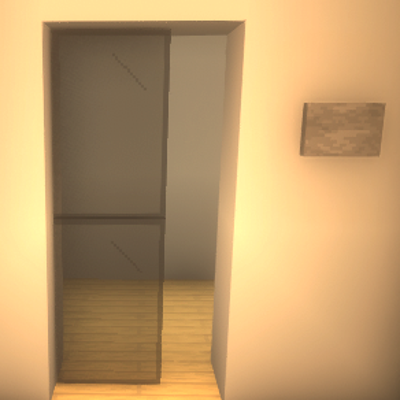
CurseForge · Minecraft mod
Smooth Doors
Tired of pistons? This simple mod lets you build custom doors of any shape or size, adds smooth animations, and allows control via redstone or a central controller tablet with support for time scheduling.
Choose a version Pick your version below, then grab the matching file.
Quick answer
Which Smooth Doors release should I use?
Latest stable file smoothdoors-1.0.jar
Game version 1.20.1
Loader Forge
Smooth Doors smoothdoors-1.0.jar targets 1.20.1 with Forge. The project page does not say whether this file belongs on the client, dedicated server, or both. No extra mods listed for this file.
Where it goes
Is Smooth Doors required on the client, server, or both?
The project page does not say whether this file belongs on the client, dedicated server, or both.
Client Source doesn’t say
Dedicated server Source doesn’t say
Loader for this release Forge
Required install it here Optional supported, not mandatory Not supported do not install here Source doesn’t say do not assume
The source does not explicitly classify this release as client-only or server-only.
What else does Smooth Doors smoothdoors-1.0.jar need?
smoothdoors-1.0.jar. Change the file and its required mods may change too.
This file does not list any required mods. Do not add a library just because a different file uses it.
This file does not list any required or optional mods.
Before you install it
Add Smooth Doors without breaking your instance.
Built for Smooth Doors smoothdoors-1.0.jar. Pick another file and the loader, install side or required mods may change.
- 01
Stick to this file
Use smoothdoors-1.0.jar. It targets 1.20.1 with Forge; another release may have different loader, side or dependency requirements.
- 02
Bring the mods it needs
This file does not list any required mods. Do not add a library just because a different file uses it.
- 03
Put it on the correct side
The project page does not say whether this file belongs on the client, dedicated server, or both.
- 04
Pick the file you checked
Use the “Get this file” button beside smoothdoors-1.0.jar. It opens that exact file at the source.
About this project
What does Smooth Doors add?
Information
This mod acts like a tool that simplifies the creation of animated doors, gates, and similar mechanisms. What originally required very complex command chains since Minecraft 1.19, which can now be done with just one single command.
Instructions
Step 1: Build a flat area from any blocks you want that will later work as a door.
Step 2: Type in the following command in the commandline ingame (Press T):
/createdoor "name" "amount of blocks" "duration of animation (IN TICKS: 1 second = 20 ticks; 2 = 40 etc.)" "direction" "length"
Name: Any name you want for the door
Amount of blocks: How many blocks the door is big
Duration of animation: How long the door should take to open / close
Direction: In which direction the door opens. [e.g. ypos = the gate goes up when it´s opening; yneg = the door goes down when it´s opening); xpos, xneg, zpos, zneg = the door goes sideways when it´s opening (Look at your coordinates)]
Length: How far (in blocks) the door will open
Example: /createdoor exampledoor 4 100 ypos 2 -> Creates a 2x2 blocks big door named "exampledoor" which goes 2 blocks up when you open it.
Step 3: After typing in the command, click on all blocks which are belonging to the door. Done!
NOTE: If you made a mistake with the command etc. -> just type in: /deletedoor "name" and try it again.
Functionality
When you give one of the blocks around the door any redstone signal, it will open / close with a smooth animation.
If you have multiple doors, you can craft and use the Door Controller tablet (you can find it in in the Redstone-Tab in Creative Mode) to steer all doors. You can enter times when the door opens and closes "Schedule Button" too.
Important / Known bugs
It´s my first mod, so there are some bugs I´m trying to fix in the future.
If you are using multiple worlds, it could happen that you could steer doors of your other worlds.
If you are playing with your friends, only the host can use the Door Controller at the moment.
Flickering: If you see flickeing of the door blocks, remove the blocks where the door is inside or overbuild the space where the open door is in.
-> Please report other bugs you find to me
Future features:
Bug fixes and more animations like rotation or opening to two sides etc.
Project description from CurseForge.
Pick your setup
Smooth Doors by Minecraft version and loader
Choose the version and loader you play, then open the matching release.
Check the dependencies, then try the file in a copied instance before changing a world you care about.
Recent files
Smooth Doors versions and loaders
smoothdoors-1.0.jar
3 Aug 2025
Client Source doesn’t say Server Source doesn’t say Dependencies No extras listed Listed on Release listing
Check the 1.20.1 · Forge setup 1.20.1Forge release
Looking for an older file? The official CurseForge project page is in Resources.
 mod
CurseForge · Minecraft
HMX的棍木
Ore Stick adds 6 auto-mining blocks (Wood/Iron/Gold/Copper/Diamond/Netherite). Place it on the ground: 1 Ore Stick Chunk drops every 3s. 1 chunk -> 1 chestnut, 4 chestnuts -> 1 ore!
 mod
CurseForge · Minecraft
Logical Lasers
Adds modular lasers that function as logic gates.
 mod
CurseForge · Minecraft
Fulgurite Fusion
Lightning, live it, love it, use it. create immense power and items.