Minecraft version
Back to mods 
CurseForge · Minecraft mod
Larry's Copper Hopper
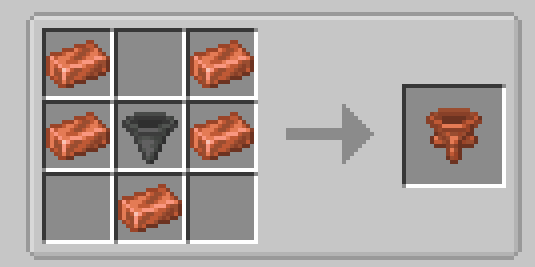
A mod that adds my version of the Copper Hopper and Copper Funnel
Choose a version Pick your version below, then grab the matching file.
Quick answer
Which Larry's Copper Hopper release should I use?
Latest stable file larryscopperhopper-1.0.0-forge-1.20.1.jar
Game version 1.20.1
Loader Forge
Larry's Copper Hopper larryscopperhopper-1.0.0-forge-1.20.1.jar targets 1.20.1 with Forge. The project page does not say whether this file belongs on the client, dedicated server, or both. No extra mods listed for this file.
Where it goes
Is Larry's Copper Hopper required on the client, server, or both?
The project page does not say whether this file belongs on the client, dedicated server, or both.
Client Source doesn’t say
Dedicated server Source doesn’t say
Loader for this release Forge
Required install it here Optional supported, not mandatory Not supported do not install here Source doesn’t say do not assume
The source does not explicitly classify this release as client-only or server-only.
What else does Larry's Copper Hopper larryscopperhopper-1.0.0-forge-1.20.1.jar need?
larryscopperhopper-1.0.0-forge-1.20.1.jar. Change the file and its required mods may change too.
This file does not list any required mods. Do not add a library just because a different file uses it.
This file does not list any required or optional mods.
Before you install it
Add Larry's Copper Hopper without breaking your instance.
Built for Larry's Copper Hopper larryscopperhopper-1.0.0-forge-1.20.1.jar. Pick another file and the loader, install side or required mods may change.
- 01
Stick to this file
Use larryscopperhopper-1.0.0-forge-1.20.1.jar. It targets 1.20.1 with Forge; another release may have different loader, side or dependency requirements.
- 02
Bring the mods it needs
This file does not list any required mods. Do not add a library just because a different file uses it.
- 03
Put it on the correct side
The project page does not say whether this file belongs on the client, dedicated server, or both.
- 04
Pick the file you checked
Use the “Get this file” button beside larryscopperhopper-1.0.0-forge-1.20.1.jar. It opens that exact file at the source.
About this project
What does Larry's Copper Hopper add?
A mod that adds the Copper Hopper and Copper Funnel.
Copper Hopper
The Copper Hopper is a more advanced version of the normal hopper, it can filter items taken from the top in 5 different directions at once and you can place different items in the function slots and it will imitate that items behaviour.
Currently the items with working functions are:
- Hopper
- Dropper
- Copper Funnel
You can also right click the copper hopper with one of these function blocks in hand to insert it into the corresponding slot.
(the 5 function slots for each direction)
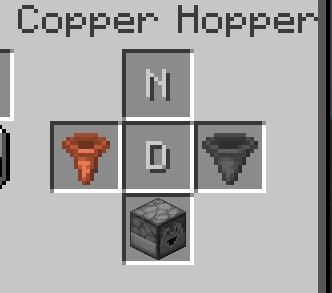
The copper hopper also has the Item Filtering Function from the Copper Funnel for all slots.
Copper Funnel
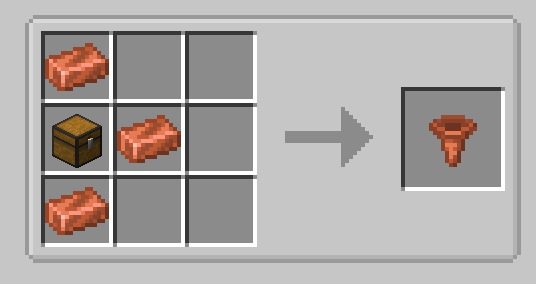
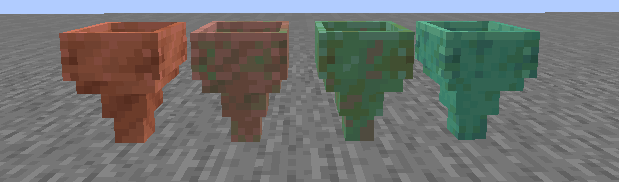
The Copper Funnel is a hopper but it only has 1 slot and can be set to point in any direction, taking items from the block with the wide side and inserting them into the block at the point.
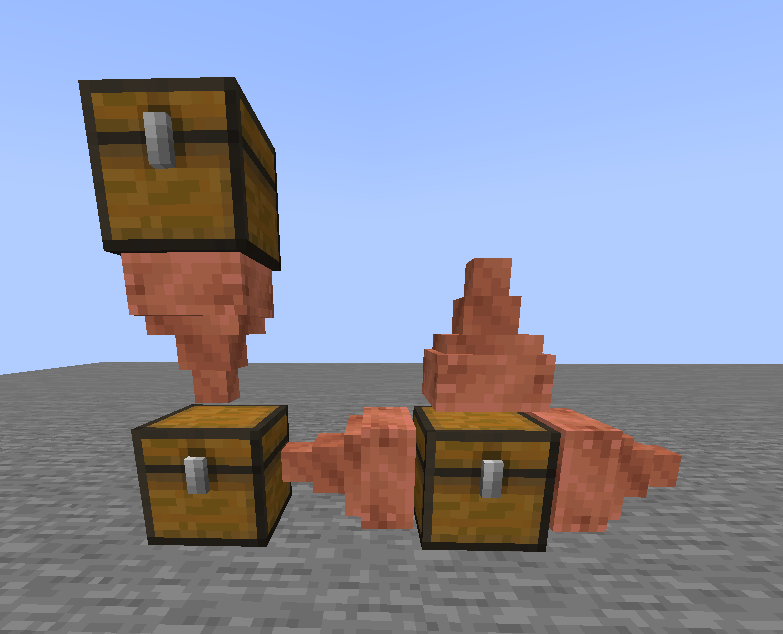
The Copper Funnel also has two unique features:
Item Filtering
Toggled with the lock under the item slot the item filtering makes the copper funnel always have 1 item in the slot so you can use it to filter a specific type of item instead of taking every kind of item one at a time.
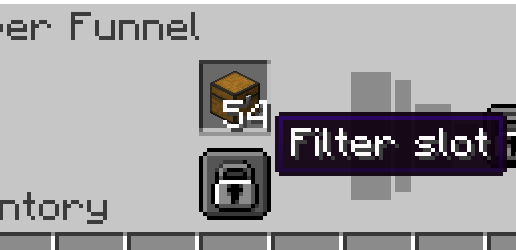
Single Slot Insert
Toggled with the lock to the right of the funnel sprite, the single slot option will let you choose if you want to fill the container with items or only place items in one specific slot.
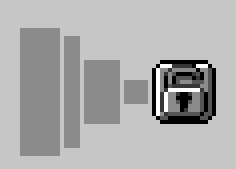
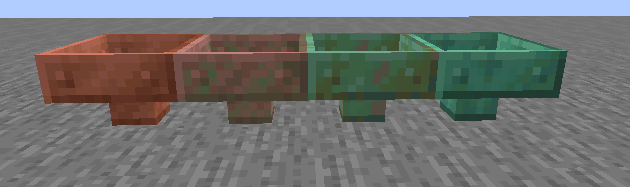
The slot for the single slot option is based on which level of oxidation the copper funnel is in:
Normal: 1st Slot
Exposed: 2nd Slot
Weathered: 3rd Slot
Oxidized: 4th Slot
Project description from CurseForge.
Pick your setup
Larry's Copper Hopper by Minecraft version and loader
Choose the version and loader you play, then open the matching release.
Check the dependencies, then try the file in a copied instance before changing a world you care about.
Recent files
Larry's Copper Hopper versions and loaders
larryscopperhopper-1.0.0-forge-1.20.1.jar
7 Aug 2025
Client Source doesn’t say Server Source doesn’t say Dependencies No extras listed Listed on Release listing
Check the 1.20.1 · Forge setup 1.20.1Forge release
Looking for an older file? The official CurseForge project page is in Resources.
 mod
CurseForge + Modrinth · Minecraft
Adventure Item Names
Unique names for weapons, tools, armour and items found throughout your world.
 mod
CurseForge + Modrinth · Minecraft
Tinkers' Gadgets
A lightweight Tinkers' Construct addon featuring tools, new materials, and exclusive projectile traits.
 mod
CurseForge · Minecraft
Better Search JEI
Improve daily quality of life by adding better search logic to JEI