Minecraft version
Back to mods 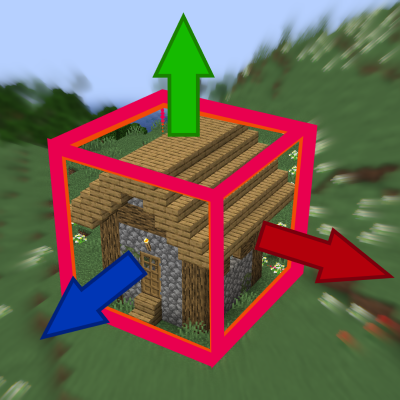
CurseForge · Minecraft mod
WorldDrag
Select and drag your builds visually through the world by looking in the direction!
Choose a version Pick your version below, then grab the matching file.
Quick answer
Which WorldDrag release matches 1.21?
Best match for your filters WorldDrag-5.0.jar
Game version 1.21, 1.21.1-Snapshot, 1.21.1
Loader Fabric
WorldDrag-5.0.jar targets 1.21, 1.21.1-Snapshot, 1.21.1 with Fabric. The project page does not say whether this file belongs on the client, dedicated server, or both. No extra mods listed for this file.
Where it goes
Is WorldDrag required on the client, server, or both?
The project page does not say whether this file belongs on the client, dedicated server, or both.
Client Source doesn’t say
Dedicated server Source doesn’t say
Loader for this release Fabric
Required install it here Optional supported, not mandatory Not supported do not install here Source doesn’t say do not assume
The source does not explicitly classify this release as client-only or server-only.
What else does WorldDrag-5.0.jar need?
WorldDrag-5.0.jar on 1.21. Every mod below is checked against that same setup.
This file does not list any required mods. Do not add a library just because a different file uses it.
This file does not list any required or optional mods.
Before you install it
Add WorldDrag without breaking your instance.
Built for WorldDrag-5.0.jar on 1.21. Pick another file and the loader, install side or required mods may change.
- 01
Stick to this file
Use WorldDrag-5.0.jar. It targets 1.21, 1.21.1-Snapshot, 1.21.1 with Fabric; another release may have different loader, side or dependency requirements.
- 02
Bring the mods it needs
This file does not list any required mods. Do not add a library just because a different file uses it.
- 03
Put it on the correct side
The project page does not say whether this file belongs on the client, dedicated server, or both.
- 04
Pick the file you checked
Use the “Get this file” button beside WorldDrag-5.0.jar. It opens that exact file at the source.
About this project
What does WorldDrag add?

Move mountains, duplicate villages, fill your friends server with silly builds because he gave you OP (use with caution) or mass duplicate redstone calc units in your redstone computer, and more with just a swing of your head. It could not be easier.
WorldDrag lets you select and move builds, redstone machines and any other block constellations and entities.
- Select
- Cut-/Copy- Drag (& rotate)
- Paste
Move those blocks by changing the looking direction.

Rotate it!
How to use:
- Cheats On & be OP
- Any gamemode
- Hold stick
- Left-click = select new
- Right-click = include more
- Look on selection + Left-click drag = cut & move
- Look on selection + Right-click drag = copy & move
- Drag + Mouse wheel = rotate
- Stop drag = paste!
Already tried Modrinth?
It could be that I don't publish some versions on Curseforge, because I am lazy and Curseforge makes it annoyingly hard to push new versions.
Commands:
/worlddrag … gets used by the mod to send the instructions, but can be used by the player too.
Client-Side?
The mod isn't absolutely required on the server and works on client-side only too, but:…
When mod isn't on server:
- … it will use the /clone command instead
- /clone unfortunately doesn't have the rotation feature.
- because of no clipboard behaviour with /clone, it cuts the blocks when pasting instead of when starting the drag
Found sth annoying or a flaw?
Tell me!
Have suggestions?
Tell me!
Recent changes:
- 5.0: all entities get copied now.
- 4.1: removes crashes.
- 4.0: block entities get copied too.
- 3.0: tickable blocks like button or pressure plate won't stay stuck after being moved in the activated state.
- 2.2: increased range while holding the stick.
- 2.1: fixed selection hit.
- 2.0: added rotation.
- 1.0: first version.
edit, 1.21.x, 1.21.7, 1.21, Fabric, mark blocks
Project description from CurseForge.
Pick your setup
WorldDrag by Minecraft version and loader
Choose the version and loader you play, then open the matching release.
Minecraft version
1.21.7
1 loader buildMinecraft version
1.21.6
1 loader buildMinecraft version
1.21.5-Snapshot
1 loader buildMinecraft version
1.21.5
1 loader buildMinecraft version
1.21.4-Snapshot
1 loader buildMinecraft version
1.21.4
1 loader buildMinecraft version
1.21.3
1 loader buildMinecraft version
1.21.2
1 loader buildMinecraft version
1.21.1-Snapshot
1 loader buildMinecraft version
1.21.1
1 loader buildMinecraft version
1.21
1 loader buildCheck the dependencies, then try the file in a copied instance before changing a world you care about.
Recent files
WorldDrag versions and loaders
WorldDrag-5.0.jar
19 Aug 2025
Client Source doesn’t say Server Source doesn’t say Dependencies No extras listed Listed on Release listing
Check the 1.21 · Fabric setup 1.21Fabric1.21.1-Snapshot1.21.1 release
WorldDrag-3.0.jar
WorldDrag-3.0 (1).jar
12 Aug 2025
Client Source doesn’t say Server Source doesn’t say Dependencies No extras listed Listed on Release listing
Check the 1.21 · Fabric setup 1.21Fabric1.21.1-Snapshot1.21.1 release
Looking for an older file? The official CurseForge project page is in Resources.
 mod
CurseForge + Modrinth · Minecraft
ShapeGen
Additional shapes for any block, including modded ones
 mod
CurseForge + Modrinth · Minecraft
Just Enough Backups (JEB)
Backup mod that keeps your worlds safe with automatic and manual backups, with an easy in-game UI to create, manage, and restore them.
 mod
CurseForge + Modrinth · Minecraft
Quick Skin
Sick of wasting time with Minecraft’s slow launcher just to change your skin? Quick Skin lets you swap skins instantly even on “offline” servers and gives you access to every official Minecraft cape.