Minecraft version
Back to mods 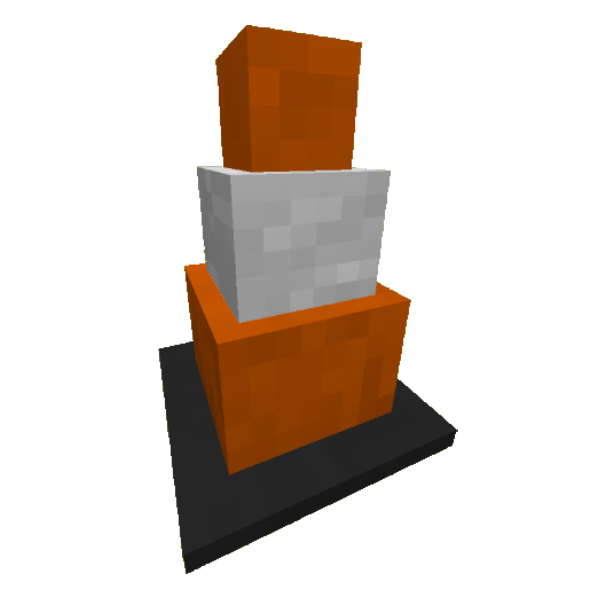
CurseForge · Minecraft mod
Construction Blocks
Adds a few blocks that you could find around a Construction Site
Choose a version Pick your version below, then grab the matching file.
Quick answer
Which Construction Blocks release should I use?
beta file construction_blocks-b1.2-neoforge-1.21.1
Game version 1.21.1
Loader NeoForge
Construction Blocks construction_blocks-b1.2-neoforge-1.21.1 targets 1.21.1 with NeoForge. The project page does not say whether this file belongs on the client, dedicated server, or both. No extra mods listed for this file.
Where it goes
Is Construction Blocks required on the client, server, or both?
The project page does not say whether this file belongs on the client, dedicated server, or both.
Client Source doesn’t say
Dedicated server Source doesn’t say
Loader for this release NeoForge
Required install it here Optional supported, not mandatory Not supported do not install here Source doesn’t say do not assume
The source does not explicitly classify this release as client-only or server-only.
What else does Construction Blocks construction_blocks-b1.2-neoforge-1.21.1 need?
construction_blocks-b1.2-neoforge-1.21.1. Change the file and its required mods may change too.
This file does not list any required mods. Do not add a library just because a different file uses it.
This file does not list any required or optional mods.
Before you install it
Add Construction Blocks without breaking your instance.
Built for Construction Blocks construction_blocks-b1.2-neoforge-1.21.1. Pick another file and the loader, install side or required mods may change.
- 01
Stick to this file
Use construction_blocks-b1.2-neoforge-1.21.1. It targets 1.21.1 with NeoForge; another release may have different loader, side or dependency requirements.
- 02
Bring the mods it needs
This file does not list any required mods. Do not add a library just because a different file uses it.
- 03
Put it on the correct side
The project page does not say whether this file belongs on the client, dedicated server, or both.
- 04
Pick the file you checked
Use the “Get this file” button beside construction_blocks-b1.2-neoforge-1.21.1. It opens that exact file at the source.
About this project
What does Construction Blocks add?
Development has Stopped for this Mod
Welcome to my very first "actual" mod (Contruction Blocks)
This mod is very small and basic, all it adds its a few decorative blocks that could be found around a contruction site or perhaps a train station using the Create Mod.
This mod is still in development as I will be adding many different in the future and there are currently only 2 different blocks and they are
- Caution/Hazard Block
- Safety Cone Block
Blocks that are Planned
- Wheel Barrow
- Warning Sign
- Construction Sign
- Tool Rack
- Storage Block
- Heavy-Duty Door
Notice: (These are AI generated but sorta fit the theme of the mod, more blocks will come)
You are free to use this mod in your modpacks just do not redistubute modified versions of it or reupload it as your own
Support The Development Of My Mods And Modpacks Here

If your someone like me, then you probably want a discount right? Well why didn't you just say so, use the discount code BUBBY for a 25% Off your first month at WABBANODE
Project description from CurseForge.
Pick your setup
Construction Blocks by Minecraft version and loader
Choose the version and loader you play, then open the matching release.
Check the dependencies, then try the file in a copied instance before changing a world you care about.
Recent files
Construction Blocks versions and loaders
construction_blocks-b1.2-neoforge-1.21.1
construction_blocks-b1.2-neoforge-1.21.1.jar
23 Aug 2025
Client Source doesn’t say Server Source doesn’t say Dependencies No extras listed Listed on Release listing
Check the 1.21.1 · NeoForge setup NeoForge1.21.1 beta
construction_blocks-b1.1-neoforge-1.21.1
construction_blocks-1.0.1-neoforge-1.21.1.jar
20 Aug 2025
Client Source doesn’t say Server Source doesn’t say Dependencies No extras listed Listed on Release listing
Check the 1.21.1 · NeoForge setup NeoForge1.21.1 beta
construction_blocks-b1.0-neoforge-1.21.1
construction_blocks-1.0.0-neoforge-1.21.1.jar
19 Aug 2025
Client Source doesn’t say Server Source doesn’t say Dependencies No extras listed Listed on Release listing
Check the 1.21.1 · NeoForge setup NeoForge1.21.1 beta
Looking for an older file? The official CurseForge project page is in Resources.
 mod
CurseForge + Modrinth · Minecraft
REDACTION
The cleanest Minecraft experience (no hacks included). By Polyfrost, best with OneClient.
 mod
CurseForge · Minecraft
geential
Instant co-op world hosting, friends & invites hub, custom profile switcher, 3D wardrobe studio (wings, capes, emotes, Mojang & .PNG skin importer), and weak-PC performance booster for Minecraft 1.20.1 (Forge & Fabric).
 mod
CurseForge · Minecraft
NarutoUI
A Modern UI configuration screen library for Minecraft client mods.