Minecraft version
Back to mods 
CurseForge · Minecraft mod
Interactive Block Prompt
A Simple but Customizable QoL Mod which Overhaul the Crosshair - Adding Interactive Indicators to Minecraft.
Choose a version Pick your version below, then grab the matching file.
Quick answer
Which Interactive Block Prompt release matches 26.1.2?
Best match for your filters ibp 1.2.1
Game version 26.1.2
Loader NeoForge
Interactive Block Prompt ibp 1.2.1 targets 26.1.2 with NeoForge. The project page does not say whether this file belongs on the client, dedicated server, or both. No extra mods listed for this file.
Where it goes
Is Interactive Block Prompt required on the client, server, or both?
The project page does not say whether this file belongs on the client, dedicated server, or both.
Client Source doesn’t say
Dedicated server Source doesn’t say
Loader for this release NeoForge
Required install it here Optional supported, not mandatory Not supported do not install here Source doesn’t say do not assume
The source does not explicitly classify this release as client-only or server-only.
What else does Interactive Block Prompt ibp 1.2.1 need?
ibp 1.2.1 on 26.1.2. Every mod below is checked against that same setup.
This file does not list any required mods. Do not add a library just because a different file uses it.
This file does not list any required or optional mods.
Before you install it
Add Interactive Block Prompt without breaking your instance.
Built for Interactive Block Prompt ibp 1.2.1 on 26.1.2. Pick another file and the loader, install side or required mods may change.
- 01
Stick to this file
Use ibp 1.2.1. It targets 26.1.2 with NeoForge; another release may have different loader, side or dependency requirements.
- 02
Bring the mods it needs
This file does not list any required mods. Do not add a library just because a different file uses it.
- 03
Put it on the correct side
The project page does not say whether this file belongs on the client, dedicated server, or both.
- 04
Pick the file you checked
Use the “Get this file” button beside ibp 1.2.1. It opens that exact file at the source.
About this project
What does Interactive Block Prompt add?

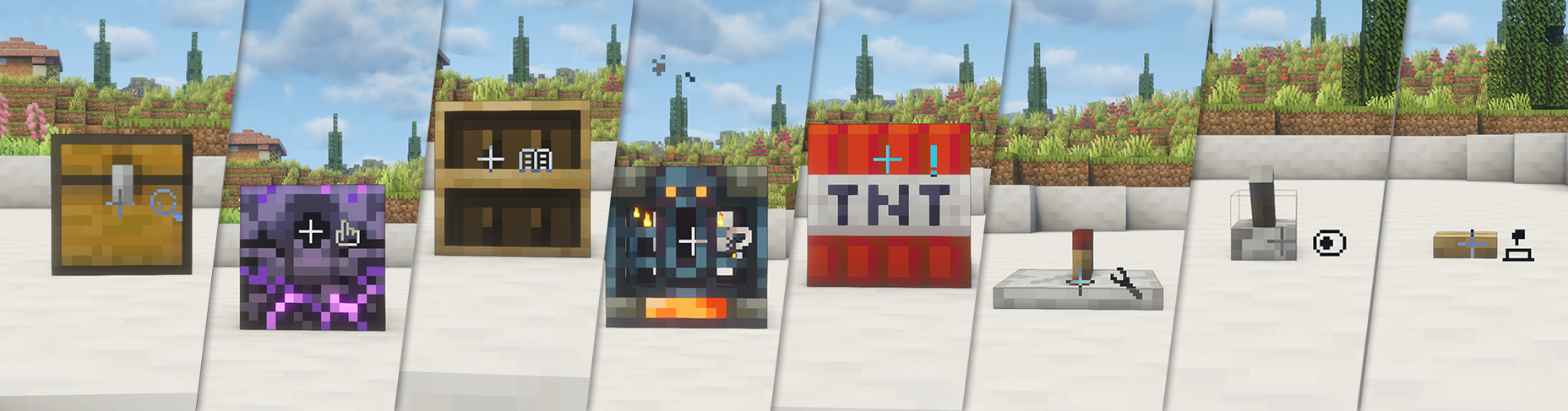
Interactive Block Prompt is a QoL mod designed for map and modpack creators. It adds more functionality to the crosshair, introducing several icon indicators on its right side. These icons appear when the player looks at specific blocks, offering a more intuitive way to guide player interaction.
The mod itself does not add new content, only including a few block prompts as examples. **Creators can customize it freely by editing the config (Default location: config/ibp/indicators folder), or modifying tags via Datapacks or mods like KubeJS. This allows you to choose which icon is displayed for each block or item as you wish. You can also adjust the position of the indicators via the config file.
Current Icons and Corresponding Tags:
- 🔍 Search -
ibp:search - 👆 Click -
ibp:click - 📖 Book -
ibp:book - ❓ Point of Interest -
ibp:interest - ❗ Notice -
ibp:notice - 🔧 Wrench -
ibp:wrench - ⏺️ Button -
ibp:button - 🕹️ Toggle -
ibp:toggle
Example Config
{
  "rules": [
    {
      "block": "minecraft:barrel"
    },
    {
      "block_tag": "minecraft:signs"
    }
  ]
}
Special thanks to TimyaSifer for drawing the adorable icons!
The mod is continuously being updated, with plans to support more Minecraft versions and add more features in the future.
*You can be free to use this mod in your modpacks, and you can even distribute it directly without needing to redirect back to this link.
Project description from CurseForge.
Pick your setup
Interactive Block Prompt by Minecraft version and loader
Choose the version and loader you play, then open the matching release.
Minecraft version
1.21.1
1 loader buildMinecraft version
1.20.1
1 loader buildCheck the dependencies, then try the file in a copied instance before changing a world you care about.
Recent files
Interactive Block Prompt versions and loaders
ibp 1.2.1
ibp-1.2.1.jar
13 Apr 2026
Client Source doesn’t say Server Source doesn’t say Dependencies No extras listed Listed on Release listing
Check the 26.1.2 · NeoForge setup NeoForge26.1.2 release
Looking for an older file? The official CurseForge project page is in Resources.
 mod
CurseForge · Minecraft
Gash's Super Pylons
Modular Minecraft pylons for storage, farming, and processing, with upgrades and wires for items, fluids, energy, and XP.
 mod
CurseForge + Modrinth · Minecraft
Doom Block
Doom Block adds a deadly block with instant damage to the game. Flexible settings and full compatibility with NeoForge.
 mod
CurseForge · Minecraft
Sky’s Terrain Smoother
Smooth new terrain and cave floors with slabs, steps and corners, choose from three smoothing levels, with built in Mineralogy support.