Fabric API Needed by Client Chat Channels v1.2.0 for Fabric 26.1.x
requiredMatching file found Matched file: [26.1.2] Fabric API 0.155.3+26.1.2

CurseForge · Minecraft mod
A client-side mod that adds chat channels to the game.
Quick answer
Client Chat Channels v1.2.0 for Fabric 26.1.x targets 26.1, 26.1.1, 26.1.2 with Fabric. The project page does not say whether this file belongs on the client, dedicated server, or both. All 1 required mods have matching files.
Where it goes
The project page does not say whether this file belongs on the client, dedicated server, or both.
The source does not explicitly classify this release as client-only or server-only.
v1.2.0 for Fabric 26.1.x on 26.1.2. Every mod below is checked against that same setup.
Install Fabric API first. We found matching files for this game-version and loader setup. 2 come through another mod in the chain.
2 extra mods were pulled in by other dependencies. Indented rows show who needs each one. We only count dependency files that match this setup. A file for another loader does not fill the gap.
Before you install it
Built for Client Chat Channels v1.2.0 for Fabric 26.1.x on 26.1.2. Pick another file and the loader, install side or required mods may change.
Use v1.2.0 for Fabric 26.1.x. It targets 26.1, 26.1.1, 26.1.2 with Fabric; another release may have different loader, side or dependency requirements.
Install Fabric API first. We found matching files for this game-version and loader setup. 2 come through another mod in the chain.
The project page does not say whether this file belongs on the client, dedicated server, or both.
Use the “Get this file” button beside v1.2.0 for Fabric 26.1.x. It opens that exact file at the source.
About this project
A client-side mod that adds chat channels to the game.
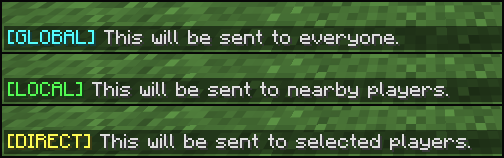
Works like vanilla chat - all players on the server can see your messages (unless otherwise configured by the server).
Messages are only sent to players within a specified distance from you.
Messages are sent exclusively to one or more specific players.
Messages are only sent to your teammates.
When using a channel other than global, the mod automatically converts your chat messages into private messages using the /msg or /teammsg command and sends them only to the intended recipients.
You can use commands to switch between different channels:
You can also use hotkeys to quickly switch between channels:
Project description from CurseForge.
Pick your setup
Choose the version and loader you play, then open the matching release.
Showing the newest 12 of 16 game versions. Older files are in the list below.
Check the dependencies, then try the file in a copied instance before changing a world you care about.
Recent files
clientchatchannels-fabric-mc26.1-1.2.0+mc26.1.jar
9 Jun 2026
clientchatchannels-neoforge-mc26.1-1.2.0+mc26.1.jar
9 Jun 2026
Looking for an older file? The official CurseForge project page is in Resources.
 mod
A mod designed to enhance world generation and elevate the gameplay experience by smoothing out terrain with custom slabs, making exploration more seamless!
 mod
Attempts to patch any Iris/Optifine shaderpack to add mod support
 mod
Improves render distance by making it perfectly spherical, culling diagonal chunk sections and entities for better performance.