Minecraft version
Back to mods 
CurseForge · Minecraft mod
List Craft
Never forget what you need again - create, save, and share inventory checklists with live progress tracking (1.19.2-1.20.1)
Choose a version Pick your version below, then grab the matching file.
Quick answer
Which List Craft release should I use?
Latest stable file listcraft-1.0.0-forge-1.19.2.jar
Game version 1.19.2
Loader Forge
List Craft listcraft-1.0.0-forge-1.19.2.jar targets 1.19.2 with Forge. The project page does not say whether this file belongs on the client, dedicated server, or both. No extra mods listed for this file.
Where it goes
Is List Craft required on the client, server, or both?
The project page does not say whether this file belongs on the client, dedicated server, or both.
Client Source doesn’t say
Dedicated server Source doesn’t say
Loader for this release Forge
Required install it here Optional supported, not mandatory Not supported do not install here Source doesn’t say do not assume
The source does not explicitly classify this release as client-only or server-only.
What else does List Craft listcraft-1.0.0-forge-1.19.2.jar need?
listcraft-1.0.0-forge-1.19.2.jar. Change the file and its required mods may change too.
This file does not list any required mods. Do not add a library just because a different file uses it.
This file does not list any required or optional mods.
Before you install it
Add List Craft without breaking your instance.
Built for List Craft listcraft-1.0.0-forge-1.19.2.jar. Pick another file and the loader, install side or required mods may change.
- 01
Stick to this file
Use listcraft-1.0.0-forge-1.19.2.jar. It targets 1.19.2 with Forge; another release may have different loader, side or dependency requirements.
- 02
Bring the mods it needs
This file does not list any required mods. Do not add a library just because a different file uses it.
- 03
Put it on the correct side
The project page does not say whether this file belongs on the client, dedicated server, or both.
- 04
Pick the file you checked
Use the “Get this file” button beside listcraft-1.0.0-forge-1.19.2.jar. It opens that exact file at the source.
About this project
What does List Craft add?
What is this?
Ever started building something massive in Minecraft, only to realize halfway through that you forgot half the materials? Or spent ages wandering around trying to remember what you still needed for that complex recipe? Yeah, me too. That's why I made ListCraft.
It's basically a to-do list for your inventory. You tell it what you need, it keeps track of what you have, and shows you the progress in real time. Simple as that.
Default Keybind: I
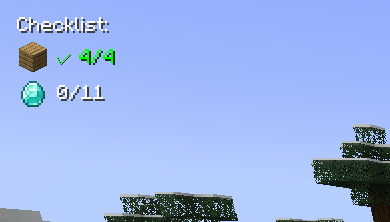
- Make lists of items you need (with amounts)
- See your progress live as you collect stuff
- Items show up like "32/64 Oak Planks" or get a green checkmark when done
- Everything appears as a small overlay in the corner of your screen
- Auto-suggests items as you type (works with modded items too! so you can even use create mod items)
- Click on any item in your list to change how many you need
- Save your lists with names
- Share lists with friends using simple codes
- Works on any server since it's client-side only
Common questions
"Does this work with [insert mod here]?" Probably yes. It automatically finds items from any mod.
"Can I use this on servers?" Yep, since it's client-side only.
"What if I want to change the hotkey?" Controls menu, look for "Inventory Checklist"
"Found a bug" Let me know! I actually read the comments and try to fix stuff.
Contact Me: X Link
Project description from CurseForge.
Pick your setup
List Craft by Minecraft version and loader
Choose the version and loader you play, then open the matching release.
Minecraft version
1.19.2
1 loader buildCheck the dependencies, then try the file in a copied instance before changing a world you care about.
Recent files
List Craft versions and loaders
listcraft-1.0.0-forge-1.19.2.jar
26 Aug 2025
Client Source doesn’t say Server Source doesn’t say Dependencies No extras listed Listed on Release listing
Check the 1.19.2 · Forge setup 1.19.2Forge release
listcraft-1.0.0-forge-1.20.1.jar
26 Aug 2025
Client Source doesn’t say Server Source doesn’t say Dependencies No extras listed Listed on Release listing
Check the 1.20.1 · Forge setup 1.20.1Forge release
Looking for an older file? The official CurseForge project page is in Resources.