Minecraft version
Back to mods 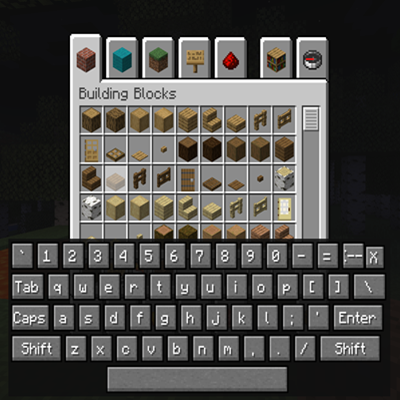
CurseForge · Minecraft mod
On-Screen Keyboard
A simple mod that opens an on-screen keyboard on hotkey press. Useful for controller on java.
Choose a version Pick your version below, then grab the matching file.
Quick answer
Which On-Screen Keyboard release should I use?
Latest stable file onscreenkeyboard-neoforge-0.2.0.jar
Game version 1.21.1
Loader Forge, NeoForge
On-Screen Keyboard onscreenkeyboard-neoforge-0.2.0.jar targets 1.21.1 with Forge, NeoForge. The project page does not say whether this file belongs on the client, dedicated server, or both. No extra mods listed for this file.
Where it goes
Is On-Screen Keyboard required on the client, server, or both?
The project page does not say whether this file belongs on the client, dedicated server, or both.
Client Source doesn’t say
Dedicated server Source doesn’t say
Loader for this release Forge, NeoForge
Required install it here Optional supported, not mandatory Not supported do not install here Source doesn’t say do not assume
The source does not explicitly classify this release as client-only or server-only.
What else does On-Screen Keyboard onscreenkeyboard-neoforge-0.2.0.jar need?
onscreenkeyboard-neoforge-0.2.0.jar. Change the file and its required mods may change too.
This file does not list any required mods. Do not add a library just because a different file uses it.
This file does not list any required or optional mods.
Before you install it
Add On-Screen Keyboard without breaking your instance.
Built for On-Screen Keyboard onscreenkeyboard-neoforge-0.2.0.jar. Pick another file and the loader, install side or required mods may change.
- 01
Stick to this file
Use onscreenkeyboard-neoforge-0.2.0.jar. It targets 1.21.1 with Forge, NeoForge; another release may have different loader, side or dependency requirements.
- 02
Bring the mods it needs
This file does not list any required mods. Do not add a library just because a different file uses it.
- 03
Put it on the correct side
The project page does not say whether this file belongs on the client, dedicated server, or both.
- 04
Pick the file you checked
Use the “Get this file” button beside onscreenkeyboard-neoforge-0.2.0.jar. It opens that exact file at the source.
About this project
What does On-Screen Keyboard add?
On-Screen Keyboard (OSK)
This mod adds a virtual keyboard overlay to Minecraft, letting you type and interact with text fields directly on your screen.
Features
- On-screen keyboard panel that appears at the bottom of the screen when toggled
- Works with controllers and D-pad navigation, no physical keyboard required
- Full mouse support, so you can click keys like a touchscreen keyboard
- Handles Shift and Caps Lock for uppercase letters and symbols
- Includes special keys like Backspace, Enter, Tab, and Shift
- Focus lock system prevents inputs from leaking into the game while typing
- Close button to quickly hide the keyboard
- Custom key binding to toggle the keyboard on or off
This mod is especially helpful for players using controllers or TV setups without a keyboard, and for accessibility needs.
If you are looking for full controller support in Minecraft, check out the Controllable mod.
This mod is All Rights Reserved. You may include it in modpacks, but modification or redistribution outside CurseForge is not allowed.
Project description from CurseForge.
Pick your setup
On-Screen Keyboard by Minecraft version and loader
Choose the version and loader you play, then open the matching release.
Minecraft version
1.20.1
2 loader buildsCheck the dependencies, then try the file in a copied instance before changing a world you care about.
Recent files
On-Screen Keyboard versions and loaders
OSK NeoForge 1.21.1
onscreenkeyboard-neoforge-0.3.0.jar
26 Feb 2026
Client Source doesn’t say Server Source doesn’t say Dependencies No extras listed Listed on Release listing
Check the 1.21.1 · NeoForge setup 1.21.1NeoForge beta
OSK Neoforge 1.20.1
onscreenkeyboard-neoforge-1.20.1-0.3.0.jar
26 Feb 2026
Client Source doesn’t say Server Source doesn’t say Dependencies No extras listed Listed on Release listing
Check the 1.20.1 · NeoForge setup 1.20.1NeoForge beta
OSK Forge 1.21.1
onscreenkeyboard-forge-0.3.0.jar
26 Feb 2026
Client Source doesn’t say Server Source doesn’t say Dependencies No extras listed Listed on Release listing
Check the 1.21.1 · Forge setup Forge1.21.1 beta
OSK Forge 1.20.1
onscreenkeyboard-forge-0.3.0.jar
26 Feb 2026
Client Source doesn’t say Server Source doesn’t say Dependencies No extras listed Listed on Release listing
Check the 1.20.1 · Forge setup 1.20.1Forge beta
onscreenkeyboard-neoforge-0.2.0.jar
31 Aug 2025
Client Source doesn’t say Server Source doesn’t say Dependencies No extras listed Listed on Release listing
Check the 1.21.1 · Forge setup Forge1.21.1NeoForge release
onscreenkeyboard-0.1.0.jar
31 Aug 2025
Client Source doesn’t say Server Source doesn’t say Dependencies No extras listed Listed on Release listing
Check the 1.21.1 · NeoForge setup NeoForge1.21.1 release
Looking for an older file? The official CurseForge project page is in Resources.
 mod
mod CurseForge + Modrinth · Minecraft
FTB Quests Entity Visualization
Adds entity visualization to FTB Quests
 mod
mod CurseForge · Minecraft
SCorpse
SCorpse is a lightweight corpse system for Minecraft servers, preserving player items after death with secure corpse inventories, death location tracking, privacy controls, recovery tools, and multilingual support.
 mod
mod CurseForge · Minecraft
Navas ZA Megas
Adds All Megas from Pokemon Legends ZA into Cobblemon! (MSD Required)