Mod Menu Needed by SettingsManagerLib settingsmanager-1.1.3+26.1
requiredMatching file found Matched file: v18.0.2 for 26.1

CurseForge · Minecraft mod
A simple, easy-to-set-up config mod using YACL and Mod Menu to create simple or complex config menus
Quick answer
SettingsManagerLib settingsmanager-1.1.3+26.1 targets 26.1, 26.1.1, 26.1.2 with Fabric. The project page does not say whether this file belongs on the client, dedicated server, or both. All 4 required mods have matching files.
Where it goes
The project page does not say whether this file belongs on the client, dedicated server, or both.
The source does not explicitly classify this release as client-only or server-only.
settingsmanager-1.1.3+26.1 on 26.1 Fabric. Every mod below is checked against that same setup.
Install Mod Menu, YetAnotherConfigLib, Fabric API, Text Placeholder API first. We found matching files for this game-version and loader setup. 1 comes through another mod in the chain.
1 extra mod was pulled in by another dependency. Indented rows show who needs each one. We only count dependency files that match this setup. A file for another loader does not fill the gap.
Before you install it
Built for SettingsManagerLib settingsmanager-1.1.3+26.1 on 26.1 Fabric. Pick another file and the loader, install side or required mods may change.
Use settingsmanager-1.1.3+26.1. It targets 26.1, 26.1.1, 26.1.2 with Fabric; another release may have different loader, side or dependency requirements.
Install Mod Menu, YetAnotherConfigLib, Fabric API, Text Placeholder API first. We found matching files for this game-version and loader setup. 1 comes through another mod in the chain.
The project page does not say whether this file belongs on the client, dedicated server, or both.
Use the “Get this file” button beside settingsmanager-1.1.3+26.1. It opens that exact file at the source.
About this project
A simple settings manager library, which implements YACL to easily generate config screens for Mod Menu.
in build.gradle
repositories {
    maven { url = "https://api.modrinth.com/maven" }
    maven {
        name = "Terraformers"
        url = "https://maven.terraformersmc.com/"
    }
}

dependencies {
    modImplementation("maven.modrinth:settingsmanagerlib:${project.modmenu_version}")
    modImplementation("com.terraformersmc:modmenu:${project.modmenu_version}")
}
in gradle.properties
settingsmanagerlib_version=LATEST_VERSION_NUMBER (e.g. 1.0.0)
modmenu_version=LATEST_VERSION_NUMBER (e.g. 15.0.0)
in fabric.mod.json
"entrypoints": {
"modmenu": [ "com.example.mod.ModMenuAPI" ]
}
Then create a new class ModMenuAPI
public class ModMenuAPI implements ModMenuApi {
     @Override
     public ConfigScreenFactory<?> getModConfigScreenFactory() {
            return parentScreen -> ExampleModClient.settings.getConfig(parentScreen);
     }
}
in ExampleModClient
public static Settings settings;

@Override
public void onInitializeClient() {
     settings = new Settings().setup("Example Mod", "examplemod");
     settings.loadFromFile();
}
Note: supports Strings, Booleans, Integers, Floats, Colors, and custom Enums.
<details> <summary>Standard Strings/Integers/Floats</summary>
in ExampleModClient
@Override
public void onInitializeClient() {
     settings.add(String settingId, String page, String group, String/int/float defaultValue, String settingName, String description)

     settings.add("guiName", "Visual Settings", "Overlay", "Default Gui Name", "Gui Scale", "This text will appear as a tooltip when you click on the option.");
}
</details>
<details> <summary>Integer/Float Sliders</summary>
in ExampleModClient
@Override
public void onInitializeClient() {
     settings.addSlider(String settingId, String page, String group, int/float defaultValue, String settingName, String description, int/float min, int/float max, int/float step)

     settings.add("guiScale", "Visual Settings", "Overlay", 1.0f, "Gui Scale", "This text will appear as a tooltip when you click on the option.", 0.5f, 5.0f, 0.1f);
}
</details>
<details> <summary>Booleans</summary>
in ExampleModClient
@Override
public void onInitializeClient() {
     settings.addSlider(String settingId, String page, String group, boolean defaultValue, String settingName, String description, BooleanFormat valueFormat)

     settings.add("doRenderGui", "Visual Settings", "Overlay", true, "Render Gui", "This text will appear as a tooltip when you click on the option.", BooleanFormat.ONOFF);
}
BooleanFormat - the displayed value of the boolean:
BooleanFormat.ONOFF - "On" or "Off"BooleanFormat.TRUEFALSE - "True" or "False"BooleanFormat.YESNO - "Yes" or "No"BooleanFormat.TICKBOX - A box that is either checked or unchecked </details><details> <summary>Colors</summary>
in ExampleModClient
@Override
public void onInitializeClient() {
     settings.addColor(String settingId, String page, String group, int defaultValue, String settingName, String description)

     settings.addColor("guiBackgroundColor", "Visual Settings", "Overlay", net.minecraft.util.Colors.GRAY, "Gui Background Color", "This text will appear as a tooltip when you click on the option.");
}
</details>
<details> <summary>Custom Enum</summary> Custom Enums are not currently supported </details>
Note that the value of settings automatically persist after restarting the client, however, you still need to add them to the config menu, which can be accomplished by creating the config menu inside onInitializeClient()
To get the value of a setting, use the following where typeInstance is a value with the same type as the value of the setting you are getting. Refer to below for example implementations.
ExampleModClient.settings.get("settingId", typeInstance);

ExampleModClient.settings.get("doRenderGui", true); //to return a boolean
ExampleModClient.settings.get("guiBackgroundColor", net.minecraft.util.Colors.GRAY); //to return a color
ExampleModClient.settings.get("guiScale", 1.0f); //to return a float
ExampleModClient.settings.get("guiName", "Default Gui Name"); //to return a string
ExampleModClient.settings.get("guiSliderMin", 1); //to return an integer
By default, the value of a setting is set to its default value, unless the user changes it. To manually set the value of a setting, use the following.
ExampleModClient.settings.set("settingId", newValue);

ExampleModClient.settings.set("doRenderGui", false); //example with a boolean
Settings are organized by pages and groups. Refer to the image below for an example. The page is the bar at the top, and you can open one page at a time. A group is a collapsible collection of settings. You can have unlimited groups and unlimited settings on each page. Each setting must have a page, but does not require a group. To create a setting without a group as shown in the image below, set the group to "" or "none". 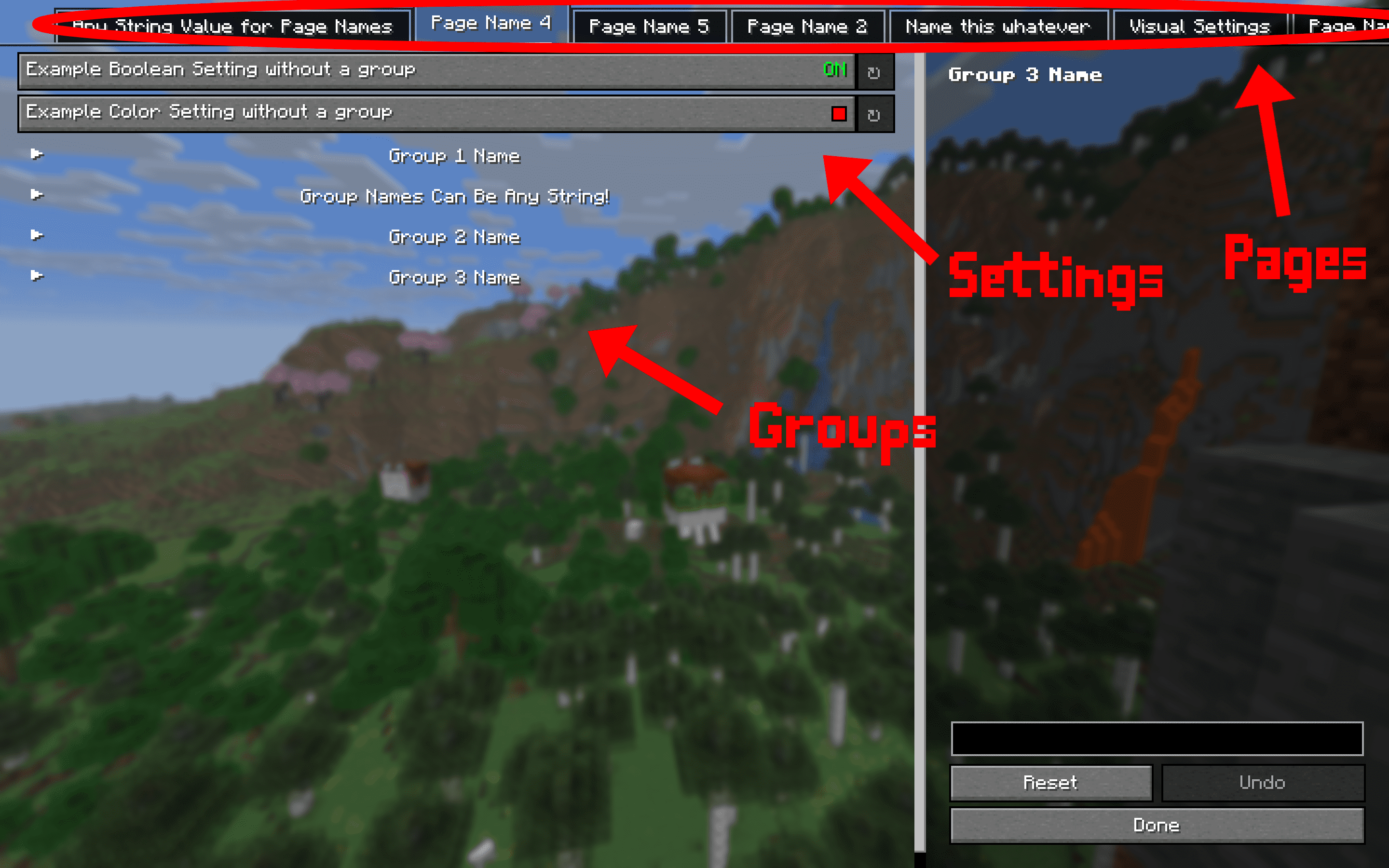
This mod requires multiple other mods in order to function. They will all automatically be installed with this one, so no need to manually download them.
Project description from CurseForge.
Pick your setup
Choose the version and loader you play, then open the matching release.
Showing the newest 12 of 20 game versions. Older files are in the list below.
Check the dependencies, then try the file in a copied instance before changing a world you care about.
Recent files
settingsmanager-1.1.3+26.1.jar
27 Mar 2026
Looking for an older file? The official CurseForge project page is in Resources.
 mod
High performance JavaScript runtime, tweaked for Minecraft usage
 mod
See any build as see-through ghost blocks in your world, with a materials list, layers and build copying.
 mod
This mod replaces vanilla status bars with clean, animated numerical values and dynamic icons.