KhazodaCore Needed by Heirlooms 1.4.3+26.1.x
requiredMatching file found Matched file: 1.0.4+26.1.x
CurseForge · Minecraft mod
engrave your unstackable items with tooltips containing their history
Quick answer
Heirlooms 1.4.3+26.1.x targets 26.1, 26.1.1, 26.1.2 with NeoForge. The project page does not say whether this file belongs on the client, dedicated server, or both. All 1 required mods have matching files.
Where it goes
The project page does not say whether this file belongs on the client, dedicated server, or both.
The source does not explicitly classify this release as client-only or server-only.
1.4.3+26.1.x. Change the file and its required mods may change too.
Install KhazodaCore first. We found matching files for this game-version and loader setup.
We only count dependency files that match this setup. A file for another loader does not fill the gap.
Before you install it
Built for Heirlooms 1.4.3+26.1.x. Pick another file and the loader, install side or required mods may change.
Use 1.4.3+26.1.x. It targets 26.1, 26.1.1, 26.1.2 with NeoForge; another release may have different loader, side or dependency requirements.
Install KhazodaCore first. We found matching files for this game-version and loader setup.
The project page does not say whether this file belongs on the client, dedicated server, or both.
Use the “Get this file” button beside 1.4.3+26.1.x. It opens that exact file at the source.
About this project
🏷️ This description may not reflect the version of the mod you’re using. If you have questions or need help, ask in the #support channel on my Discord server. 




Heirlooms gives your crafted items a history, then lets you display them like keepsakes inside your world.
Your unstackable crafted items get a special tooltip showing:
Heirlooms adds two new blocks, which are perfect for holding your favourite items and elevating their symbolic importance:
Both blocks show information about the item, including the tooltip information the mod adds, when a player looks at the block in-world.
Any item that you craft which can't be stacked will receive an heirloom tooltip. Popular examples would include tools, weapons and armour. 
The tooltip information is only shown when holding down the CTRL or ALT keys while hovering over the item. 
As long as the item is made in a crafting table or a smithing table, or enchanted in an enchanting table, it should work, no matter the mod.
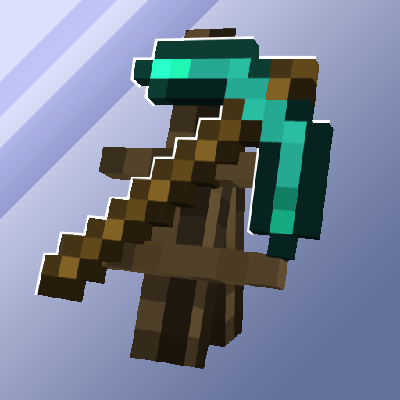
This example shows an item from Basic Weapons 
Heirlooms adds two blocks to show off your items with: 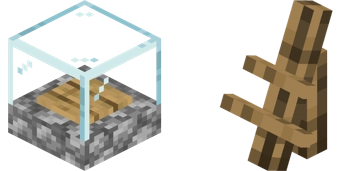
The display case is a full-sized block and shows items on the wooden plate in the center.
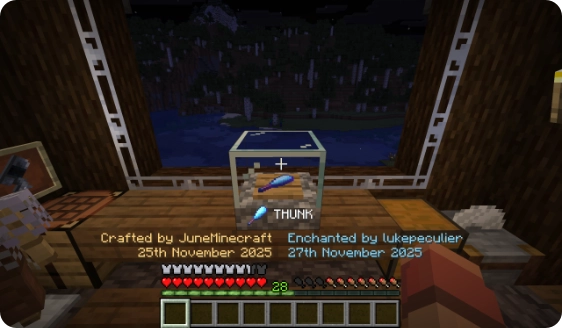
The display rack is a small block and shows items at an angle.
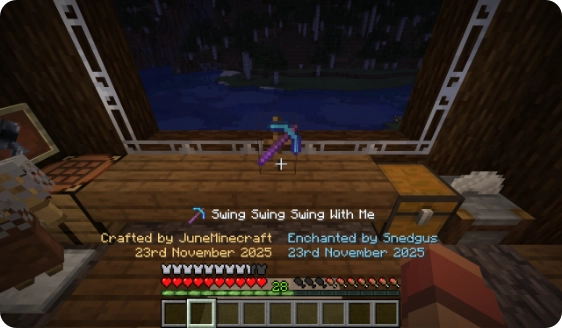
The display case and rack render some items differently to each other. If an item is a block with a custom item texture (e.g. sugar cane, torch, sign) the display case will show the block model, while the rack shows the gui sprite: 
Is there a (fabric/forge/neoforge/risugami's modloader) version? Heirlooms exists on both Fabric and NeoForge. If you're running Quilt, use the Fabric jar. Can you backport the mod to Minecraft 1.X.X? Heirlooms will not be backported. The mod will however support new major versions of Minecraft. I found a bug / my game crashed If you find any problems with Heirlooms, please feel encouraged to create an issue on the GitHub repository issue tracker. Bug reports are incredibly useful and help this mod reach its full potential.
Project description from CurseForge.
Pick your setup
Choose the version and loader you play, then open the matching release.
Check the dependencies, then try the file in a copied instance before changing a world you care about.
Recent files
heirlooms-neoforge-1.4.3+26.1.jar
27 Jul 2026
heirlooms-fabric-1.4.3+26.1.jar
27 Jul 2026
heirlooms-neoforge-1.4.2+26.1.jar
25 Jul 2026
heirlooms-fabric-1.4.2+26.1.jar
25 Jul 2026
heirlooms-neoforge-1.4.1+26.1.jar
21 Jul 2026
heirlooms-fabric-1.4.1+26.1.jar
21 Jul 2026
heirlooms-fabric-1.4.0+26.1.jar
20 Jul 2026
heirlooms-neoforge-1.4.0+26.1.jar
20 Jul 2026
heirlooms-neoforge-1.3.1+1.21.11.jar
30 Jan 2026
heirlooms-fabric-1.3.1+1.21.11.jar
30 Jan 2026
heirlooms-neoforge-1.2.1+1.21.1.jar
30 Jan 2026
heirlooms-fabric-1.2.1+1.21.1.jar
30 Jan 2026
Looking for an older file? The official CurseForge project page is in Resources.
 mod
Expand the capabilities of Cobblemon's battle engine!
 mod
A addon mod for Touhou Little Maid which makes your maid a mobile beacon.
 mod
this mod add the kraken boss
