Minecraft version
Back to mods 
CurseForge · Minecraft mod
ProtectionBlocks
ProtectionBlocks allows players to secure their builds with customizable protection blocks and manage permissions with ease.
Choose a version Pick your version below, then grab the matching file.
Quick answer
Which ProtectionBlocks release should I use?
Latest stable file protectionblocks-1.0.13.jar
Game version 1.20.1
Loader Forge
protectionblocks-1.0.13.jar targets 1.20.1 with Forge. The project page does not say whether this file belongs on the client, dedicated server, or both. No extra mods listed for this file.
Where it goes
Is ProtectionBlocks required on the client, server, or both?
The project page does not say whether this file belongs on the client, dedicated server, or both.
Client Source doesn’t say
Dedicated server Source doesn’t say
Loader for this release Forge
Required install it here Optional supported, not mandatory Not supported do not install here Source doesn’t say do not assume
The source does not explicitly classify this release as client-only or server-only.
What else does protectionblocks-1.0.13.jar need?
protectionblocks-1.0.13.jar. Change the file and its required mods may change too.
This file does not list any required mods. Do not add a library just because a different file uses it.
This file does not list any required or optional mods.
Before you install it
Add ProtectionBlocks without breaking your instance.
Built for protectionblocks-1.0.13.jar. Pick another file and the loader, install side or required mods may change.
- 01
Stick to this file
Use protectionblocks-1.0.13.jar. It targets 1.20.1 with Forge; another release may have different loader, side or dependency requirements.
- 02
Bring the mods it needs
This file does not list any required mods. Do not add a library just because a different file uses it.
- 03
Put it on the correct side
The project page does not say whether this file belongs on the client, dedicated server, or both.
- 04
Pick the file you checked
Use the “Get this file” button beside protectionblocks-1.0.13.jar. It opens that exact file at the source.
About this project
What does ProtectionBlocks add?
🛡️ Protection Blocks
Protect your builds · Catch every intruder · Get pinged on Discord
5 tiers of protection blocks safeguard your constructions against griefing, with a granular permission system for allies (build / break / interact), upgrade slots to extend range, an optional economy mode where blocks consume a configurable currency item over time, and a welcome bonus of 24 h free time on the first block of new players. And when something happens in one of your zones — intruder entering, blocked break attempt, TNT trying to nuke your base — a private Discord DM lands in your inbox, even when you're offline.
✨ What's inside
| 🛡️ Bulletproof protection Tier-based cubes from 5×5×5 up to 25×25×25. Anti-bypass built in: pistons, explosions, fluids and hoppers all blocked at the edge. Owner always retains full control. |
🔔 Real-time Discord alerts Link your Discord once and receive a private DM the moment someone enters, breaks, interacts or bypasses one of your zones. Available offline. Bot in 5 languages. |
|---|---|
| 🔑 Per-ally permissions Grant build, break and interact independently to each ally. Live edits from the GUI — no commands, no NBT editing. |
⚙️ Hot config All sizes, limits and tier toggles live in a TOML file (or via the new in-game GUI). A config change applies immediately to existing protections — no chunk regen, no restart. |
| 💰 Currency mode — economy-driven protection Optional: each block holds a configurable currency item (any item from vanilla or any installed mod) and consumes it over time to stay active. Cost is "N items per M minutes" and supports fractional ratios like "1 iron ingot every 60 min". Master switch is OFF by default. |
📦 Upgrade slots — extend range Each block has 4 upgrade slots. Insert other protection blocks to expand the protected radius. Effective range = base + Σ(inserted ranges), effective cost scales the same way. Broken block returns all upgrades + fuel to the world. |
| 🎁 Welcome bonus for new players On their FIRST protection block, new players automatically get 24 h of free time (configurable, 0–720 h). Anchored to the player's UUID — break & replace the block within the window and the remaining time transfers to the new one. Awarded once per player forever — anti-cheat by design. |
🔍 X-ray wireframe & HSV color picker Toggle "Show area" and see the protected volume rendered as a wireframe cube through walls, blocks and terrain. Pick any color via an inline HSV picker (60-segment hue bar + 40×16 SV grid). Session-persistent per block. |
🔔 Discord alerts — Free & Premium
100% opt-in. Leave the bot endpoint empty in the config and the mod runs as a pure protection mod with zero external dependencies.
| Feature | FREE — 0 €/forever | ⭐ PREMIUM — 4,99 €/month |
|---|---|---|
| Minecraft servers | 1 | Unlimited |
| All 4 alert types (enter / break / interact / bypass) | ✔ | ✔ |
| Cooldown between alerts | 10 min | Real-time |
| Bot in 5 languages (ES / EN / DE / FR / IT) | ✔ | ✔ |
| Self-service customer portal — cancel anytime | — | ✔ |
| Stripe payments — no card data stored | — | ✔ |
🚀 Get alerts in 3 steps
| 1 Register Log in with Discord on the panel, create your server, copy the token. |
2 Configure Paste the token in protectionblocks-server.toml. Restart the MC server. |
3 Link Discord Run /protection link in-game, then /link <code> in Discord. Done. |
|---|
📖 Full tutorial: protectionblocks.infinixmc.es/dashboard/docs/link
🧊 Managing a placed block
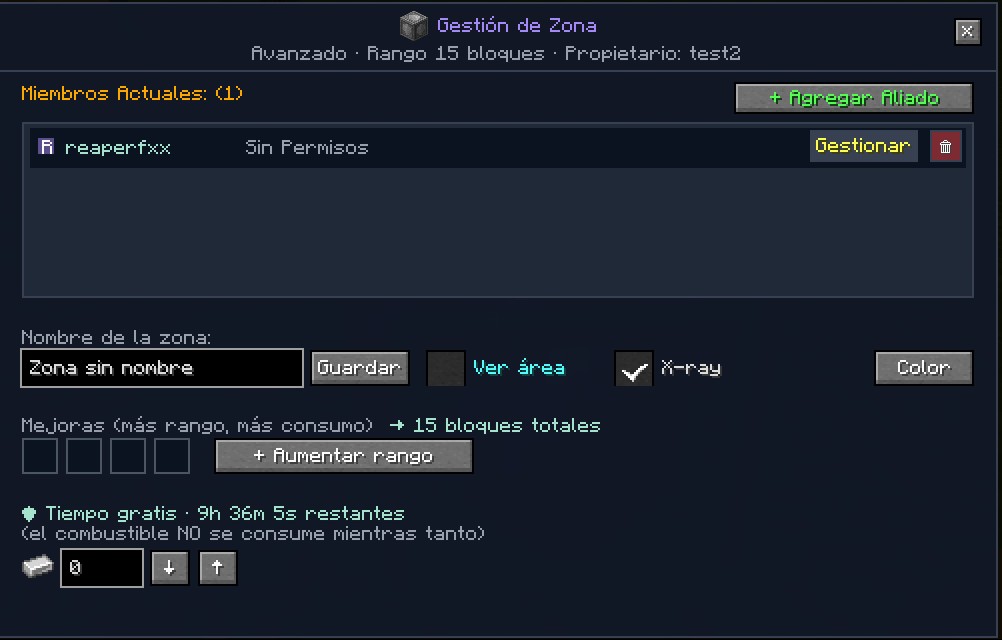
Place any tier of protection block, then right-click it as its owner to open the management GUI shown below. From a single panel you can:
- Add allies with an inline player picker (auto-focus + centered input) — no more separate screen.
- Tune each ally's build / break / interact grid live from the Gestionar dropdown.
- Toggle "Ver área" for the wireframe preview, cycle X-ray on/off, and pick any highlight color from the inline HSV picker.
- Drop items into the 4 upgrade slots to extend the range (the total is shown live next to the label).
- In currency mode: monitor the free-time countdown plus fuel state, and refill / withdraw the currency stack with the
↓/↑buttons in one click.
⚙️ In-game admin configuration GUI
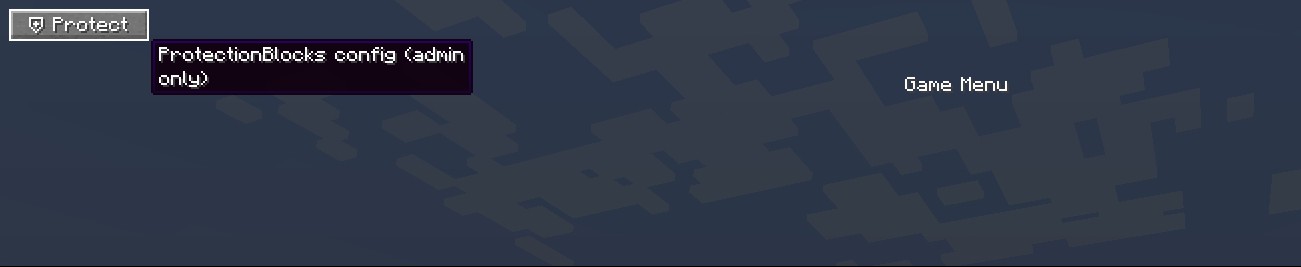
Forget editing TOML files. The entire server config is now editable from inside Minecraft — one click in the pause menu and you get a clean GUI with every option grouped in tabs. All changes apply instantly, no restart (except crafting recipes, marked with a "⚠ requires /reload" badge).
Opens via the new ⛨ Protect button in the pause menu (top-left, auto-positioned next to other admin-mod buttons like HeadRoles — never overlaps), or via your own keybind under the new "Protection Blocks" category in Options → Controls. Visible only to ops.
General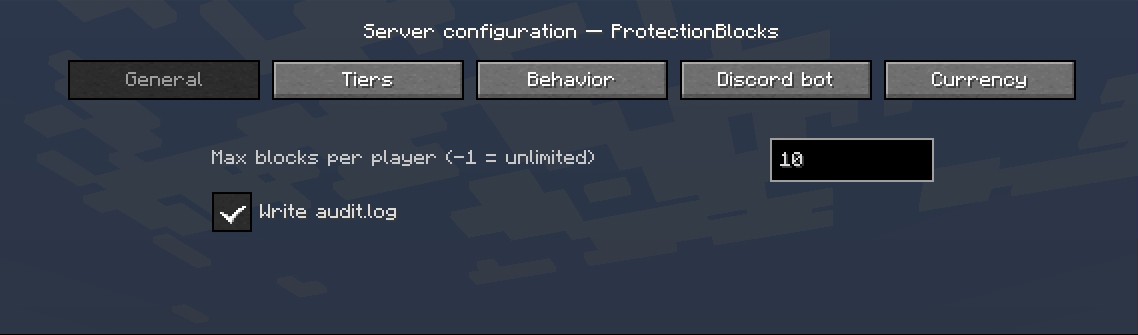 |
|---|
Tiers — radii & per-tier toggles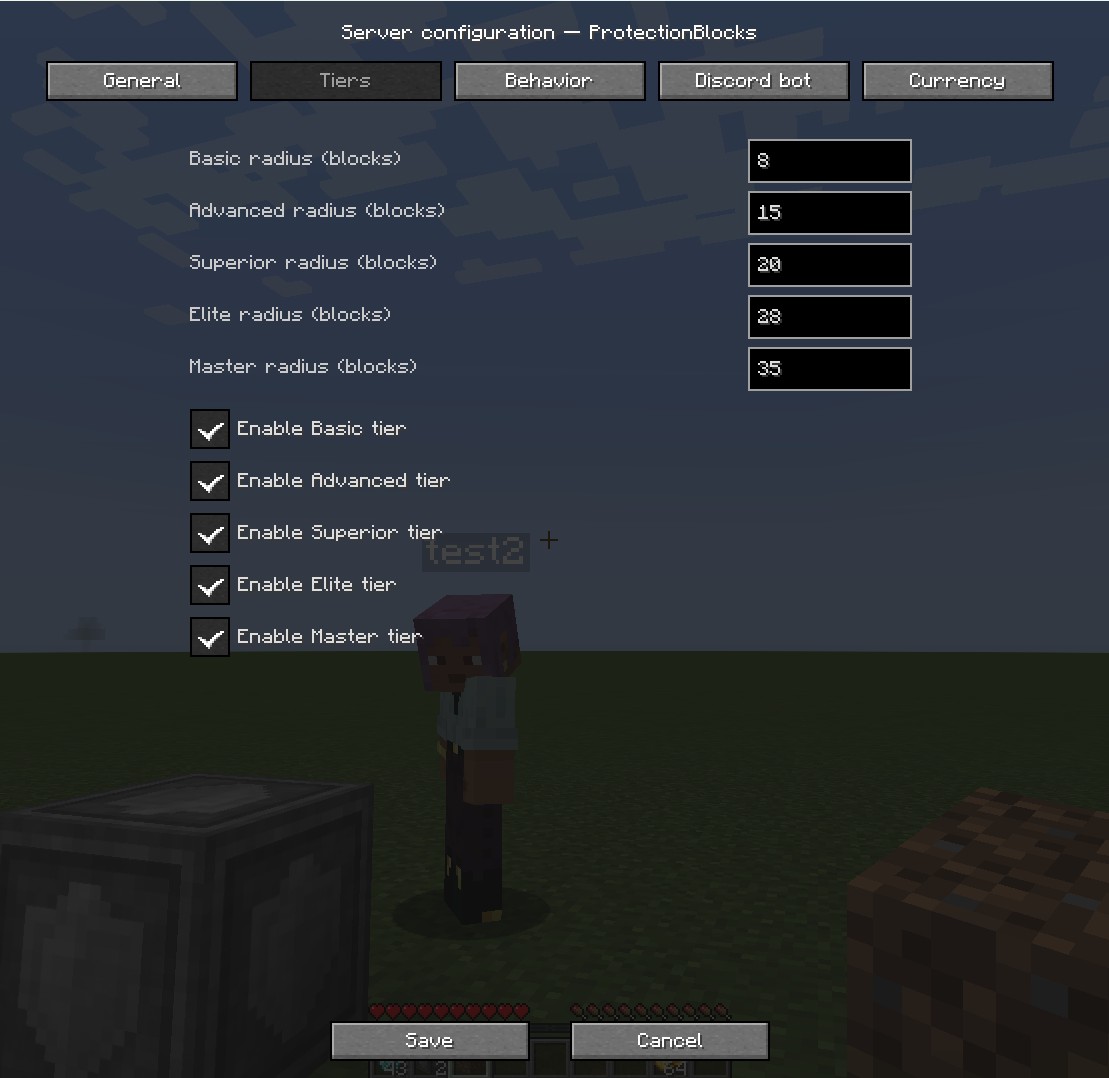 |
Behavior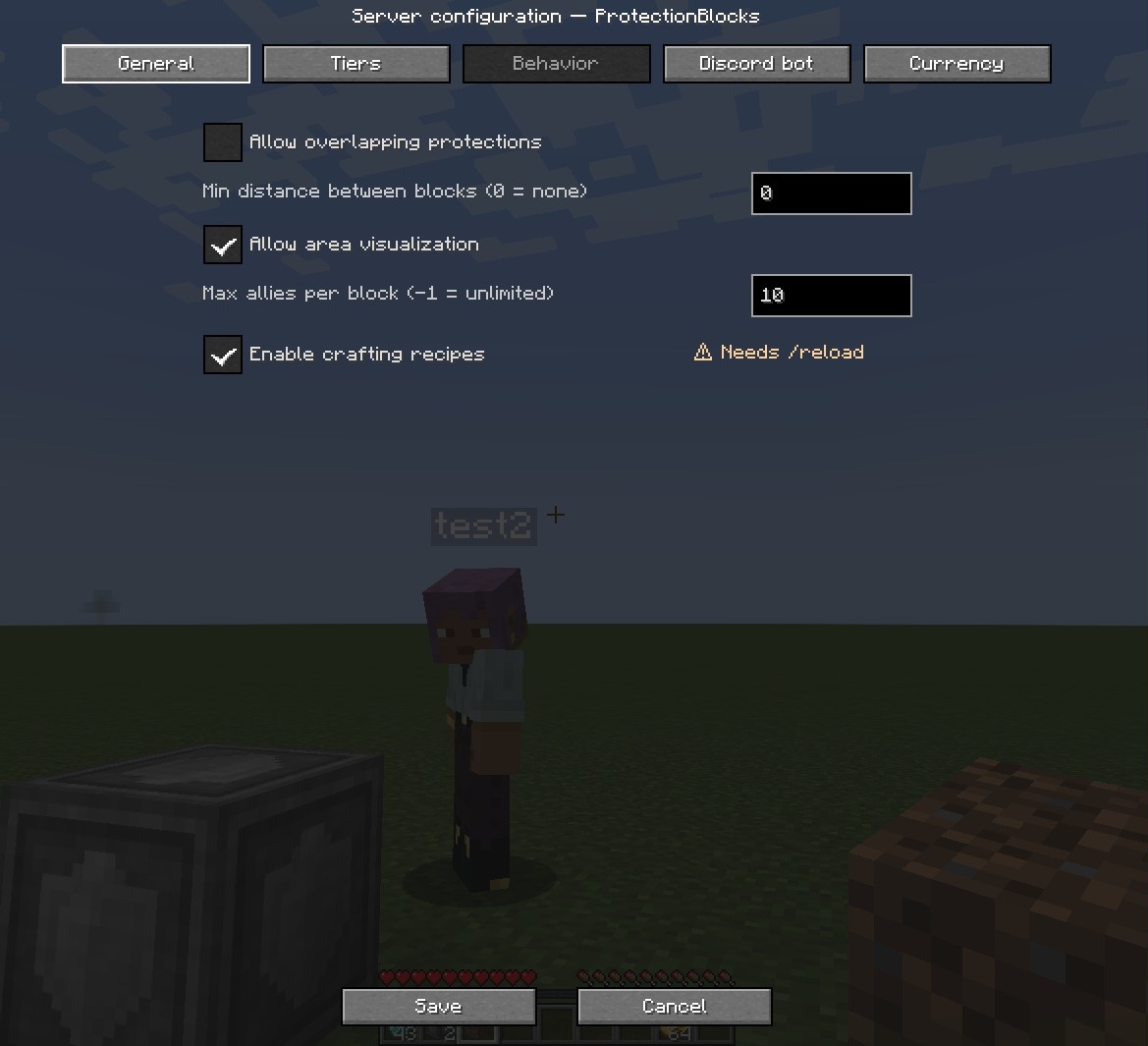 |
Discord bot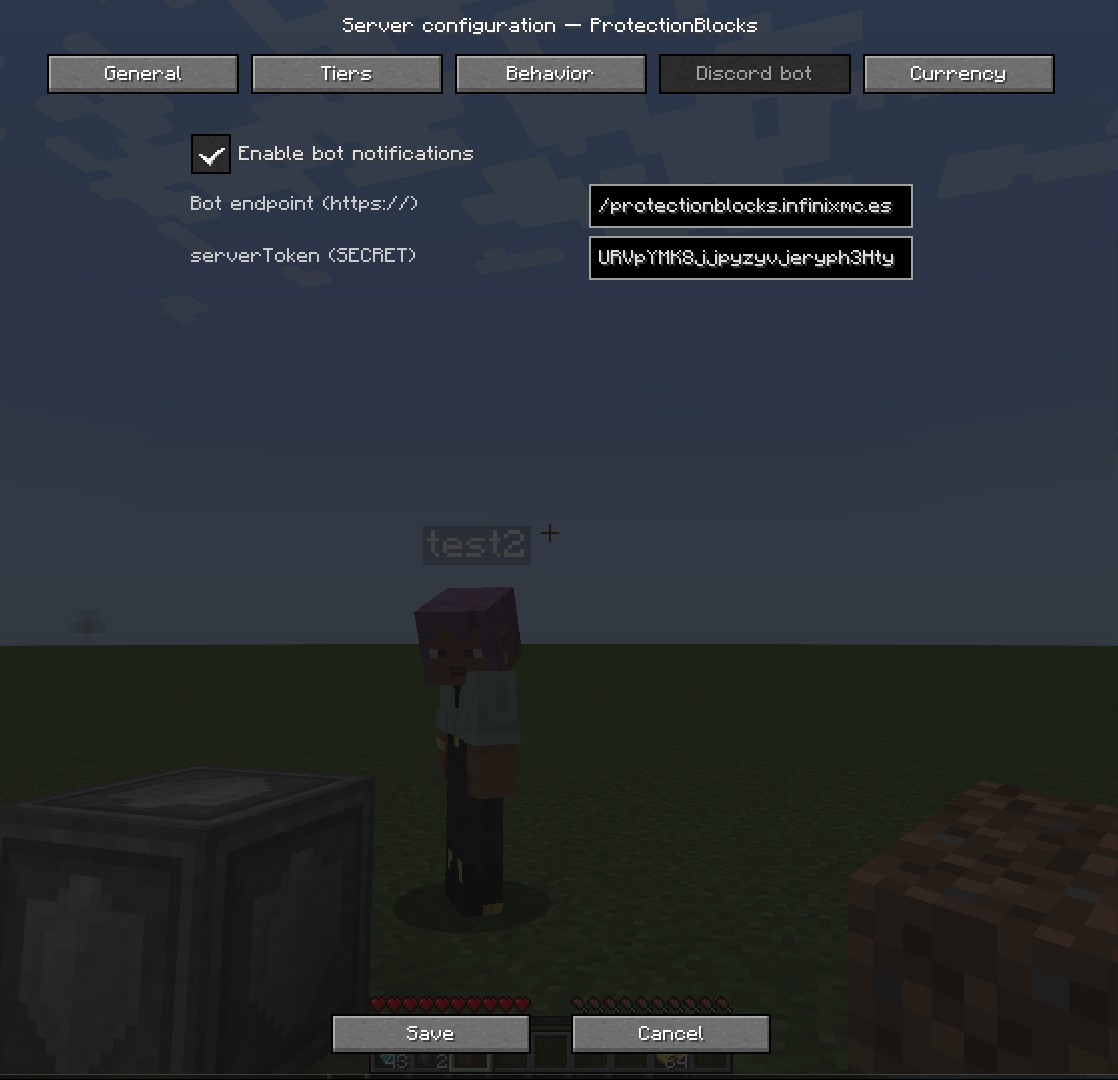 |
Currency — economy & free time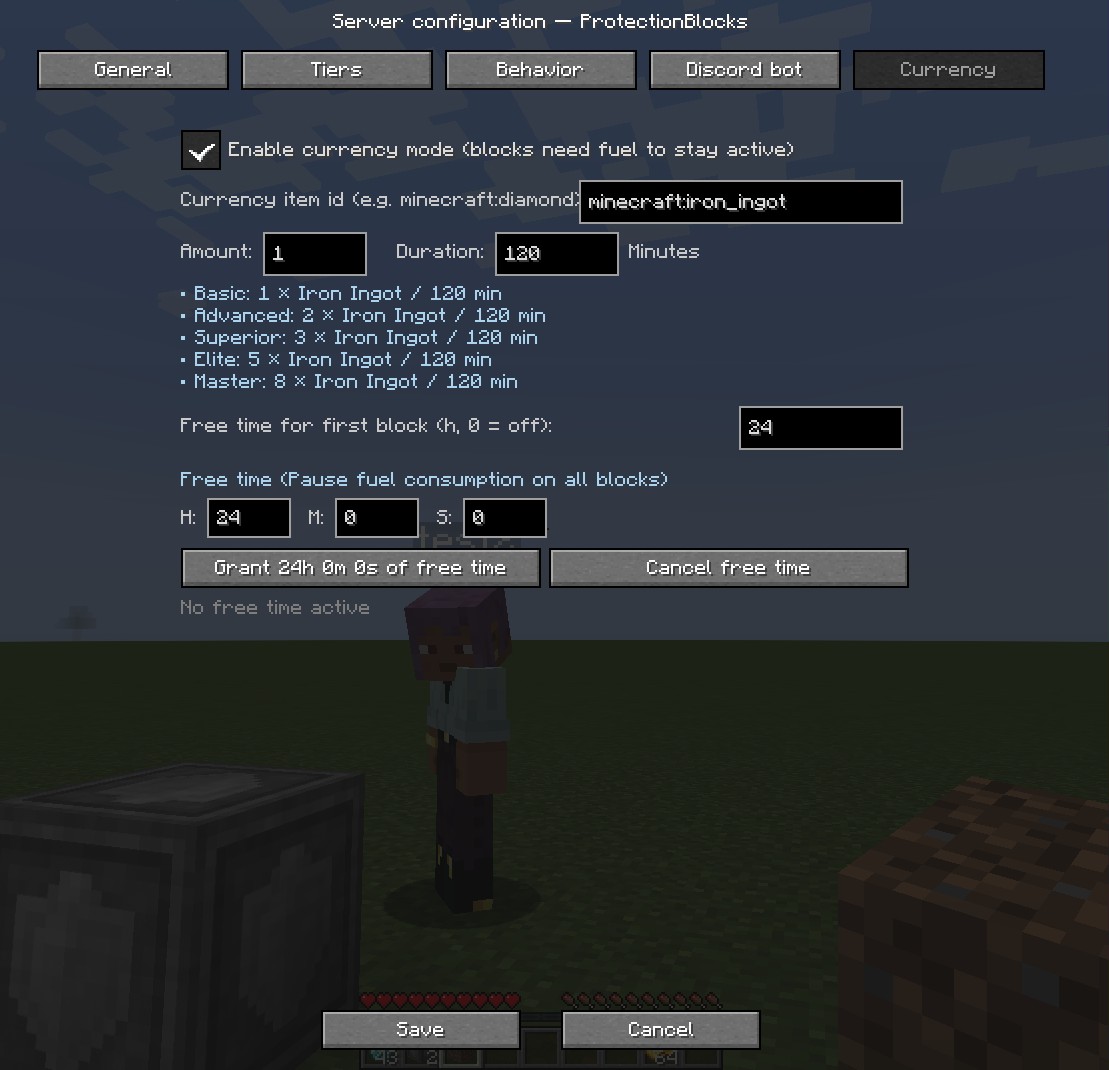 |
The Currency tab has live per-tier cost breakdown (updates as you type), an in-GUI toast card for save/grant/cancel confirmations (so the chat stays clean), and greys out the whole section when the master switch is OFF so admins don't accidentally edit values that don't matter.
📏 Protection tiers
Each block protects a cube of (radius × 2 + 1)³ centered on it. All sizes are configurable.
| Tier | Radius | Area | Preview |
|---|---|---|---|
| Basic | 2 | 5×5×5 | 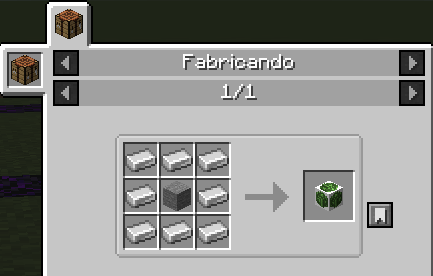 |
| Advanced | 5 | 11×11×11 | 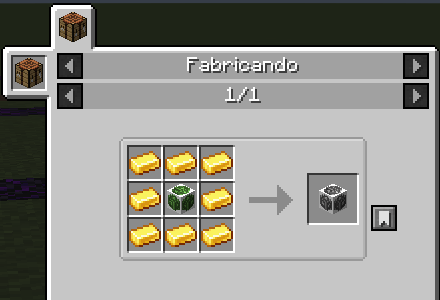 |
| Superior | 7 | 15×15×15 | 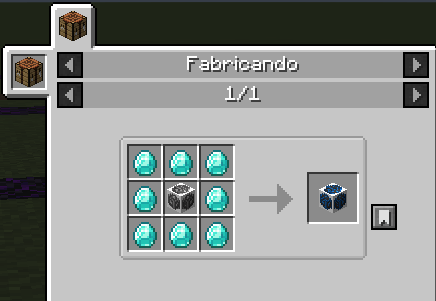 |
| Elite | 10 | 21×21×21 | 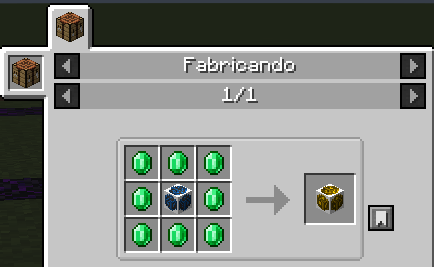 |
| Master | 12 | 25×25×25 | 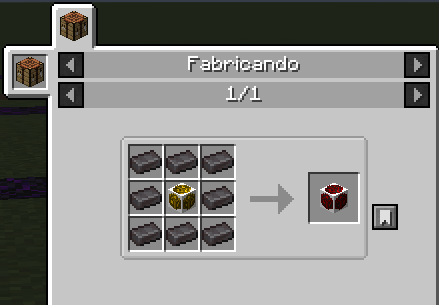 |
⚙️ Server configuration
Fully tunable via config/protectionblocks/protectionblocks-server.toml or via the in-game GUI. A config change applies immediately to existing protections.
| Key | What it does |
|---|---|
maxProtectionBlocksPerPlayer |
Max blocks per player (-1 = unlimited). |
basicProtectionRadius … masterProtectionRadius |
Radius (in blocks) of each tier's cube. |
allowOverlappingProtection |
Whether two protections can overlap. |
minDistanceBetweenBlocks |
Min distance between same player's blocks. |
enableProtectionVisualization |
Toggle the in-game outline preview. |
maxAlliesPerBlock |
Limit allies per block (-1 = unlimited). |
enableProtectionBlockRecipes |
Enable/disable crafting recipes (requires /reload). |
enableBotNotifications |
Master switch for Discord alerts. |
botEndpoint |
Endpoint of the bot. Leave empty to disable. |
serverToken |
⚠ Secret. Per-server token from the panel. Don't share it; rotate from the panel if leaked. |
enableCurrencyMode |
Master switch for the economy layer. When OFF (default), blocks work as before with no fuel needed. |
currencyItem |
Item id used as currency, e.g. minecraft:diamond or modid:custom_coin. Any stackable item works. |
costItemCount & costDurationMinutes |
Base cost expressed as "N items last M minutes" (M is a decimal). Multiplied by the per-tier weight (Basic ×1, Advanced ×2, Superior ×3, Elite ×5, Master ×8). |
newPlayerGraceHours |
Free-time hours awarded on the FIRST protection block of a new player (0–720, default 24, 0 disables it). Once per player forever. |
💬 In-game commands
| Command | Who | What it does |
|---|---|---|
/protection link |
Player | Generates a 6-char code to pair the account with the Discord bot (/link <code> on Discord). |
/protection diag |
OP | Inspects the block the OP is aiming at and prints owner, tier, range, isActive, fuel, per-block grace state, cache membership — everything needed to answer "why is / isn't this action allowed?". |
/protection grantfreetime <player> <hours> |
OP | Overwrites the target player's free-time pool. 0 cuts their remaining grace; any value 1–720 re-grants that many hours (bypasses the "once per player" rule for testing). |
📦 Compatibility
Minecraft 1.20.1 · Forge 47.x · Java 17 · Client & Server
© 2026 vicxelcode · MIT License · GitHub · Panel & tutorial
Project description from CurseForge.
Pick your setup
ProtectionBlocks by Minecraft version and loader
Choose the version and loader you play, then open the matching release.
Check the dependencies, then try the file in a copied instance before changing a world you care about.
Recent files
ProtectionBlocks versions and loaders
protectionblocks-1.0.13.jar
25 Oct 2026
Client Source doesn’t say Server Source doesn’t say Dependencies No extras listed Listed on Release listing
Check the 1.20.1 · Forge setup 1.20.1Forge release
protectionblocks-1.0.12.jar
7 Jul 2026
Client Source doesn’t say Server Source doesn’t say Dependencies No extras listed Listed on Release listing
Check the 1.20.1 · Forge setup 1.20.1Forge release
protectionblocks-1.0.11.jar
6 Jul 2026
Client Source doesn’t say Server Source doesn’t say Dependencies No extras listed Listed on Release listing
Check the 1.20.1 · Forge setup 1.20.1Forge release
protectionblocks-1.0.10.jar
6 Jul 2026
Client Source doesn’t say Server Source doesn’t say Dependencies No extras listed Listed on Release listing
Check the 1.20.1 · Forge setup 1.20.1Forge release
protectionblocks-1.0.9.jar
4 Jul 2026
Client Source doesn’t say Server Source doesn’t say Dependencies No extras listed Listed on Release listing
Check the 1.20.1 · Forge setup 1.20.1Forge release
protectionblocks-1.0.8.jar
2 Jul 2026
Client Source doesn’t say Server Source doesn’t say Dependencies No extras listed Listed on Release listing
Check the 1.20.1 · Forge setup 1.20.1Forge release
protectionblocks-1.0.7.jar
2 Jul 2026
Client Source doesn’t say Server Source doesn’t say Dependencies No extras listed Listed on Release listing
Check the 1.20.1 · Forge setup 1.20.1Forge release
protectionblocks-1.0.6.jar
28 Jun 2026
Client Source doesn’t say Server Source doesn’t say Dependencies No extras listed Listed on Release listing
Check the 1.20.1 · Forge setup 1.20.1Forge release
protectionblocks-1.0.5.jar
20 Jun 2026
Client Source doesn’t say Server Source doesn’t say Dependencies No extras listed Listed on Release listing
Check the 1.20.1 · Forge setup 1.20.1Forge release
protectionblocks-1.0.4.jar
3 Oct 2025
Client Source doesn’t say Server Source doesn’t say Dependencies No extras listed Listed on Release listing
Check the 1.20.1 · Forge setup 1.20.1Forge release
protectionblocks-1.0.3.jar
22 Sept 2025
Client Source doesn’t say Server Source doesn’t say Dependencies No extras listed Listed on Release listing
Check the 1.20.1 · Forge setup 1.20.1Forge release
protectionblocks-1.0.2.jar
22 Sept 2025
Client Source doesn’t say Server Source doesn’t say Dependencies No extras listed Listed on Release listing
Check the 1.20.1 · Forge setup 1.20.1Forge release
Looking for an older file? The official CurseForge project page is in Resources.
 mod
mod CurseForge + Modrinth · Minecraft
World Stripper
Strips away blocks to reveal the underground world gen. A must have tool for all map-makers, pack-makers or developers.
 mod
mod CurseForge · Minecraft
[TACZ] FreeZBe Gunpack Addon
It adds not only Russian and Soviet weapons but also its own unique mechanics.
 mod
mod CurseForge + Modrinth · Minecraft
Craftable Horse Armour & Saddle [CHA&S]
Adds configurable recipes to horse armour and saddles from vanilla MC.