Minecraft version
Back to mods 
CurseForge · Minecraft mod
Chroma Key - Green Screen
Green screen instead of green concrete
Choose a version Pick your version below, then grab the matching file.
Quick answer
Which Chroma Key - Green Screen release should I use?
Latest stable file green-screen-1.1.3.jar
Game version 1.17.1, 1.21.2-Snapshot, 1.21
Loader Fabric, Forge, NeoForge
Chroma Key - Green Screen green-screen-1.1.3.jar targets 1.17.1, 1.21.2-Snapshot, 1.21 with Fabric, Forge, NeoForge. The project page does not say whether this file belongs on the client, dedicated server, or both. No extra mods listed for this file.
Where it goes
Is Chroma Key - Green Screen required on the client, server, or both?
The project page does not say whether this file belongs on the client, dedicated server, or both.
Client Source doesn’t say
Dedicated server Source doesn’t say
Loader for this release Fabric, Forge, NeoForge
Required install it here Optional supported, not mandatory Not supported do not install here Source doesn’t say do not assume
The source does not explicitly classify this release as client-only or server-only.
What else does Chroma Key - Green Screen green-screen-1.1.3.jar need?
green-screen-1.1.3.jar. Change the file and its required mods may change too.
This file does not list any required mods. Do not add a library just because a different file uses it.
This file does not list any required or optional mods.
Before you install it
Add Chroma Key - Green Screen without breaking your instance.
Built for Chroma Key - Green Screen green-screen-1.1.3.jar. Pick another file and the loader, install side or required mods may change.
- 01
Stick to this file
Use green-screen-1.1.3.jar. It targets 1.17.1, 1.21.2-Snapshot, 1.21 with Fabric, Forge, NeoForge; another release may have different loader, side or dependency requirements.
- 02
Bring the mods it needs
This file does not list any required mods. Do not add a library just because a different file uses it.
- 03
Put it on the correct side
The project page does not say whether this file belongs on the client, dedicated server, or both.
- 04
Pick the file you checked
Use the “Get this file” button beside green-screen-1.1.3.jar. It opens that exact file at the source.
About this project
What does Chroma Key - Green Screen add?
Description
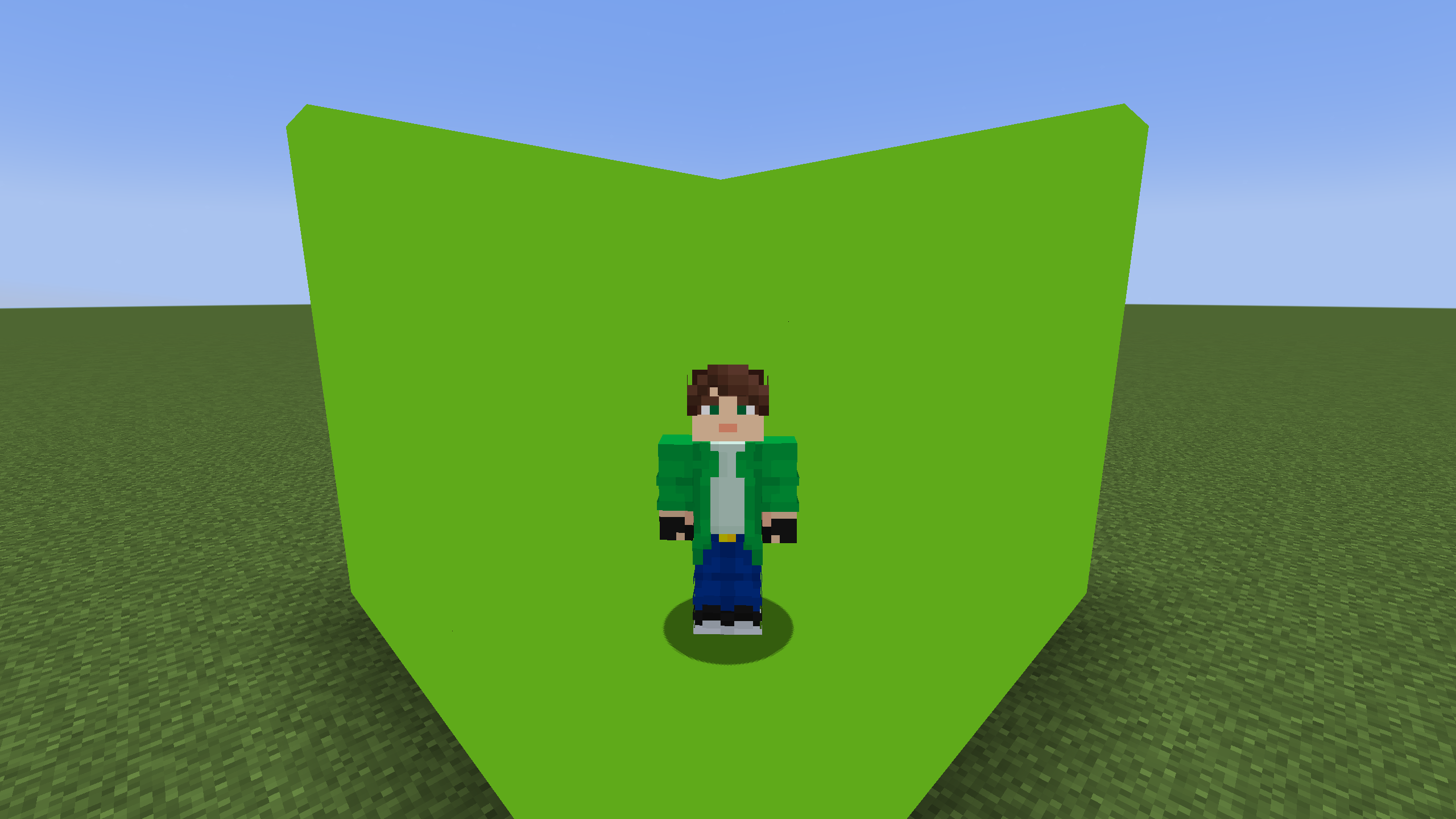
A vanilla shader that changes lime concrete to chroma key. Green screen instead of green concrete
Dependencies
- Fabric loader requires Fabric API
Project description from CurseForge.
Pick your setup
Chroma Key - Green Screen by Minecraft version and loader
Choose the version and loader you play, then open the matching release.
Minecraft version
26.1.2
4 loader buildsMinecraft version
26.1.1
4 loader buildsMinecraft version
26.1
4 loader buildsMinecraft version
1.21.11-snapshot
4 loader buildsMinecraft version
1.21.11
4 loader buildsMinecraft version
1.21.10
4 loader buildsMinecraft version
1.21.9-snapshot
4 loader buildsMinecraft version
1.21.9
4 loader buildsMinecraft version
1.21.8
4 loader buildsMinecraft version
1.21.7
4 loader buildsMinecraft version
1.21.6-snapshot
4 loader buildsShowing the newest 12 of 50 game versions. Older files are in the list below.
Check the dependencies, then try the file in a copied instance before changing a world you care about.
Recent files
Chroma Key - Green Screen versions and loaders
green-screen-1.1.3.jar
15 Sept 2026
Client Source doesn’t say Server Source doesn’t say Dependencies No extras listed Listed on Release listing
Check the 26.2 · Fabric setup 1.17.11.21.2-Snapshot1.211.21.6-snapshot release
green-screen-v1.1.2.jar
14 Aug 2026
Client Source doesn’t say Server Source doesn’t say Dependencies No extras listed Listed on Release listing
Check the 26.2 · Fabric setup 1.17.11.21.2-Snapshot1.211.21.6-snapshot release
green-screen-v1.1.1.jar
24 Mar 2026
Client Source doesn’t say Server Source doesn’t say Dependencies No extras listed Listed on Release listing
Check the 26.2 · Fabric setup 1.17.11.21.2-Snapshot1.211.21.6-snapshot release
green-screen-v1.1.jar
10 Dec 2025
Client Source doesn’t say Server Source doesn’t say Dependencies No extras listed Listed on Release listing
Check the 1.21.11-snapshot · Fabric setup 1.17.11.21.2-Snapshot1.211.21.6-snapshot release
green-screen.jar
26 Sept 2025
Client Source doesn’t say Server Source doesn’t say Dependencies No extras listed Listed on Release listing
Check the 1.21.11-snapshot · Fabric setup 1.17.11.21.2-Snapshot1.211.21.6-snapshot release
Looking for an older file? The official CurseForge project page is in Resources.
 mod
CurseForge · Minecraft
Murim Login
Wuxia / murim cultivation: pick a side, join a sect, climb from realm 10 to immortal with qi, a skill hotbar, scroll-learned arts, flying swords, quests and bosses. Thai or English.
 mod
CurseForge · Minecraft
Not Enough Sigils
a simple mod that adds a wide variety of sigils, among other items from Neo Vitae
 mod
CurseForge · Minecraft
Bestiary O’ Beasts
A living bestiary of every creature in your modpack. Watch them move, examine them in 3D, discover their habitats and drops, and control what spawns.