Minecraft version
Back to mods 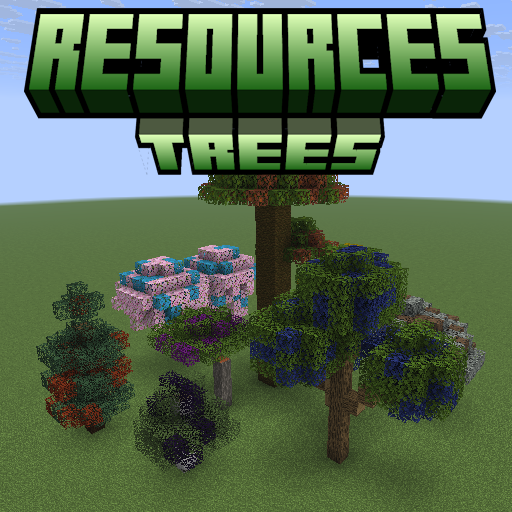
CurseForge · Minecraft mod
Resources Trees
Resources Trees provide you a new way to generate resources such as iron, gold, and diamond.
Choose a version Pick your version below, then grab the matching file.
Quick answer
Which Resources Trees release matches 1.20.1?
Best match for your filters 1.6.2+mc1.20.1-forge
Game version 1.20.1
Loader Forge
Resources Trees 1.6.2+mc1.20.1-forge targets 1.20.1 with Forge. Installation on the client is optional. Installation on the dedicated server is optional. No extra mods listed for this file.
Where it goes
Is Resources Trees required on the client, server, or both?
Installation on the client is optional. Installation on the dedicated server is optional.
Client Optional
Dedicated server Optional
Loader for this release Forge
Required install it here Optional supported, not mandatory Not supported do not install here Source doesn’t say do not assume
The source marks this as usable on both the client and server.
What else does Resources Trees 1.6.2+mc1.20.1-forge need?
1.6.2+mc1.20.1-forge on 1.20.1. Every mod below is checked against that same setup.
This file does not list any required mods. Do not add a library just because a different file uses it.
This file does not list any required or optional mods.
Before you install it
Add Resources Trees without breaking your instance.
Built for Resources Trees 1.6.2+mc1.20.1-forge on 1.20.1. Pick another file and the loader, install side or required mods may change.
- 01
Stick to this file
Use 1.6.2+mc1.20.1-forge. It targets 1.20.1 with Forge; another release may have different loader, side or dependency requirements.
- 02
Bring the mods it needs
This file does not list any required mods. Do not add a library just because a different file uses it.
- 03
Put it on the correct side
Installation on the client is optional. Installation on the dedicated server is optional.
- 04
Pick the file you checked
Use the “Get this file” button beside 1.6.2+mc1.20.1-forge. It opens that exact file at the source.
About this project
What does Resources Trees add?
🌳 ResourcesTrees
Grow your resources — no mining required.
ResourcesTrees adds resource-producing trees to Minecraft. Plant specialized saplings, tend your farm, and harvest valuable materials — from iron and diamonds to mob drops, essences, and more. Every combination of a resource type and a tree shape generates its own unique sapling, leaves, and leaf fragments.
⚡ Features
- 🌱 47+ Resource Types — Iron, diamond, netherite, coal, gold, sculk, mob essences, dyes, and many more.
- 🌲 8 Tree Shapes — Oak, Spruce, Birch, Jungle, Acacia, Dark Oak, Cherry, and Pale Oak. Each resource type grows as every tree shape.
- 🛠 Fully Config-Driven — Add your own custom resource types and tree types by dropping JSON files into the config folder. No datapacks or coding required.
- 🪓 Tree Simulator — Automate resource production without planting trees in the world. Insert a sapling and an axe, and let it run.
- 🧩 Plugin API — Mod developers can register custom resource types and tree types in code via the
IResourcesTreesPlugininterface. - 🌍 Seamless Integration — Works in vanilla survival, modpacks, and skyblock-style worlds.
📖 How It Works
- Craft a resource sapling — surround a vanilla sapling with the resource material in a
+pattern at a crafting table. - Plant it on grass or dirt, just like a normal sapling.
- Let it grow — it uses the vanilla tree structure for its tree type.
- Break the leaves to collect Leaf Fragments and occasionally a new sapling.
- Craft leaf fragments back into raw resources using shaped recipes.
- (Optional) Use the Tree Simulator to automate the whole process with no trees needed.
🪓 Tree Simulator
The Tree Simulator block automates resource production. Place a resource sapling in the input slot and an axe in the axe slot — it will produce resources on a timer. The axe type determines the speed multiplier:
| Axe | Speed Multiplier |
|---|---|
| Wooden | 1× |
| Stone | 2× |
| Iron | 3× |
| Diamond | 4× |
| Netherite | 5× |
| Golden | 6× |
Axe speed values are fully configurable in config/resourcestrees/axe.json.
🧩 For Modpack Makers — Custom Types
Drop JSON files into your config folder to register new resource types or tree types — no code required.
config/resourcestrees/resources_type/ruby.json
{
  "name": "ruby",
  "material": "minecraft:redstone",
  "color": -3342336,
  "saplingDropChance": 0.1,
  "leafDropChance": 0.2,
  "treeSimulatorTicks": 1400
}
config/resourcestrees/tree_type/oak.json
{
  "name": "oak",
  "treeGrowerName": "oak",
  "saplingTexture": "minecraft:block/oak_sapling",
  "leavesTexture": "minecraft:block/oak_leaves",
  "originalSapling": "minecraft:oak_sapling",
  "originalLeaves": "minecraft:oak_leaves",
  "log": "minecraft:oak_log"
}
🔧 For Mod Developers — Plugin API
Implement IResourcesTreesPlugin and register it via ServiceLoader to add resource types and tree types in code.
public class MyPlugin implements IResourcesTreesPlugin {
    @Override
    public void registerResourcesType(IResourcesTypeRegistry registry) {
        registry.register(new ResourcesType.Builder("ruby", Items.REDSTONE, 0xFFCC0000)
                .saplingDropChance(0.1f)
                .leafDropChance(0.2f)
                .treeSimulatorTicks(1400));
    }
}
⚠️ The Plugin API is experimental. Use config files for stability.
🔗 Links
- 📚 Wiki: resourcestrees.coolerpromc.com
- 🐛 Issues & Suggestions: GitHub Issues
- 💻 Source Code: GitHub Repository
- 💬 Community & Support: Discord
Project description from CurseForge.
Pick your setup
Resources Trees by Minecraft version and loader
Choose the version and loader you play, then open the matching release.
Minecraft version
26.3
2 loader buildsMinecraft version
26.2
2 loader buildsMinecraft version
26.1.2
2 loader buildsMinecraft version
26.1.1
2 loader buildsMinecraft version
26.1-snapshot-7
2 loader buildsMinecraft version
26.1-snapshot-4
2 loader buildsMinecraft version
26.1-snapshot-3
1 loader buildMinecraft version
26.1-snapshot
2 loader buildsMinecraft version
26.1
2 loader buildsMinecraft version
1.21.11
3 loader buildsMinecraft version
1.21.10
3 loader buildsShowing the newest 12 of 14 game versions. Older files are in the list below.
Check the dependencies, then try the file in a copied instance before changing a world you care about.
Recent files
Resources Trees versions and loaders
1.6.2+mc1.20.1-forge
resourcestrees-1.6.2+mc1.20.1-forge.jar
5 Apr 2026
Client Optional Server Optional Dependencies No extras listed Listed on Release listing
Check the 1.20.1 · Forge setup 1.20.1Forge release
1.6.1+mc1.20.1-forge
resourcestrees-1.6.1+mc1.20.1-forge.jar
7 Feb 2026
Client Optional Server Optional Dependencies No extras listed Listed on Release listing
Check the 1.20.1 · Forge setup 1.20.1Forge release
1.5.1+mc1.20.1-forge
resourcestrees-1.5.1+mc1.20.1-forge.jar
21 Jan 2026
Client Optional Server Optional Dependencies No extras listed Listed on Release listing
Check the 1.20.1 · Forge setup 1.20.1Forge release
1.5.0+mc1.20.1-forge
resourcestrees-1.5.0+mc1.20.1-forge.jar
15 Jan 2026
Client Optional Server Optional Dependencies No extras listed Listed on Release listing
Check the 1.20.1 · Forge setup 1.20.1Forge release
1.3.0+mc1.20.1-forge
resourcestrees-1.3.0+mc1.20.1-forge.jar
29 Dec 2025
Client Optional Server Optional Dependencies No extras listed Listed on Release listing
Check the 1.20.1 · Forge setup 1.20.1Forge release
Looking for an older file? The official CurseForge project page is in Resources.
 mod
mod CurseForge + Modrinth · Minecraft
Goety-Fabric
An unofficial Fabric port of Goety. Perform necromancy and dark rituals using the power of souls
 mod
mod CurseForge · Minecraft
Modern Content Backport
Backports newer Minecraft content to 1.20.1, with a strong focus on vanilla accuracy
 mod
mod CurseForge · Minecraft
LOL-new
A module that porting the game content from the game "League of Legends" to MC, containing a large number of powerful LOL equipment and other items.