Minecraft version
Back to mods 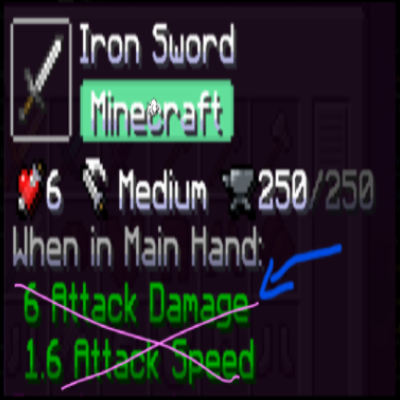
CurseForge · Minecraft mod
Configurable Tooltips
Let's you remove tooltips from any mods using text matching
Choose a version Pick your version below, then grab the matching file.
Quick answer
Which Configurable Tooltips release matches 1.20.1 Forge?
Best match for your filters ConfigurableTooltips-1.20.1-Forge-1.0.1.jar
Game version 1.20.1
Loader Forge
Configurable Tooltips ConfigurableTooltips-1.20.1-Forge-1.0.1.jar targets 1.20.1 with Forge. The project page does not say whether this file belongs on the client, dedicated server, or both. No extra mods listed for this file.
Where it goes
Is Configurable Tooltips required on the client, server, or both?
The project page does not say whether this file belongs on the client, dedicated server, or both.
Client Source doesn’t say
Dedicated server Source doesn’t say
Loader for this release Forge
Required install it here Optional supported, not mandatory Not supported do not install here Source doesn’t say do not assume
The source does not explicitly classify this release as client-only or server-only.
What else does Configurable Tooltips ConfigurableTooltips-1.20.1-Forge-1.0.1.jar need?
ConfigurableTooltips-1.20.1-Forge-1.0.1.jar on 1.20.1 Forge. Every mod below is checked against that same setup.
This file does not list any required mods. Do not add a library just because a different file uses it.
This file does not list any required or optional mods.
Before you install it
Add Configurable Tooltips without breaking your instance.
Built for Configurable Tooltips ConfigurableTooltips-1.20.1-Forge-1.0.1.jar on 1.20.1 Forge. Pick another file and the loader, install side or required mods may change.
- 01
Stick to this file
Use ConfigurableTooltips-1.20.1-Forge-1.0.1.jar. It targets 1.20.1 with Forge; another release may have different loader, side or dependency requirements.
- 02
Bring the mods it needs
This file does not list any required mods. Do not add a library just because a different file uses it.
- 03
Put it on the correct side
The project page does not say whether this file belongs on the client, dedicated server, or both.
- 04
Pick the file you checked
Use the “Get this file” button beside ConfigurableTooltips-1.20.1-Forge-1.0.1.jar. It opens that exact file at the source.
About this project
What does Configurable Tooltips add?
This mod uses text based filtering to allow you to remove any tooltips.
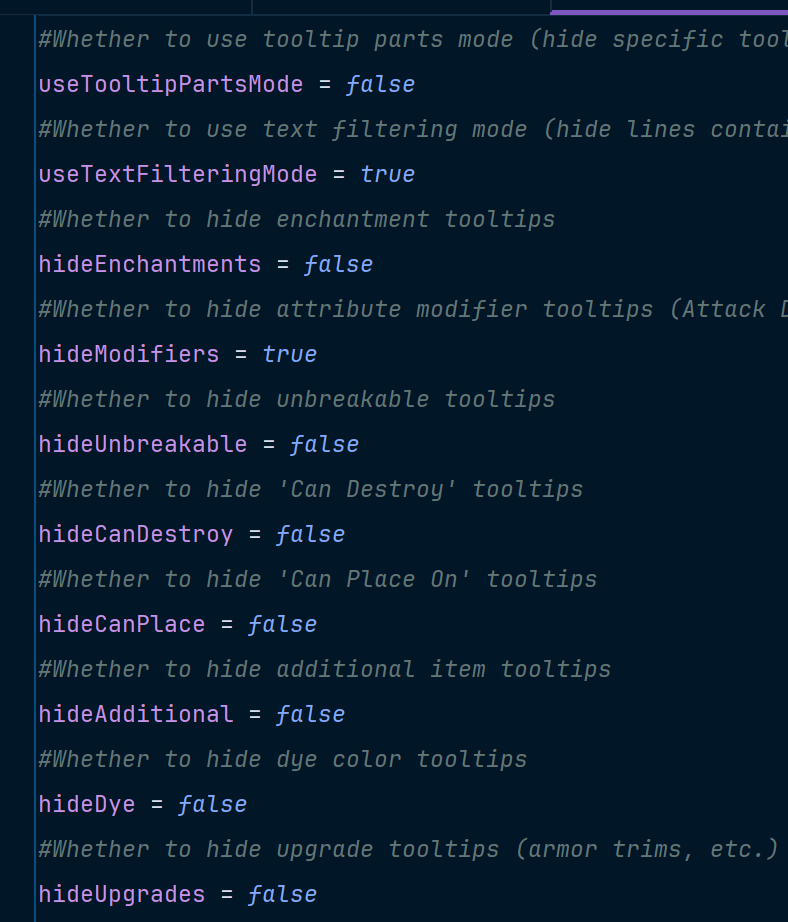
THE MOD IS DISABLED BY DEFAULT, YOU NEED TO CONFIGURE IT AT configurable-tooltips.toml
Need Help ? Here's my Discord

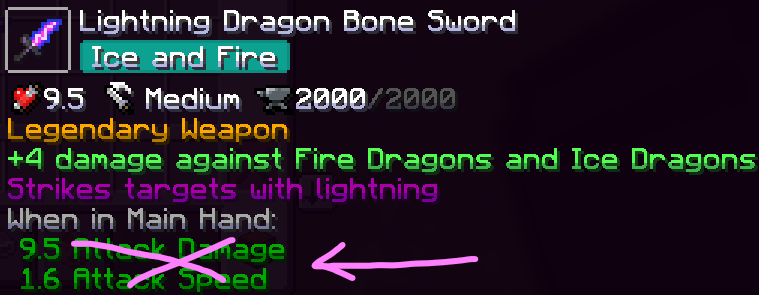
It also lets you remove specific tooltip parts
If you'd like to support me and the development of my mods, I recommend trying out BisectHosting. Use code "project8gbderam" to get 25% off your first month of a gaming server for new customers. They offer 24/7 support and lightning-fast response times, ensuring you're in great hands and providing exceptional assistance for all your gaming needs. https://www.bisecthosting.com/project8gbderam

Project description from CurseForge.
Pick your setup
Configurable Tooltips by Minecraft version and loader
Choose the version and loader you play, then open the matching release.
Check the dependencies, then try the file in a copied instance before changing a world you care about.
Recent files
Configurable Tooltips versions and loaders
ConfigurableTooltips-1.20.1-Forge-1.0.1.jar
30 Sept 2025
Client Source doesn’t say Server Source doesn’t say Dependencies No extras listed Listed on Release listing
Check the 1.20.1 · Forge setup 1.20.1Forge release
ConfigurableTooltips-1.20.1-Forge-1.0.0.jar
28 Sept 2025
Client Source doesn’t say Server Source doesn’t say Dependencies No extras listed Listed on Release listing
Check the 1.20.1 · Forge setup 1.20.1Forge release
Looking for an older file? The official CurseForge project page is in Resources.
 mod
CurseForge · Minecraft
Turbo for Distant Horizons
Distant Horizons addon: generates distant terrain from the world noise several times faster, with real trees and structures.
 mod
CurseForge · Minecraft
musicaldash
Insert Musical Dash discs into any Jukebox to teleport to live action stages across all Minecraft updates, spawn a Bot with your exact skin that builds, mines, and fights, record your own replay discs, and return anytime via the Skip Block!
 mod
CurseForge · Minecraft
Ember's Questing
Powerful data driven questing mod using LDLib2 for maximum customizability