Minecraft version
Back to mods 
CurseForge · Minecraft mod
QuestTapestry
A modern questing framework for the latest Minecraft versions, featuring a powerful in-game visual editor.
Choose a version Pick your version below, then grab the matching file.
Quick answer
Which QuestTapestry release should I use?
beta file QuestTapestry-1.2.0 for NeoForge 1.21.9/10
Game version 1.21.9, 1.21.10
Loader NeoForge
QuestTapestry-1.2.0 for NeoForge 1.21.9/10 targets 1.21.9, 1.21.10 with NeoForge. The project page does not say whether this file belongs on the client, dedicated server, or both. No extra mods listed for this file.
Where it goes
Is QuestTapestry required on the client, server, or both?
The project page does not say whether this file belongs on the client, dedicated server, or both.
Client Source doesn’t say
Dedicated server Source doesn’t say
Loader for this release NeoForge
Required install it here Optional supported, not mandatory Not supported do not install here Source doesn’t say do not assume
The source does not explicitly classify this release as client-only or server-only.
What else does QuestTapestry-1.2.0 for NeoForge 1.21.9/10 need?
QuestTapestry-1.2.0 for NeoForge 1.21.9/10. Change the file and its required mods may change too.
This file does not list any required mods. Do not add a library just because a different file uses it.
This file does not list any required or optional mods.
Before you install it
Add QuestTapestry without breaking your instance.
Built for QuestTapestry-1.2.0 for NeoForge 1.21.9/10. Pick another file and the loader, install side or required mods may change.
- 01
Stick to this file
Use QuestTapestry-1.2.0 for NeoForge 1.21.9/10. It targets 1.21.9, 1.21.10 with NeoForge; another release may have different loader, side or dependency requirements.
- 02
Bring the mods it needs
This file does not list any required mods. Do not add a library just because a different file uses it.
- 03
Put it on the correct side
The project page does not say whether this file belongs on the client, dedicated server, or both.
- 04
Pick the file you checked
Use the “Get this file” button beside QuestTapestry-1.2.0 for NeoForge 1.21.9/10. It opens that exact file at the source.
About this project
What does QuestTapestry add?
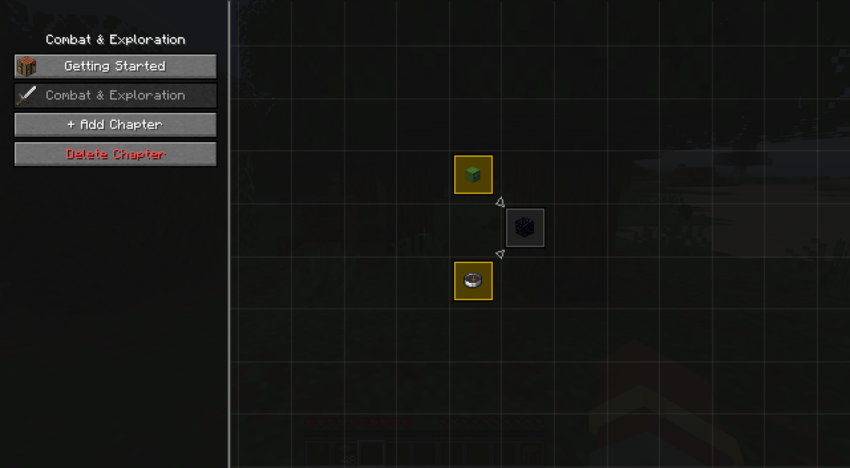
Tired of waiting for your favorite questing mod to update? Quest Tapestry is a powerful, modern, and server-friendly questing framework built from the ground up for the latest versions of Minecraft. Its standout feature is a live, in-game visual editor, allowing you to create, modify, and link quests in real-time without ever leaving the game.
Whether you're a modpack creator designing an epic adventure or a server admin guiding new players, Quest Tapestry is your canvas.
IMPORTANT: To enable the powerful new AI features, the AI Librarian Server is now a separate required download. You can get it from the official Discord!
Features for Players
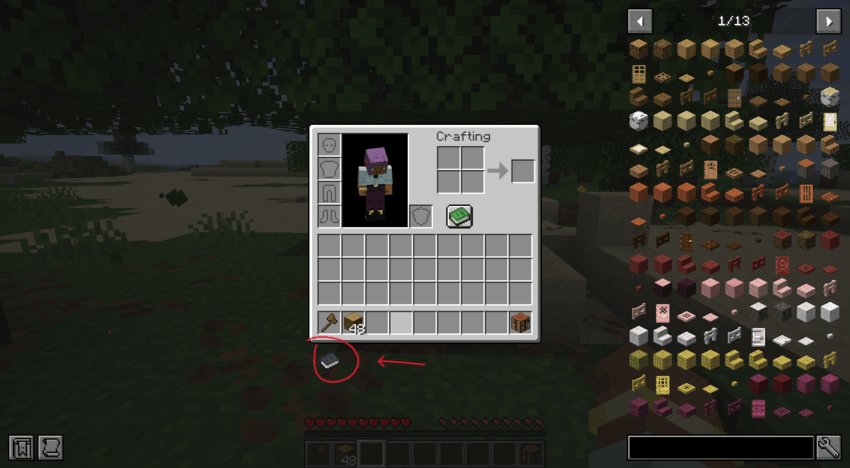
- Intuitive Quest Journal: Access all your quests through a convenient journal, opened via the inventory button or
/questtapestry open. - Visual Progress Map: See your entire adventure laid out in chapters with clear dependency lines connecting each quest.
- Clear Objectives & Rewards: Detailed tooltips show you exactly what you need to do and what you'll get, complete with icons.
- Real-time Notifications: Get instant feedback when you complete an objective.
- JEI Integration: Right-click on quest objectives to see how to craft or obtain them in JEI!
- Customizable Button Position: Don't like where the journal button is? Use
/questtapestry movebuttonto enter move mode and drag it anywhere you want!
Features for Creators (Modpack & Server Admins)
This is where Quest Tapestry truly shines. Say goodbye to complex config files and constant game restarts!
- Live In-Game Visual Editor: The heart of the mod. Create, delete, and modify entire questlines without ever closing Minecraft. Changes are instant.
- Visual Dependency Linking: Simply click to link quests and create complex progression trees. The editor prevents you from creating impossible loops.
- Multiple Objective Types: Create diverse tasks for your players.
ITEM_SUBMIT: Collect items (with an option to consume them or not).BLOCK_BREAK: Break specific blocks.MOB_KILL: Hunt down creatures.BIOME_VISIT: Explore the world and visit specific biomes.DIMENSION_VISIT: Travel to other dimensions.
- Full Tag Support: Use any vanilla or modded item/block tag (e.g.,
#minecraft:logs,#c:copper_ingots) for objectives, making your quests instantly compatible with other mods. - Custom Rewards: Reward your players with any item from the game.
- Simple Data Structure: All quests are saved in a human-readable
quests.jsonfile, making backups and manual edits easy if needed.
How to Get Started (Guide)
For Players
- Open your inventory and click the Quest Journal button (a book icon).
- Alternatively, type
/questtapestry open. - Browse the chapters, hover over quests to see their details, and complete the objectives.
- Once a quest's objectives are met, its border will turn blue. Click it to claim your rewards!
How to Move the Quest Button
Is the Quest Journal button in your way? You can move it!
- Enable Move Mode: You need operator permissions (OP). Type
/questtapestry movebuttonin chat. - Move the Button: Open your inventory. The button will have a gold border. Click and drag it to your desired position.
- Save the Position: Simply close your inventory. The new position will be saved automatically.
- Disable Move Mode: Type
/questtapestry movebuttonagain to lock the button in place.
For Creators: Using the In-Game Editor
- Enable Edit Mode: You need operator permissions (OP). Type
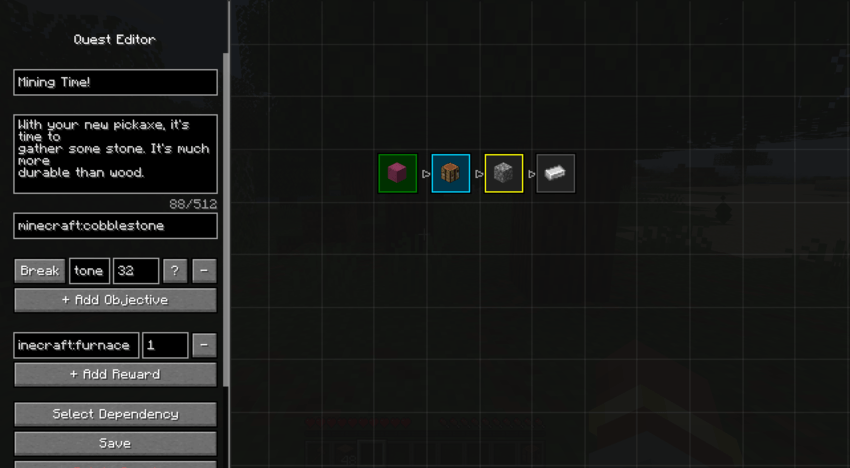
/questtapestry edit_modein chat. You will get a confirmation message. Re-open the journal to see the editor options. - Create a Chapter: Click the "+ Add Chapter" button, give it a name and an icon (e.g.,
minecraft:compass), and click "Save". - Create a Quest: While in Edit Mode, find an empty spot on the grid and Right-Click. The Quest Editor panel will appear on the left.
- Edit the Quest:
- Fill in the Name, Description, and Icon (item ID or tag).
- Click "+ Add Objective" to add tasks. Select the type (Collect, Break, Kill, etc.), set the item/block/mob ID or tag, and the required amount.
- Click "+ Add Reward" to define the rewards.
- Set Dependencies:
- Click the "Select Dependency" button. The quest grid will highlight.
- Click on another quest that must be completed before this one.
- Click "Select Dependency" again to exit this mode.
- Save: Click the "Save" button. Your changes are live instantly!
Future Plans
- AI-powered quest generation to create dynamic, procedural questlines (Experimental).
- More objective and reward types.
- Improved visual customization options.
Have a question or found a bug?
Write in a comment or on the official discord!
AI Assistance Disclaimer
This mod was developed with the help of AI assistants. They were used for brainstorming, code generation, troubleshooting, and creating some of the promotional text and images.
Project description from CurseForge.
Pick your setup
QuestTapestry by Minecraft version and loader
Choose the version and loader you play, then open the matching release.
Minecraft version
1.21.9
1 loader buildCheck the dependencies, then try the file in a copied instance before changing a world you care about.
Recent files
QuestTapestry versions and loaders
QuestTapestry-1.2.0 for NeoForge 1.21.9/10
questtapestry-1.2.0.jar
20 Oct 2025
Client Source doesn’t say Server Source doesn’t say Dependencies No extras listed Listed on Release listing
Check the 1.21.10 · NeoForge setup 1.21.91.21.10NeoForge beta
QuestTapestry-1.1.0 for NeoForge 1.21.9/10
questtapestry-1.1.0.jar
15 Oct 2025
Client Source doesn’t say Server Source doesn’t say Dependencies No extras listed Listed on Release listing
Check the 1.21.10 · NeoForge setup 1.21.91.21.10NeoForge beta
QuestTapestry-1.0.2 for NeoForge 1.21.9/10
questtapestry-1.0.2.jar
11 Oct 2025
Client Source doesn’t say Server Source doesn’t say Dependencies No extras listed Listed on Release listing
Check the 1.21.10 · NeoForge setup 1.21.91.21.10NeoForge beta
QuestTapestry-1.0.1 for NeoForge 1.21.10
questtapestry-1.0.1.jar
10 Oct 2025
Client Source doesn’t say Server Source doesn’t say Dependencies No extras listed Listed on Release listing
Check the 1.21.10 · NeoForge setup 1.21.10NeoForge beta
Looking for an older file? The official CurseForge project page is in Resources.
 mod
CurseForge · Minecraft
XP Health
Increase the max health amount with experience levels
 mod
CurseForge · Minecraft
geential
Instant co-op world hosting, friends & invites hub, custom profile switcher, 3D wardrobe studio (wings, capes, emotes, Mojang & .PNG skin importer), and weak-PC performance booster for Minecraft 1.20.1 (Forge & Fabric).
 mod
CurseForge · Minecraft
Natural Healing Setting
Customize natural health regeneration from hunger and saturation with a configurable healing percentage.