Minecraft version
Back to mods 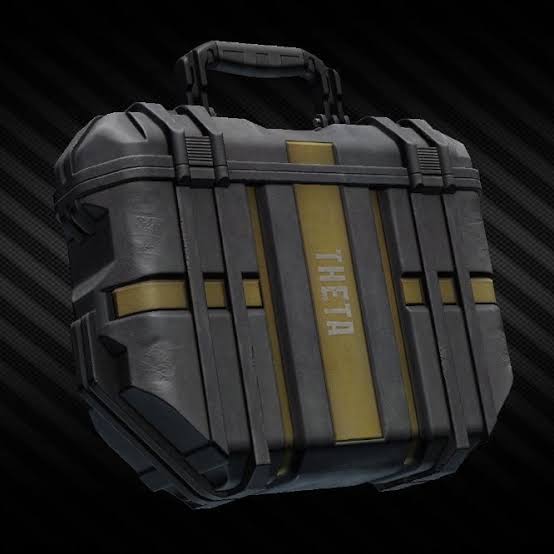
CurseForge · Minecraft mod
Secure Container
just like in Escape From Tarkov, you can store important stuffs in the security case(secure container) without losing them after your sudden death
Choose a version Pick your version below, then grab the matching file.
Quick answer
Which Secure Container release should I use?
Latest stable file securitybackpack-1.1.1.jar
Game version 26.2
Loader NeoForge
Secure Container securitybackpack-1.1.1.jar targets 26.2 with NeoForge. The project page does not say whether this file belongs on the client, dedicated server, or both. No extra mods listed for this file.
Where it goes
Is Secure Container required on the client, server, or both?
The project page does not say whether this file belongs on the client, dedicated server, or both.
Client Source doesn’t say
Dedicated server Source doesn’t say
Loader for this release NeoForge
Required install it here Optional supported, not mandatory Not supported do not install here Source doesn’t say do not assume
The source does not explicitly classify this release as client-only or server-only.
What else does Secure Container securitybackpack-1.1.1.jar need?
securitybackpack-1.1.1.jar. Change the file and its required mods may change too.
This file does not list any required mods. Do not add a library just because a different file uses it.
This file does not list any required or optional mods.
Before you install it
Add Secure Container without breaking your instance.
Built for Secure Container securitybackpack-1.1.1.jar. Pick another file and the loader, install side or required mods may change.
- 01
Stick to this file
Use securitybackpack-1.1.1.jar. It targets 26.2 with NeoForge; another release may have different loader, side or dependency requirements.
- 02
Bring the mods it needs
This file does not list any required mods. Do not add a library just because a different file uses it.
- 03
Put it on the correct side
The project page does not say whether this file belongs on the client, dedicated server, or both.
- 04
Pick the file you checked
Use the “Get this file” button beside securitybackpack-1.1.1.jar. It opens that exact file at the source.
About this project
What does Secure Container add?
just like Escape from Tarkov, you can now secure some of your valuable stuffs in the security case. to make your security case larger, go to the server side and edit /config/securitybackpack-server.toml
Although the UI looks ugly, but it works well :)
There will be a extra Button in your Backpack UI, after klicking at it you can open the Secure Container. It is originally 2 blocks big and you can Upgrade it through using Diamonds. The stuffs in there will Always Be Safe.
Project description from CurseForge.
Pick your setup
Secure Container by Minecraft version and loader
Choose the version and loader you play, then open the matching release.
Minecraft version
26.1
1 loader buildMinecraft version
1.21.11
1 loader buildMinecraft version
1.21.10
1 loader buildMinecraft version
1.21.9
1 loader buildMinecraft version
1.21.8
1 loader buildMinecraft version
1.21.7
1 loader buildMinecraft version
1.21.6
1 loader buildMinecraft version
1.21.5
1 loader buildMinecraft version
1.21.4
1 loader buildMinecraft version
1.21.3
1 loader buildMinecraft version
1.21.2
1 loader buildShowing the newest 12 of 14 game versions. Older files are in the list below.
Check the dependencies, then try the file in a copied instance before changing a world you care about.
Recent files
Secure Container versions and loaders
securitybackpack-1.1.1.jar
3 Jul 2026
Client Source doesn’t say Server Source doesn’t say Dependencies No extras listed Listed on Release listing
Check the 26.2 · NeoForge setup NeoForge26.2 release
securitybackpack-1.1.1.jar
31 Mar 2026
Client Source doesn’t say Server Source doesn’t say Dependencies No extras listed Listed on Release listing
Check the 26.1 · NeoForge setup NeoForge26.1 release
securitybackpack-1.1.1.jar
8 Feb 2026
Client Source doesn’t say Server Source doesn’t say Dependencies No extras listed Listed on Release listing
Check the 1.21.11 · NeoForge setup NeoForge1.21.11 release
securitybackpack-1.1.2.jar
8 Feb 2026
Client Source doesn’t say Server Source doesn’t say Dependencies No extras listed Listed on Release listing
Check the 1.21.10 · NeoForge setup NeoForge1.21.10 release
securitybackpack-1.1.1.jar
13 Oct 2025
Client Source doesn’t say Server Source doesn’t say Dependencies No extras listed Listed on Release listing
Check the 1.21.8 · NeoForge setup 1.21.8NeoForge1.21.71.21.6 release
securitybackpack-1.1.1.jar
securitybackpack-1.1.1 (1).jar
13 Oct 2025
Client Source doesn’t say Server Source doesn’t say Dependencies No extras listed Listed on Release listing
Check the 1.21.4 · NeoForge setup 1.21.4NeoForge1.21.31.21.1 release
securitybackpack-1.1.1.jar
13 Oct 2025
Client Source doesn’t say Server Source doesn’t say Dependencies No extras listed Listed on Release listing
Check the 1.20.1 · Forge setup 1.20.1Forge release
securitybackpack-1.1.1.jar
securitybackpack-1.1.1 (1).jar
13 Oct 2025
Client Source doesn’t say Server Source doesn’t say Dependencies No extras listed Listed on Release listing
Check the 1.21.5 · NeoForge setup 1.21.5NeoForge release
securitybackpack-1.1.1.jar
13 Oct 2025
Client Source doesn’t say Server Source doesn’t say Dependencies No extras listed Listed on Release listing
Check the 1.21.9 · NeoForge setup 1.21.9NeoForge release
Looking for an older file? The official CurseForge project page is in Resources.
 mod
CurseForge · Minecraft
[Let's Do] Furniture
Let's expand your world with a whole set of new and exciting furnitures! All in the style of the Let's Do Mods.
 mod
CurseForge + Modrinth · Minecraft
[Let's Do] Farm & Charm
The farm calls: Experience the art of advanced agriculture and farmhouse cuisine! Use mincers, cooking pots, as well as new grains and fruit varieties to enhance your culinary and agricultural skills.
 mod
Modrinth · Minecraft
Props
The ultimate solution for placing items in the world.