Minecraft version
Back to mods 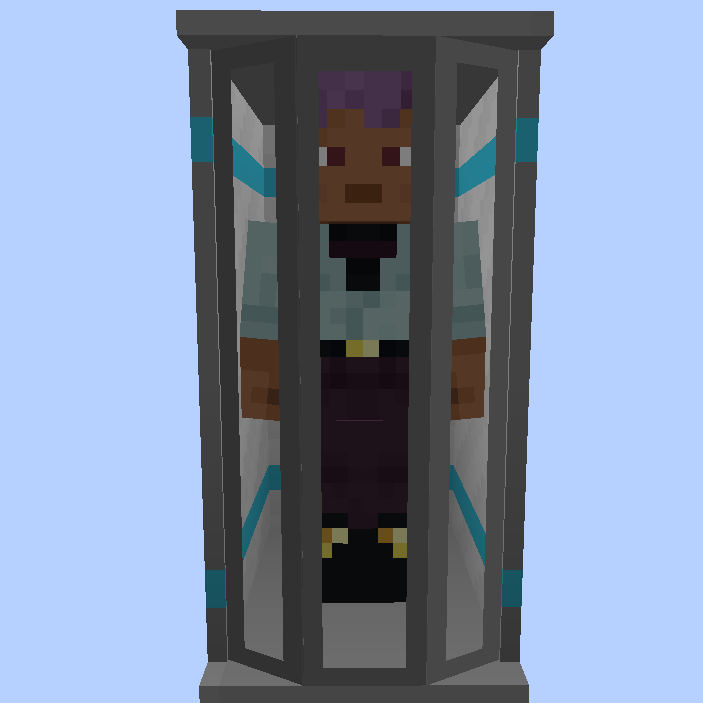
CurseForge · Minecraft mod
Player Shells
Adds Shell Forges that allow players to create and transfer into new Shells - essentially new bodies with their own inventory, experience level, and even gamemode
Choose a version Pick your version below, then grab the matching file.
Quick answer
Which Player Shells release should I use?
beta file playershells-1.21.1-0.0.11.jar
Game version 1.21.1
Loader NeoForge
Player Shells playershells-1.21.1-0.0.11.jar targets 1.21.1 with NeoForge. The project page does not say whether this file belongs on the client, dedicated server, or both. No extra mods listed for this file.
Where it goes
Is Player Shells required on the client, server, or both?
The project page does not say whether this file belongs on the client, dedicated server, or both.
Client Source doesn’t say
Dedicated server Source doesn’t say
Loader for this release NeoForge
Required install it here Optional supported, not mandatory Not supported do not install here Source doesn’t say do not assume
The source does not explicitly classify this release as client-only or server-only.
What else does Player Shells playershells-1.21.1-0.0.11.jar need?
playershells-1.21.1-0.0.11.jar. Change the file and its required mods may change too.
This file does not list any required mods. Do not add a library just because a different file uses it.
This file does not list any required or optional mods.
Before you install it
Add Player Shells without breaking your instance.
Built for Player Shells playershells-1.21.1-0.0.11.jar. Pick another file and the loader, install side or required mods may change.
- 01
Stick to this file
Use playershells-1.21.1-0.0.11.jar. It targets 1.21.1 with NeoForge; another release may have different loader, side or dependency requirements.
- 02
Bring the mods it needs
This file does not list any required mods. Do not add a library just because a different file uses it.
- 03
Put it on the correct side
The project page does not say whether this file belongs on the client, dedicated server, or both.
- 04
Pick the file you checked
Use the “Get this file” button beside playershells-1.21.1-0.0.11.jar. It opens that exact file at the source.
About this project
What does Player Shells add?
If you want to put this mod in your modpack, feel free to use it :)
This mod is inspired by Sync
Adds Shell Forges that allow players to create and transfer into new Shells - essentially new bodies with their own inventory, experience level, and even gamemode.
To create a Shell, you’ll first need to build a Shell Forge. Then, Shift + Right-click it to open it's creation GUI. Each Shell creation consumes 64 DNA, which you can obtain from the DNA Centrifuge and 1,000,000 FE (configurable) and takes about 10 minutes to complete (also configurable).
The DNA Centrifuge processes a blood-filled syringe to produce 1-6 DNA samples. To fill a syringe with blood, right-click while holding an empty syringe (this inflicts 4 hearts of damage).
Once you’ve built another Shell Forge, you can transfer your mind into any of your Shells. Simply right-click (without sneaking) a Shell Forge to go into it and open the radial menu, then select the desired Shell to transfer into.
Mind transfers work across dimensions, too! Also when you die, your consciousness will automatically transfer to the nearest available Shell, granting you an extra life, even in Hardcore mode.

Project description from CurseForge.
Pick your setup
Player Shells by Minecraft version and loader
Choose the version and loader you play, then open the matching release.
Minecraft version
1.20.1
1 loader buildCheck the dependencies, then try the file in a copied instance before changing a world you care about.
Recent files
Player Shells versions and loaders
playershells-1.21.1-0.0.11.jar
8 Jun 2026
Client Source doesn’t say Server Source doesn’t say Dependencies No extras listed Listed on Release listing
Check the 1.21.1 · NeoForge setup 1.21.1NeoForge beta
playershells-1.21.1-0.0.10.jar
28 May 2026
Client Source doesn’t say Server Source doesn’t say Dependencies No extras listed Listed on Release listing
Check the 1.21.1 · NeoForge setup 1.21.1NeoForge beta
playershells-1.20.1-0.0.9.jar
15 Jan 2026
Client Source doesn’t say Server Source doesn’t say Dependencies No extras listed Listed on Release listing
Check the 1.20.1 · NeoForge setup 1.20.1NeoForge beta
playershells-1.21.1-0.0.8.jar
8 Nov 2025
Client Source doesn’t say Server Source doesn’t say Dependencies No extras listed Listed on Release listing
Check the 1.21.1 · NeoForge setup NeoForge1.21.1 beta
playershells-1.21.1-0.0.7.jar
7 Nov 2025
Client Source doesn’t say Server Source doesn’t say Dependencies No extras listed Listed on Release listing
Check the 1.21.1 · NeoForge setup NeoForge1.21.1 beta
playershells-1.21.1-0.0.6.jar
24 Oct 2025
Client Source doesn’t say Server Source doesn’t say Dependencies No extras listed Listed on Release listing
Check the 1.21.1 · NeoForge setup NeoForge1.21.1 beta
playershells-1.21.1-0.0.5.jar
24 Oct 2025
Client Source doesn’t say Server Source doesn’t say Dependencies No extras listed Listed on Release listing
Check the 1.21.1 · NeoForge setup NeoForge1.21.1 beta
playershells-1.21.1-0.0.4.jar
22 Oct 2025
Client Source doesn’t say Server Source doesn’t say Dependencies No extras listed Listed on Release listing
Check the 1.21.1 · NeoForge setup NeoForge1.21.1 beta
playershells-1.21.1-0.0.3.jar
22 Oct 2025
Client Source doesn’t say Server Source doesn’t say Dependencies No extras listed Listed on Release listing
Check the 1.21.1 · NeoForge setup NeoForge1.21.1 beta
playershells-1.21.1-0.0.2.jar
22 Oct 2025
Client Source doesn’t say Server Source doesn’t say Dependencies No extras listed Listed on Release listing
Check the 1.21.1 · NeoForge setup NeoForge1.21.1 beta
playershells-1.21.1-0.0.1.jar
22 Oct 2025
Client Source doesn’t say Server Source doesn’t say Dependencies No extras listed Listed on Release listing
Check the 1.21.1 · NeoForge setup NeoForge1.21.1 beta
Looking for an older file? The official CurseForge project page is in Resources.
 mod
mod CurseForge + Modrinth · Minecraft
World Border Shop
Fight the border for every block!
 mod
mod CurseForge · Minecraft
Emaculate Technology
a somewhat difficult tech mod revolving around combat stress and destruction simulations and has a infection mod sub-mod in it
 mod
mod CurseForge · Minecraft
Seroka
A brutal asymmetrical PvP survival experience pitting hyper-mobile human combatants against an unpredictable army of genetically mutated players.