Composite Material Optional for No Infinite Effects in Hud NoInfiniteEffectsInHud 1.20.2-neoforge v3.0.0+build.1
optionalNo matching file
CurseForge · Minecraft mod
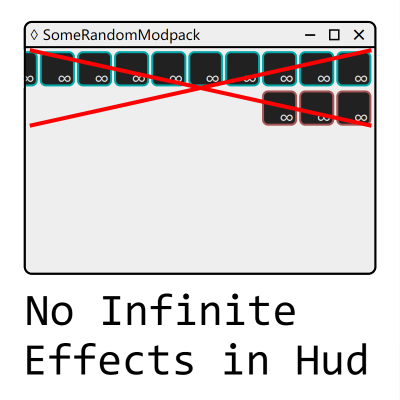
Disables infinite effects display in the hud.
Quick answer
No Infinite Effects in Hud NoInfiniteEffectsInHud 1.20.2-neoforge v3.0.0+build.1 targets 1.20.2, 1.20.3 with NeoForge. The project page does not say whether this file belongs on the client, dedicated server, or both. No extra mods listed for this file.
Where it goes
The project page does not say whether this file belongs on the client, dedicated server, or both.
The source does not explicitly classify this release as client-only or server-only.
NoInfiniteEffectsInHud 1.20.2-neoforge v3.0.0+build.1. Change the file and its required mods may change too.
This file does not list any required mods. Do not add a library just because a different file uses it.
We only count dependency files that match this setup. A file for another loader does not fill the gap.
Before you install it
Built for No Infinite Effects in Hud NoInfiniteEffectsInHud 1.20.2-neoforge v3.0.0+build.1. Pick another file and the loader, install side or required mods may change.
Use NoInfiniteEffectsInHud 1.20.2-neoforge v3.0.0+build.1. It targets 1.20.2, 1.20.3 with NeoForge; another release may have different loader, side or dependency requirements.
This file does not list any required mods. Do not add a library just because a different file uses it.
The project page does not say whether this file belongs on the client, dedicated server, or both.
Use the “Get this file” button beside NoInfiniteEffectsInHud 1.20.2-neoforge v3.0.0+build.1. It opens that exact file at the source.
About this project
This mod No Infinite Effects in Hud (also known as Nieih) is a client mod. You can use it in client, and it will do nothing in the server.
This mod will disable the display of some status effects in the upper right corner of the main hud.
Whether the status effects are disabled depends on their duration and user configuration.
By default, this mod will only disable all status effects with infinite duration. You can choose whether to disable status effects with non infinite duration, disable effects with infinite duration, or disable the entire mod. These configurations are modifiable in the game.
You can join our QQ group 108917413 for supports.
Due to the author's location, there is no contact information available for non Chinese regions.
Project description from CurseForge.
Pick your setup
Choose the version and loader you play, then open the matching release.
Showing the newest 12 of 27 game versions. Older files are in the list below.
Check the dependencies, then try the file in a copied instance before changing a world you care about.
Recent files
nieih-1.20.2-neoforge-3.0.0+build.1.jar
11 Jul 2026
nieih-1.16.5-forge-3.0.0+build.1.jar
11 Jul 2026
nieih-1.20.4-neoforge-3.0.0+build.1.jar
11 Jul 2026
nieih-1.20.2-forge-3.0.0+build.1.jar
11 Jul 2026
nieih-1.21.8-neoforge-3.0.0+build.1.jar
11 Jul 2026
nieih-1.19.2-forge-3.0.0+build.1.jar
11 Jul 2026
nieih-1.20.6-neoforge-3.0.0+build.1.jar
11 Jul 2026
nieih-1.20.1-forge-3.0.0+build.1.jar
11 Jul 2026
nieih-1.21.4-neoforge-3.0.0+build.1.jar
11 Jul 2026
nieih-1.18.2-forge-3.0.0+build.1.jar
11 Jul 2026
nieih-26.2-neoforge-3.0.0+build.1.jar
11 Jul 2026
nieih-1.17.1-forge-3.0.0+build.1.jar
11 Jul 2026
Looking for an older file? The official CurseForge project page is in Resources.
 mod
modPasture block can now be used as a utility block that gives Pokémon jobs!
 mod
modConfigurable actionbar maker with json storage, GUI editor, templates, custom colors, text styles and PNG images (heads)
 mod
modFills in the vanilla recipes that should obviously exist but don't, and stops the blast furnace and smoker from only knowing a few dozen items.