Minecraft version
Back to mods 
CurseForge · Minecraft mod
Mob Capture
A digital ORB let you capture the mob and release where you want
Choose a version Pick your version below, then grab the matching file.
Quick answer
Which Mob Capture release matches 1.20.5 Forge?
Best match for your filters mobcapture-forge-1.0.0.jar
Game version 1.20.5, 1.20.1, 1.20.6
Loader Forge
Mob Capture mobcapture-forge-1.0.0.jar targets 1.20.5, 1.20.1, 1.20.6 with Forge. The project page does not say whether this file belongs on the client, dedicated server, or both. No extra mods listed for this file.
Where it goes
Is Mob Capture required on the client, server, or both?
The project page does not say whether this file belongs on the client, dedicated server, or both.
Client Source doesn’t say
Dedicated server Source doesn’t say
Loader for this release Forge
Required install it here Optional supported, not mandatory Not supported do not install here Source doesn’t say do not assume
The source does not explicitly classify this release as client-only or server-only.
What else does Mob Capture mobcapture-forge-1.0.0.jar need?
mobcapture-forge-1.0.0.jar on 1.20.5 Forge. Every mod below is checked against that same setup.
This file does not list any required mods. Do not add a library just because a different file uses it.
This file does not list any required or optional mods.
Before you install it
Add Mob Capture without breaking your instance.
Built for Mob Capture mobcapture-forge-1.0.0.jar on 1.20.5 Forge. Pick another file and the loader, install side or required mods may change.
- 01
Stick to this file
Use mobcapture-forge-1.0.0.jar. It targets 1.20.5, 1.20.1, 1.20.6 with Forge; another release may have different loader, side or dependency requirements.
- 02
Bring the mods it needs
This file does not list any required mods. Do not add a library just because a different file uses it.
- 03
Put it on the correct side
The project page does not say whether this file belongs on the client, dedicated server, or both.
- 04
Pick the file you checked
Use the “Get this file” button beside mobcapture-forge-1.0.0.jar. It opens that exact file at the source.
About this project
What does Mob Capture add?


 MobCapture Capture & Release Mobs
MobCapture is a small add-on that lets you capture mobs into a portable item and release them later. It is simple to use and craftable with common materials.
How to capture
- Hold a Capture Orb in your hand.
- Throw it at a mob (use / right-click / tap). If the capture succeeds the mob is removed and you will receive a Release Orb.
How to release
- Select the Release Orb in your hotbar.
- Use it (press use / right-click / tap). The stored mob will spawn near you with a short particle effect.
Crafting
Place 1 Ender Pearl in the center of the crafting grid and surround it with 8 Glass. The recipe produces 4 Capture Orbs.
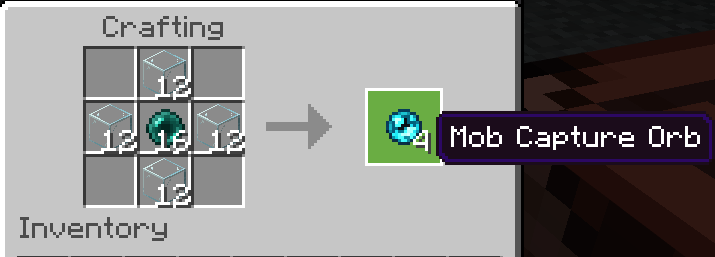
[   ] [ G ] [   ]
[ G ] [ E ] [ G ]
[   ] [ G ] [   ]
Where: G = Glass, E = Ender Pearl
Commands (testing)
/give @s mobcapture:mob_capture_orb 4
License: MIT
Project description from CurseForge.
Pick your setup
Mob Capture by Minecraft version and loader
Choose the version and loader you play, then open the matching release.
Minecraft version
1.21.4
2 loader buildsMinecraft version
1.20.6
1 loader buildMinecraft version
1.20.5
1 loader buildMinecraft version
1.20.4
1 loader buildMinecraft version
1.20.3
1 loader buildMinecraft version
1.20.1
1 loader buildCheck the dependencies, then try the file in a copied instance before changing a world you care about.
Recent files
Mob Capture versions and loaders
mobcapture-forge-1.0.0.jar
20 Oct 2025
Client Source doesn’t say Server Source doesn’t say Dependencies No extras listed Listed on Release listing
Check the 1.20.5 · Forge setup 1.20.51.20.1Forge1.20.6 release
Looking for an older file? The official CurseForge project page is in Resources.
 mod
Modrinth · Minecraft
InventoryProg
edit player inventory,change profile switch
 mod
CurseForge · Minecraft
Quick Skin
A modern skin changer that is fast and intuitive to use. Allowing you to change skins in-game, even for people who are “offline”/“non-premium.”
 mod
Modrinth · Minecraft
TACZ Turrets
Simple automated turrets for TACZ guns!