Minecraft version
Back to mods 
CurseForge · Minecraft mod
iDog (Musical Pet)
Adds iDogs to Minecraft! They play music, flash bright colors, and tell you where treasure and monsters are!
Choose a version Pick your version below, then grab the matching file.
Quick answer
Which iDog (Musical Pet) release should I use?
Latest stable file [FORGE] idogmod-1.0.5.jar
Game version 1.20.1
Loader Forge, NeoForge
iDog (Musical Pet) [FORGE] idogmod-1.0.5.jar targets 1.20.1 with Forge, NeoForge. The project page does not say whether this file belongs on the client, dedicated server, or both. No extra mods listed for this file.
Where it goes
Is iDog (Musical Pet) required on the client, server, or both?
The project page does not say whether this file belongs on the client, dedicated server, or both.
Client Source doesn’t say
Dedicated server Source doesn’t say
Loader for this release Forge, NeoForge
Required install it here Optional supported, not mandatory Not supported do not install here Source doesn’t say do not assume
The source does not explicitly classify this release as client-only or server-only.
What else does iDog (Musical Pet) [FORGE] idogmod-1.0.5.jar need?
[FORGE] idogmod-1.0.5.jar. Change the file and its required mods may change too.
This file does not list any required mods. Do not add a library just because a different file uses it.
This file does not list any required or optional mods.
Before you install it
Add iDog (Musical Pet) without breaking your instance.
Built for iDog (Musical Pet) [FORGE] idogmod-1.0.5.jar. Pick another file and the loader, install side or required mods may change.
- 01
Stick to this file
Use [FORGE] idogmod-1.0.5.jar. It targets 1.20.1 with Forge, NeoForge; another release may have different loader, side or dependency requirements.
- 02
Bring the mods it needs
This file does not list any required mods. Do not add a library just because a different file uses it.
- 03
Put it on the correct side
The project page does not say whether this file belongs on the client, dedicated server, or both.
- 04
Pick the file you checked
Use the “Get this file” button beside [FORGE] idogmod-1.0.5.jar. It opens that exact file at the source.
About this project
What does iDog (Musical Pet) add?
Current versions:
Forge 1.20.1
Fabric 1.20.1 + 1.21.1

You can find iDogs inside of boxes left behind by a futuristic civilization.
They appear in dungeons, so keep an eye out when mining and exploring! (~25% chance)
When an iDog is tamed with bones, it will use it's finely-tuned sound waves to detect enemies and loot for you! It points in the direction of anything it detects, and plays different types of sounds to alert you, so keep your ears open! It also works like a portable jukebox. And it's eyes will flash to the beat of any disc you give it!
You can disable alerts inside of it's menu by shift-right clicking it and tapping the /!\ icon. Inside the menu, you can also change the volume, and allow the iDog to loop any music discs you give it.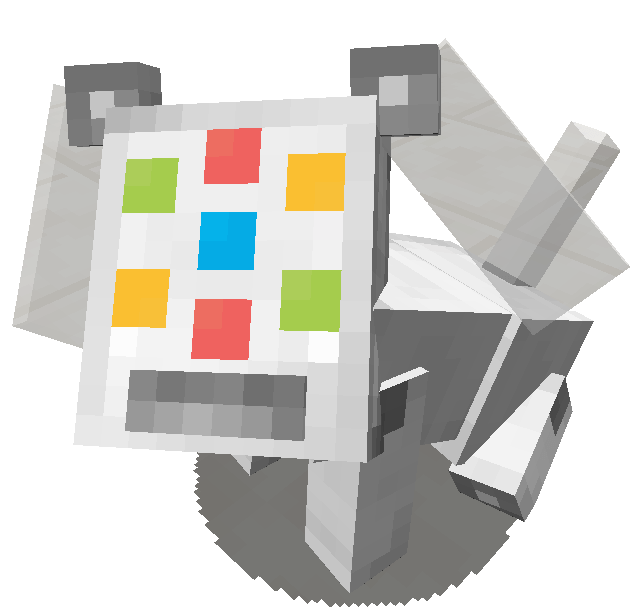
Every music disc gives the iDog a different eye color, so use it to express the personality you want your iDog to have. (Modded discs are randomized!)
You can tell how much health an iDog has by looking at it's rear-battery meter. Feed it copper, iron, or iron nuggets to heal it.
HAVE FUN!
(PS: Thank you to Curseforge for hosting this modjam!)
(PPS: Feel free to comment suggestions. bugs, or critiques!)
(PPPS: What is Frutiger Aero..? And what is Windows Vista..?) If you are a mod author with custom music discs for 1.21.1 onward, please make sure your music discs use the TagKey of c:music_discs like vanilla discs! Otherwise the iDog can't tell what to play!**
This is due to the removal of MusicDiscItems in 1.21.1
1.21.1 Players, if a disc from another mod can't be used by your iDog. It's a really simple fix!
If it can play in a jukebox but not an iDog, then that just means the mod author forgot to mark the item as a music disc inside a datapack file: 'c/tags/item/music_discs.json', and it's really easy to add it yourself with the following text inside the json file:
----------------------------------------{ "replace": false, "values": [ "modname:discname", "modname:discname2" ] }
Contact me if you have any questions, or concerns about compatibility! I don't mind helping!
Soon to be ported to Forge 1.20.1.
Then, Fabric v1.21.10, v1.20.5, v1.20.4.
(Backport to 1.12.2 planned as well.)
Project description from CurseForge.
Pick your setup
iDog (Musical Pet) by Minecraft version and loader
Choose the version and loader you play, then open the matching release.
Minecraft version
1.20.1
3 loader buildsCheck the dependencies, then try the file in a copied instance before changing a world you care about.
Recent files
iDog (Musical Pet) versions and loaders
[FORGE] idogmod-1.0.5.jar
idogmod-1.0.5.jar
1 Dec 2025
Client Source doesn’t say Server Source doesn’t say Dependencies No extras listed Listed on Release listing
Check the 1.20.1 · Forge setup 1.20.1ForgeNeoForge release
[OUTDATED] idogmod-1.0.4.jar (1.20.1 Forge)
idogmod-1.0.4.jar
1 Nov 2025
Client Source doesn’t say Server Source doesn’t say Dependencies No extras listed Listed on Release listing
Check the 1.20.1 · Forge setup 1.20.1ForgeNeoForge beta
idogmod-1.0.4.jar (1.21.1 Fabric)
idogmod-1.0.4.jar
29 Oct 2025
Client Source doesn’t say Server Source doesn’t say Dependencies No extras listed Listed on Release listing
Check the 1.21.1 · Fabric setup Fabric1.21.1 release
idogmod-1.0.3.jar (1.20.1 Fabric)
idogmod-1.0.3.jar
25 Oct 2025
Client Source doesn’t say Server Source doesn’t say Dependencies No extras listed Listed on Release listing
Check the 1.20.1 · Fabric setup Fabric1.20.1 release
[OUTDATED] idogmod-1.0.2 jar
idogmod-1.0.2.jar
22 Oct 2025
Client Source doesn’t say Server Source doesn’t say Dependencies No extras listed Listed on Release listing
Check the 1.20.1 · Fabric setup Fabric1.20.1 beta
[OUTDATED] idogmod-1.0.1.jar
idogmod-1.0.1.jar
22 Oct 2025
Client Source doesn’t say Server Source doesn’t say Dependencies No extras listed Listed on Release listing
Check the 1.20.1 · Fabric setup Fabric1.20.1 beta
[OUTDATED] idogmod-1.0.0.jar
idogmod-1.0.0.jar
21 Oct 2025
Client Source doesn’t say Server Source doesn’t say Dependencies No extras listed Listed on Release listing
Check the 1.20.1 · Fabric setup Fabric1.20.1 beta
Looking for an older file? The official CurseForge project page is in Resources.
 mod
mod CurseForge · Minecraft
AdditionZ
adds random additions like block pearcing
 mod
mod CurseForge · Minecraft
Re:Death - Yet another Return by Death mod
Yet another Return by Death mod BUT with mod integrations
 mod
mod CurseForge · Minecraft
Larper Than Wolves
Larper Than Wolves completely reimagines Minecraft's early and mid-game: flint, copper, and bronze tools, tree stumps and more!