Minecraft version
Back to mods 
CurseForge · Minecraft mod
LibTooltips
A simple library for adding tooltips to items
Choose a version Pick your version below, then grab the matching file.
Quick answer
Which LibTooltips release should I use?
Latest stable file libtooltips-2.3.2-NEOFORGE-26.3.jar
Game version 26.3
Loader NeoForge
libtooltips-2.3.2-NEOFORGE-26.3.jar targets 26.3 with NeoForge. The project page does not say whether this file belongs on the client, dedicated server, or both. No extra mods listed for this file.
Where it goes
Is LibTooltips required on the client, server, or both?
The project page does not say whether this file belongs on the client, dedicated server, or both.
Client Source doesn’t say
Dedicated server Source doesn’t say
Loader for this release NeoForge
Required install it here Optional supported, not mandatory Not supported do not install here Source doesn’t say do not assume
The source does not explicitly classify this release as client-only or server-only.
What else does libtooltips-2.3.2-NEOFORGE-26.3.jar need?
libtooltips-2.3.2-NEOFORGE-26.3.jar. Change the file and its required mods may change too.
This file does not list any required mods. Do not add a library just because a different file uses it.
This file does not list any required or optional mods.
Before you install it
Add LibTooltips without breaking your instance.
Built for libtooltips-2.3.2-NEOFORGE-26.3.jar. Pick another file and the loader, install side or required mods may change.
- 01
Stick to this file
Use libtooltips-2.3.2-NEOFORGE-26.3.jar. It targets 26.3 with NeoForge; another release may have different loader, side or dependency requirements.
- 02
Bring the mods it needs
This file does not list any required mods. Do not add a library just because a different file uses it.
- 03
Put it on the correct side
The project page does not say whether this file belongs on the client, dedicated server, or both.
- 04
Pick the file you checked
Use the “Get this file” button beside libtooltips-2.3.2-NEOFORGE-26.3.jar. It opens that exact file at the source.
About this project
What does LibTooltips add?
LibTooltips is a simple API allowing for translation-key driven tooltips with no code needed.
  "tooltip.minecraft.diamond.0" : "Such a fancy <ltrgb>rgb rainbow</ltrgb> tooltip!",
  "tooltip.minecraft.diamond.1" : "And look, it even supports several lines, wow",
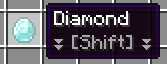
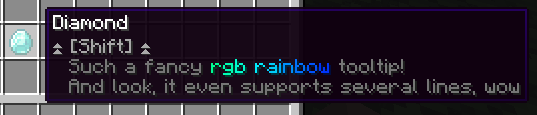
It supports basic tag processing to allow for some control over specific parts of the tooltip, such as changing the text dynamically, or adding color.
You can also add permanent tooltips to items
"tooltip.always.minecraft.diamond.0" : "This tooltip will always show!"

Using LibTooltips
This library is made to be Jar-in-Jar'd unto your mod, meaning users won't have to download it separately. If you're developing a modpack, you can may include this mod to allow for tooltip support!
Visit the Wiki Page for more information.
Can you port to X?
- Sure! Let me know through the discord!
🌸 Join the discord! 🌸 https://discord.gg/tCs89QTuzn
- made by wd with lots of love
Project description from CurseForge.
Pick your setup
LibTooltips by Minecraft version and loader
Choose the version and loader you play, then open the matching release.
Minecraft version
26.2
1 loader buildMinecraft version
26.1.2
1 loader buildMinecraft version
1.21.1
1 loader buildMinecraft version
1.20.1
1 loader buildCheck the dependencies, then try the file in a copied instance before changing a world you care about.
Recent files
LibTooltips versions and loaders
libtooltips-2.3.2-NEOFORGE-26.3.jar
16 Oct 2026
Client Source doesn’t say Server Source doesn’t say Dependencies No extras listed Listed on Release listing
Check the 26.3 · NeoForge setup NeoForge26.3 release
libtooltips-2.3.2-NEOFORGE-26.2.jar
16 Oct 2026
Client Source doesn’t say Server Source doesn’t say Dependencies No extras listed Listed on Release listing
Check the 26.2 · NeoForge setup NeoForge26.2 release
libtooltips-2.3.2-NEOFORGE-26.1.2.jar
16 Oct 2026
Client Source doesn’t say Server Source doesn’t say Dependencies No extras listed Listed on Release listing
Check the 26.1.2 · NeoForge setup NeoForge26.1.2 release
libtooltips-2.3.2-FORGE-1.20.1.jar
16 Oct 2026
Client Source doesn’t say Server Source doesn’t say Dependencies No extras listed Listed on Release listing
Check the 1.20.1 · Forge setup 1.20.1Forge release
libtooltips-2.3.2-NEOFORGE-1.21.1.jar
14 Oct 2026
Client Source doesn’t say Server Source doesn’t say Dependencies No extras listed Listed on Release listing
Check the 1.21.1 · NeoForge setup 1.21.1NeoForge release
libtooltips-2.3-NEOFORGE-26.3.jar
3 Oct 2026
Client Source doesn’t say Server Source doesn’t say Dependencies No extras listed Listed on Release listing
Check the 26.3 · NeoForge setup NeoForge26.3 release
libtooltips-2.3-NEOFORGE-26.1.2.jar
4 Sept 2026
Client Source doesn’t say Server Source doesn’t say Dependencies No extras listed Listed on Release listing
Check the 26.1.2 · NeoForge setup NeoForge26.1.2 release
libtooltips-2.3-NEOFORGE-26.2.jar
4 Sept 2026
Client Source doesn’t say Server Source doesn’t say Dependencies No extras listed Listed on Release listing
Check the 26.2 · NeoForge setup NeoForge26.2 release
libtooltips-2.3-FORGE-1.20.1.jar
4 Sept 2026
Client Source doesn’t say Server Source doesn’t say Dependencies No extras listed Listed on Release listing
Check the 1.20.1 · Forge setup 1.20.1Forge release
libtooltips-2.3.1-NEOFORGE-1.21.1.jar
4 Jul 2026
Client Source doesn’t say Server Source doesn’t say Dependencies No extras listed Listed on Release listing
Check the 1.21.1 · NeoForge setup 1.21.1NeoForge release
libtooltips-2.3-NEOFORGE-1.21.1.jar
3 Jul 2026
Client Source doesn’t say Server Source doesn’t say Dependencies No extras listed Listed on Release listing
Check the 1.21.1 · NeoForge setup 1.21.1NeoForge release
libtooltips-2.2-NEOFORGE-26.1.2.jar
28 Jun 2026
Client Source doesn’t say Server Source doesn’t say Dependencies No extras listed Listed on Release listing
Check the 26.1.2 · NeoForge setup NeoForge26.1.2 release
Looking for an older file? The official CurseForge project page is in Resources.
 mod
mod CurseForge + Modrinth · Minecraft
PianoLib
Add 88 PianoNotes For Disc Jockey Plus. 为 Disc Jockey Plus 添加了 88 个钢琴音符。
 mod
mod CurseForge · Minecraft
Fungal Infection: Spore AI
Introduce ai to the spore and make it smarter.
 mod
mod CurseForge · Minecraft
Lootwheel
An enchanted mob-loot wheel with complete drop bundles, probability-sized sectors, singleplayer pause and multiplayer protection.