Minecraft version
Back to mods 
CurseForge · Minecraft mod
Gelatin UI
A library that provides easy dynamic UI building tools.
Choose a version Pick your version below, then grab the matching file.
Quick answer
Which Gelatin UI release should I use?
Latest stable file gelatinui-forge-1.0.40+1.20.1
Game version 1.20.1
Loader Forge
Gelatin UI gelatinui-forge-1.0.40+1.20.1 targets 1.20.1 with Forge. The project page does not say whether this file belongs on the client, dedicated server, or both. No extra mods listed for this file.
Where it goes
Is Gelatin UI required on the client, server, or both?
The project page does not say whether this file belongs on the client, dedicated server, or both.
Client Source doesn’t say
Dedicated server Source doesn’t say
Loader for this release Forge
Required install it here Optional supported, not mandatory Not supported do not install here Source doesn’t say do not assume
The source does not explicitly classify this release as client-only or server-only.
What else does Gelatin UI gelatinui-forge-1.0.40+1.20.1 need?
gelatinui-forge-1.0.40+1.20.1. Change the file and its required mods may change too.
This file does not list any required mods. Do not add a library just because a different file uses it.
This file does not list any required or optional mods.
Before you install it
Add Gelatin UI without breaking your instance.
Built for Gelatin UI gelatinui-forge-1.0.40+1.20.1. Pick another file and the loader, install side or required mods may change.
- 01
Stick to this file
Use gelatinui-forge-1.0.40+1.20.1. It targets 1.20.1 with Forge; another release may have different loader, side or dependency requirements.
- 02
Bring the mods it needs
This file does not list any required mods. Do not add a library just because a different file uses it.
- 03
Put it on the correct side
The project page does not say whether this file belongs on the client, dedicated server, or both.
- 04
Pick the file you checked
Use the “Get this file” button beside gelatinui-forge-1.0.40+1.20.1. It opens that exact file at the source.
About this project
What does Gelatin UI add?
Gelatin UI is a UI library that helps Minecraft mod developers build polished, animated screens without fighting the vanilla GUI code. It adds no gameplay content of its own. If you're a player, you only need it when another mod requires it.
Build screens from a clean, fluent API and a tree of reusable components. Layouts stay predictable, animations are easy to add, and dirty flags, bounds caching and culling keep rendering work down.
Features:
- Layout: VBox, HBox, panels, manual containers, scrolling and scale-to-fit
- Components: labels with text wrapping, buttons, checkboxes, text inputs, tabs, progress bars, and nine-slice sprites
- Minecraft rendering: high-resolution items, rotating item rings, player models and avatars
- Animation: smooth interpolation, keyframes and easing, plus ready-made effects like bounce, shake, spin, flip and glow
- 2D particles: physics, sprite and 3D item particles, and scale, alpha and color changes over a particle's lifetime
- Developer tools: in-game overlays for bounds, grid and padding, plus a culled element inspector
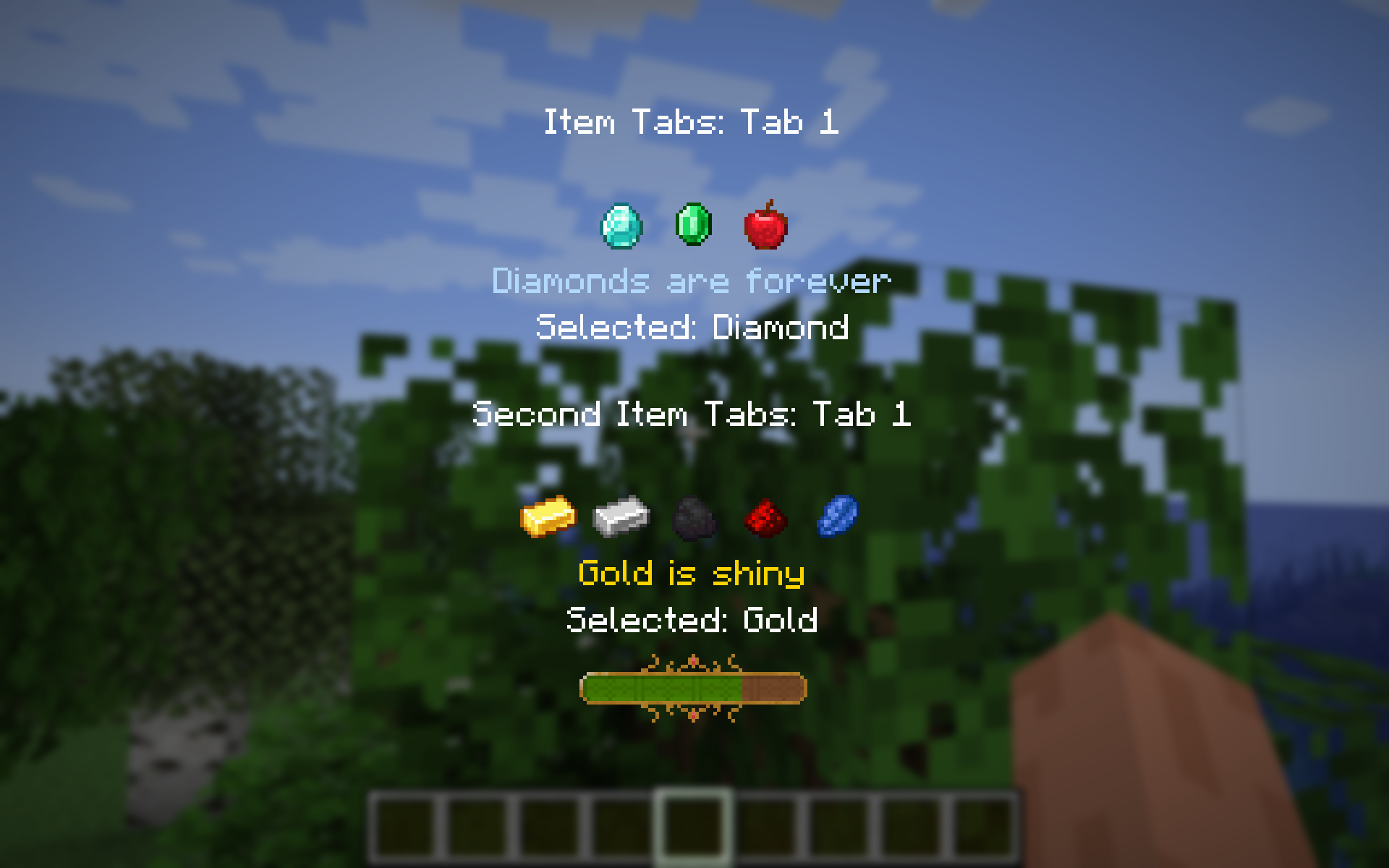
Project description from CurseForge.
Pick your setup
Gelatin UI by Minecraft version and loader
Choose the version and loader you play, then open the matching release.
Minecraft version
1.21.1
3 loader buildsMinecraft version
1.20.1
2 loader buildsCheck the dependencies, then try the file in a copied instance before changing a world you care about.
Recent files
Gelatin UI versions and loaders
gelatinui-forge-1.0.40+1.20.1
gelatinui-forge-1.0.40-1.20.1.jar
9 Nov 2026
Client Source doesn’t say Server Source doesn’t say Dependencies No extras listed Listed on Release listing
Check the 1.20.1 · Forge setup 1.20.1Forge release
gelatinui-fabric-1.0.40+1.20.1
gelatinui-fabric-1.0.40-1.20.1.jar
9 Nov 2026
Client Source doesn’t say Server Source doesn’t say Dependencies No extras listed Listed on Release listing
Check the 1.20.1 · Fabric setup Fabric1.20.1 release
gelatinui-forge-1.0.40+1.21.1
gelatinui-forge-1.0.40-1.21.1.jar
9 Nov 2026
Client Source doesn’t say Server Source doesn’t say Dependencies No extras listed Listed on Release listing
Check the 1.21.1 · Forge setup Forge1.21.1 release
gelatinui-neoforge-1.0.40+1.21.1
gelatinui-neoforge-1.0.40-1.21.1.jar
9 Nov 2026
Client Source doesn’t say Server Source doesn’t say Dependencies No extras listed Listed on Release listing
Check the 1.21.1 · NeoForge setup 1.21.1NeoForge release
gelatinui-fabric-1.0.40+1.21.1
gelatinui-fabric-1.0.40-1.21.1.jar
9 Nov 2026
Client Source doesn’t say Server Source doesn’t say Dependencies No extras listed Listed on Release listing
Check the 1.21.1 · Fabric setup Fabric1.21.1 release
gelatinui-forge-1.0.40+26.1.2
gelatinui-forge-1.0.40-26.1.2.jar
9 Nov 2026
Client Source doesn’t say Server Source doesn’t say Dependencies No extras listed Listed on Release listing
Check the 26.1.2 · Forge setup Forge26.1.2 release
gelatinui-neoforge-1.0.40+26.1.2
gelatinui-neoforge-1.0.40-26.1.2.jar
9 Nov 2026
Client Source doesn’t say Server Source doesn’t say Dependencies No extras listed Listed on Release listing
Check the 26.1.2 · NeoForge setup NeoForge26.1.2 release
gelatinui-fabric-1.0.40+26.1.2
gelatinui-fabric-1.0.40-26.1.2.jar
9 Nov 2026
Client Source doesn’t say Server Source doesn’t say Dependencies No extras listed Listed on Release listing
Check the 26.1.2 · Fabric setup Fabric26.1.2 release
gelatinui-forge-1.0.39+1.20.1
gelatinui-forge-1.0.39+1.20.1.jar
21 Oct 2026
Client Source doesn’t say Server Source doesn’t say Dependencies No extras listed Listed on Release listing
Check the 1.20.1 · Forge setup 1.20.1Forge release
gelatinui-fabric-1.0.39+1.20.1
gelatinui-fabric-1.0.39+1.20.1.jar
21 Oct 2026
Client Source doesn’t say Server Source doesn’t say Dependencies No extras listed Listed on Release listing
Check the 1.20.1 · Fabric setup Fabric1.20.1 release
gelatinui-forge-1.0.39+1.21.1
gelatinui-forge-1.0.39+1.21.1.jar
21 Oct 2026
Client Source doesn’t say Server Source doesn’t say Dependencies No extras listed Listed on Release listing
Check the 1.21.1 · Forge setup Forge1.21.1 release
gelatinui-neoforge-1.0.39+1.21.1
gelatinui-neoforge-1.0.39+1.21.1.jar
21 Oct 2026
Client Source doesn’t say Server Source doesn’t say Dependencies No extras listed Listed on Release listing
Check the 1.21.1 · NeoForge setup 1.21.1NeoForge release
Looking for an older file? The official CurseForge project page is in Resources.
 mod
CurseForge · Minecraft
Zeta Woven
A fully featured Library designed around loading highly configurable, agile developed. modular mods. Zeta Woven is an unofficial Fabric port of Zeta by Vazkii and contributors, made for Quark Woven; it is not affiliated with or endorsed by the Zeta team.
 mod
CurseForge · Minecraft
Shaders Companion
Real mirrors for shader packs: see yourself, mobs and the world behind you in water and glass. Comes with ABZA Shader.
 mod
CurseForge + Modrinth · Minecraft
VO: Creative Fly Speed
Allows players to adjust their flight speed in Creative and Spectator modes with dynamic mouse-scroll tuning, sprint momentum, and anti-rubberbanding.