Minecraft version
Back to mods 
CurseForge · Minecraft mod
Item Purge
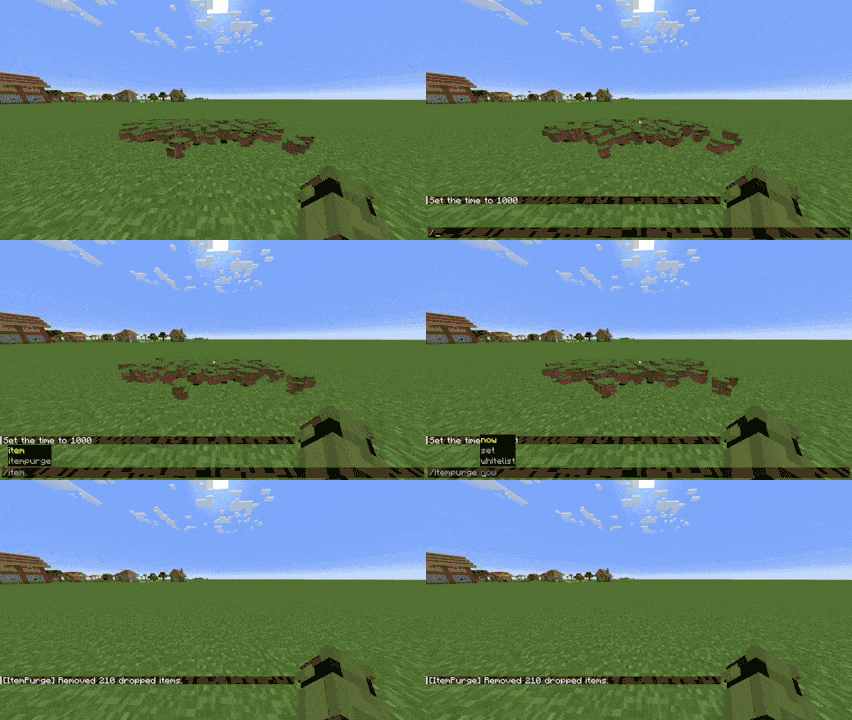
Item Purge automatically removes dropped items after a set time to keep your worlds and servers lag-free. It’s lightweight, configurable, and fully compatible with Configured for easy in-game tweaking.
Choose a version Pick your version below, then grab the matching file.
Quick answer
Which Item Purge release should I use?
Latest stable file itempurge-forge-4.1.0-mc1.21.x.jar
Game version 1.21, 1.21.8, 1.21.5
Loader Forge
Item Purge itempurge-forge-4.1.0-mc1.21.x.jar targets 1.21, 1.21.8, 1.21.5 with Forge. The project page does not say whether this file belongs on the client, dedicated server, or both. No extra mods listed for this file.
Where it goes
Is Item Purge required on the client, server, or both?
The project page does not say whether this file belongs on the client, dedicated server, or both.
Client Source doesn’t say
Dedicated server Source doesn’t say
Loader for this release Forge
Required install it here Optional supported, not mandatory Not supported do not install here Source doesn’t say do not assume
The source does not explicitly classify this release as client-only or server-only.
What else does Item Purge itempurge-forge-4.1.0-mc1.21.x.jar need?
itempurge-forge-4.1.0-mc1.21.x.jar. Change the file and its required mods may change too.
This file does not list any required mods. Do not add a library just because a different file uses it.
This file does not list any required or optional mods.
Before you install it
Add Item Purge without breaking your instance.
Built for Item Purge itempurge-forge-4.1.0-mc1.21.x.jar. Pick another file and the loader, install side or required mods may change.
- 01
Stick to this file
Use itempurge-forge-4.1.0-mc1.21.x.jar. It targets 1.21, 1.21.8, 1.21.5 with Forge; another release may have different loader, side or dependency requirements.
- 02
Bring the mods it needs
This file does not list any required mods. Do not add a library just because a different file uses it.
- 03
Put it on the correct side
The project page does not say whether this file belongs on the client, dedicated server, or both.
- 04
Pick the file you checked
Use the “Get this file” button beside itempurge-forge-4.1.0-mc1.21.x.jar. It opens that exact file at the source.
About this project
What does Item Purge add?
Features
🔄 Auto-Cleanup: Periodically deletes dropped items to prevent lag buildup.
⚙️ Configurable Interval: Choose how often purges occur (default: every 10 minutes).
✅ Whitelist System: Protect important items (like netherite, stars, or keys) from deletion.
💬 Smart Messaging: Only notifies players when items are actually removed (no chat spam).
🧭 In-Game Configuration: Works with the Configured mod — edit settings directly from the Mods menu.
📜 Admin Commands:
/itempurge now — manually purge items.
/itempurge set <seconds> — change the cleanup interval.
/itempurge whitelist add/remove/list — manage protected items.
Perfect for servers or singleplayer worlds that lag from thousands of dropped items after farms, mob battles, or mining sessions.
Runs quietly in the background, keeping performance high without touching entities or blocks.
MIT — free to modify and include in modpacks with credit.
Project description from CurseForge.
Pick your setup
Item Purge by Minecraft version and loader
Choose the version and loader you play, then open the matching release.
Minecraft version
26.2
2 loader buildsMinecraft version
26.1.2
3 loader buildsMinecraft version
26.1.1
3 loader buildsMinecraft version
26.1
3 loader buildsMinecraft version
1.21.11
1 loader buildMinecraft version
1.21.10
2 loader buildsMinecraft version
1.21.9
2 loader buildsMinecraft version
1.21.8
2 loader buildsMinecraft version
1.21.7
2 loader buildsMinecraft version
1.21.6
2 loader buildsMinecraft version
1.21.5
2 loader buildsShowing the newest 12 of 23 game versions. Older files are in the list below.
Check the dependencies, then try the file in a copied instance before changing a world you care about.
Recent files
Item Purge versions and loaders
itempurge-forge-4.1.0-mc1.21.x.jar
15 Oct 2026
Client Source doesn’t say Server Source doesn’t say Dependencies No extras listed Listed on Release listing
Check the 1.21.11 · Forge setup 1.211.21.81.21.51.21.4 release
Item purge [Fabric] 26.x
itempurge-fabric-4.0.1-mc26.x.jar
15 Oct 2026
Client Source doesn’t say Server Source doesn’t say Dependencies No extras listed Listed on Release listing
Check the 26.3 · Fabric setup Fabric26.126.1.126.1.2 release
item purge 3.0.6
itempurge-3.0.6.jar
9 Aug 2026
Client Source doesn’t say Server Source doesn’t say Dependencies No extras listed Listed on Release listing
Check the 1.20.6 · Forge setup 1.20.21.20.51.20.1Forge release
Item purge [Fabric] 1.20.x
itempurge-1.0.0.jar
12 Jul 2026
Client Source doesn’t say Server Source doesn’t say Dependencies No extras listed Listed on Release listing
Check the 1.20.6 · Fabric setup 1.20.2Fabric1.20.51.20.1 release
item purge [26.1x] Neoforge
itempurge-1.0.0.jar
6 Jul 2026
Client Source doesn’t say Server Source doesn’t say Dependencies No extras listed Listed on Release listing
Check the 26.1.2 · NeoForge setup NeoForge26.126.1.126.1.2 release
item purge [26.1x]
itempurge-3.0.6.jar
29 Jun 2026
Client Source doesn’t say Server Source doesn’t say Dependencies No extras listed Listed on Release listing
Check the 26.2 · Forge setup Forge26.126.1.126.1.2 release
item purge 3.0.5
itempurge-3.0.5.jar
23 Dec 2025
Client Source doesn’t say Server Source doesn’t say Dependencies No extras listed Listed on Release listing
Check the 1.20.4 · Forge setup 1.20.21.20.1Forge1.20.4 release
item purge NeoForge 2.0.6
itempurge-2.0.6.jar
23 Dec 2025
Client Source doesn’t say Server Source doesn’t say Dependencies No extras listed Listed on Release listing
Check the 1.21.10 · NeoForge setup 1.21.81.21.51.21.41.21.1 release
item purge NeoForge 2.0.5
itempurge-2.0.5.jar
20 Nov 2025
Client Source doesn’t say Server Source doesn’t say Dependencies No extras listed Listed on Release listing
Check the 1.21.10 · NeoForge setup 1.21.81.21.51.21.41.21.1 release
item purge NeoForge 2.0.0
itempurge-2.0.0.jar
18 Nov 2025
Client Source doesn’t say Server Source doesn’t say Dependencies No extras listed Listed on Release listing
Check the 1.21.10 · NeoForge setup 1.21.81.21.51.21.41.21.1 release
item purge 3.0.0
itempurge-3.0.0.jar
13 Nov 2025
Client Source doesn’t say Server Source doesn’t say Dependencies No extras listed Listed on Release listing
Check the 1.20.4 · Forge setup 1.20.21.20.1Forge1.20.4 release
item purge NeoForge
itempurge-1.0.0.jar
31 Oct 2025
Client Source doesn’t say Server Source doesn’t say Dependencies No extras listed Listed on Release listing
Check the 1.21.10 · NeoForge setup 1.21.51.21.81.21.91.21.10 release
Looking for an older file? The official CurseForge project page is in Resources.
 mod
mod CurseForge + Modrinth · Minecraft
Emerald Pouch
Adds a Pouch that auto-stores and compacts picked-up emeralds.
 mod
mod CurseForge + Modrinth · Minecraft
Uncraft Everything
Crafted wrong item? Uncraft everything with this mod!
 mod
mod CurseForge · Minecraft
Peterwolf's Construction Sites - Tower Crane
Peterwolf's Tower Crane** brings an authentic, server-authoritative top-slewing construction tower crane