Fabric API Needed by Status Player StatusMod 1.4.1 (fabric 26.1)
requiredMatching file found Matched file: [26.1.2] Fabric API 0.155.3+26.1.2
CurseForge · Minecraft mod
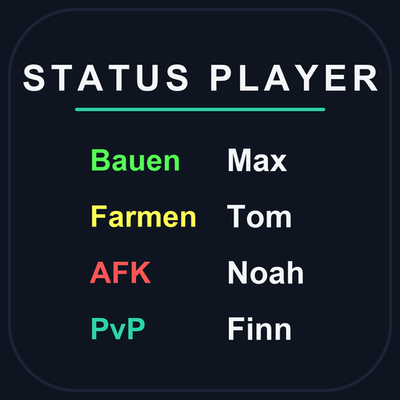
Lightweight player status tags for Fabric, Forge, NeoForge & Quilt (1.21.11 → 26.3): colored TAB/nametag text, presets, per-world overrides, history, placeholders, admin GUI, Bedrock channels + optional dashboard sync.
Quick answer
Status Player StatusMod 1.4.1 (fabric 26.1) targets 26.1 with Fabric. The project page does not say whether this file belongs on the client, dedicated server, or both. All 1 required mods have matching files.
Where it goes
The project page does not say whether this file belongs on the client, dedicated server, or both.
The source does not explicitly classify this release as client-only or server-only.
StatusMod 1.4.1 (fabric 26.1). Change the file and its required mods may change too.
Install Fabric API first. We found matching files for this game-version and loader setup.
We only count dependency files that match this setup. A file for another loader does not fill the gap.
Before you install it
Built for Status Player StatusMod 1.4.1 (fabric 26.1). Pick another file and the loader, install side or required mods may change.
Use StatusMod 1.4.1 (fabric 26.1). It targets 26.1 with Fabric; another release may have different loader, side or dependency requirements.
Install Fabric API first. We found matching files for this game-version and loader setup.
The project page does not say whether this file belongs on the client, dedicated server, or both.
Use the “Get this file” button beside StatusMod 1.4.1 (fabric 26.1). It opens that exact file at the source.
About this project
Lightweight player status tags for your Minecraft server. Players set a short status text with a color — shown in TAB and above names. No client mod needed, everything runs server-side with local JSON storage.
{time}-style placeholders/status opens a beginner-friendly GUI/status gui with skinned heads, search and pages/status list for quick overviews/status — open the self menu/status gui — admin player menu/status list — who's online with statuses/status avatar <name|url|off> — dashboard profile picture/status feature <name> <on|off> — toggle features per server/status version — installed version and build/code — login code for the dashboardFully local by default — no data leaves your server. The optional dashboard sync (UUID, username, status, settings, mutes, blocks, presence) only runs when you configure it. See README "Privacy and Security" for details.
Project description from CurseForge.
Pick your setup
Choose the version and loader you play, then open the matching release.
Check the dependencies, then try the file in a copied instance before changing a world you care about.
Recent files
Statusmod-1.4.1-fabric-26.1.jar
15 Oct 2026
Statusmod-1.4.1-quilt-26.1.2.jar
15 Oct 2026
Statusmod-1.4.1-fabric-26.3.jar
15 Oct 2026
Statusmod-1.4.1-quilt-26.3.jar
15 Oct 2026
Statusmod-1.4.1-quilt-26.1.1.jar
15 Oct 2026
Statusmod-1.4.1-quilt-1.21.11.jar
15 Oct 2026
Statusmod-1.4.1-fabric-26.1.1.jar
15 Oct 2026
Statusmod-1.4.1-quilt-26.2.jar
15 Oct 2026
Statusmod-1.4.1-quilt-26.1.jar
15 Oct 2026
Statusmod-1.4.1-fabric-26.1.2.jar
15 Oct 2026
Statusmod-1.4.1-fabric-26.2.jar
15 Oct 2026
Statusmod-1.4.1-quilt-26.2.jar
15 Oct 2026
Looking for an older file? The official CurseForge project page is in Resources.