Minecraft version
Back to mods 
CurseForge · Minecraft mod
RA: Redstone Additions
Introduces redstone logic gates and a compact clock designed for space-efficient builds.
Choose a version Pick your version below, then grab the matching file.
Quick answer
Which RA: Redstone Additions release should I use?
Latest stable file redstoneadditions-1.20.1-1.1.0.jar
Game version 1.20.1
Loader Forge
RA: Redstone Additions redstoneadditions-1.20.1-1.1.0.jar targets 1.20.1 with Forge. The project page does not say whether this file belongs on the client, dedicated server, or both. No extra mods listed for this file.
Where it goes
Is RA: Redstone Additions required on the client, server, or both?
The project page does not say whether this file belongs on the client, dedicated server, or both.
Client Source doesn’t say
Dedicated server Source doesn’t say
Loader for this release Forge
Required install it here Optional supported, not mandatory Not supported do not install here Source doesn’t say do not assume
The source does not explicitly classify this release as client-only or server-only.
What else does RA: Redstone Additions redstoneadditions-1.20.1-1.1.0.jar need?
redstoneadditions-1.20.1-1.1.0.jar. Change the file and its required mods may change too.
This file does not list any required mods. Do not add a library just because a different file uses it.
This file does not list any required or optional mods.
Before you install it
Add RA: Redstone Additions without breaking your instance.
Built for RA: Redstone Additions redstoneadditions-1.20.1-1.1.0.jar. Pick another file and the loader, install side or required mods may change.
- 01
Stick to this file
Use redstoneadditions-1.20.1-1.1.0.jar. It targets 1.20.1 with Forge; another release may have different loader, side or dependency requirements.
- 02
Bring the mods it needs
This file does not list any required mods. Do not add a library just because a different file uses it.
- 03
Put it on the correct side
The project page does not say whether this file belongs on the client, dedicated server, or both.
- 04
Pick the file you checked
Use the “Get this file” button beside redstoneadditions-1.20.1-1.1.0.jar. It opens that exact file at the source.
About this project
What does RA: Redstone Additions add?
1.21.10 support along with 1.1.0 Update is out!
View the changelog here. Please report any bugs through the GitHub or through the comment section.
Purpose of the Mod
Adds OR, XOR, NOT, and AND boolean logic gates and a CLOCK with the idea of designing more compact redstone machines with potentially better performance.
Recipes and Usage
AND Gate:
 |
|
|
 |
 |
 |
 |
|
|
Usage
2 Inputs, 1 Output. 1 Input on Left, 1 Input on Right, 1 Output on redstone torch side.
| L | R | Output |
|---|---|---|
| 0 | 0 | 0 |
| 0 | 1 | 0 |
| 1 | 0 | 0 |
| 1 | 1 | 1 |
NOT Gate:
| X | X | X |
|
|
|
|
|
|
Usage
1 Input and 1 Output. Output is the opposite of the input — so if Redstone is powered in, it will come out off.
| Input | Output |
|---|---|
| 0 | 1 |
| 1 | 0 |
(X)OR Gate:
XOR and OR is the same block.
| X | X | X |
|
|
|
|
|
|
Usage
2 Inputs, 1 Output. 1 Input on Left, 1 Input on Right, 1 Output on Redstone torch side.
OR:
| L | R | Output |
|---|---|---|
| 0 | 0 | 0 |
| 1 | 0 | 1 |
| 0 | 1 | 1 |
| 1 | 1 | 1 |
XOR:
| L | R | Output |
|---|---|---|
| 0 | 0 | 0 |
| 1 | 0 | 1 |
| 0 | 1 | 1 |
| 1 | 1 | 0 |
CLOCK:
| X | X | X |
|
|
|
|
|
|
Usage
1 Output: Flips between on and off at a rate specified by the delay, which is changed when right-clicked.
| Delay # | Flips per Second |
|---|---|
| 1 | 20 |
| 5 | 4 |
| 10 | 2 |
| 15 | 1.333 |
| 20 | 1 |
Potential Performance Increase with Clocks
NOTE!
I never made this mod to make a better performant way for using Redstone — I more built this to learn modding and to save space in Redstone designs. Do not download this mod for the potential performance increase.
If you have any information to add regarding whether the test is accurate or flawed, I would love to hear about it.
Base Rules for each test:
- Both worlds were duplicates using Minecraft's built-in recreate button
- Sim distance: 12 chunks
- Render Distance: 12 chunks
- Super flat world with "Redstone Ready" preset
- Peaceful, no structures
- Windowed mode
- Forge install with just Redstone Additions and WorldEdit
Redstone Additions Clock
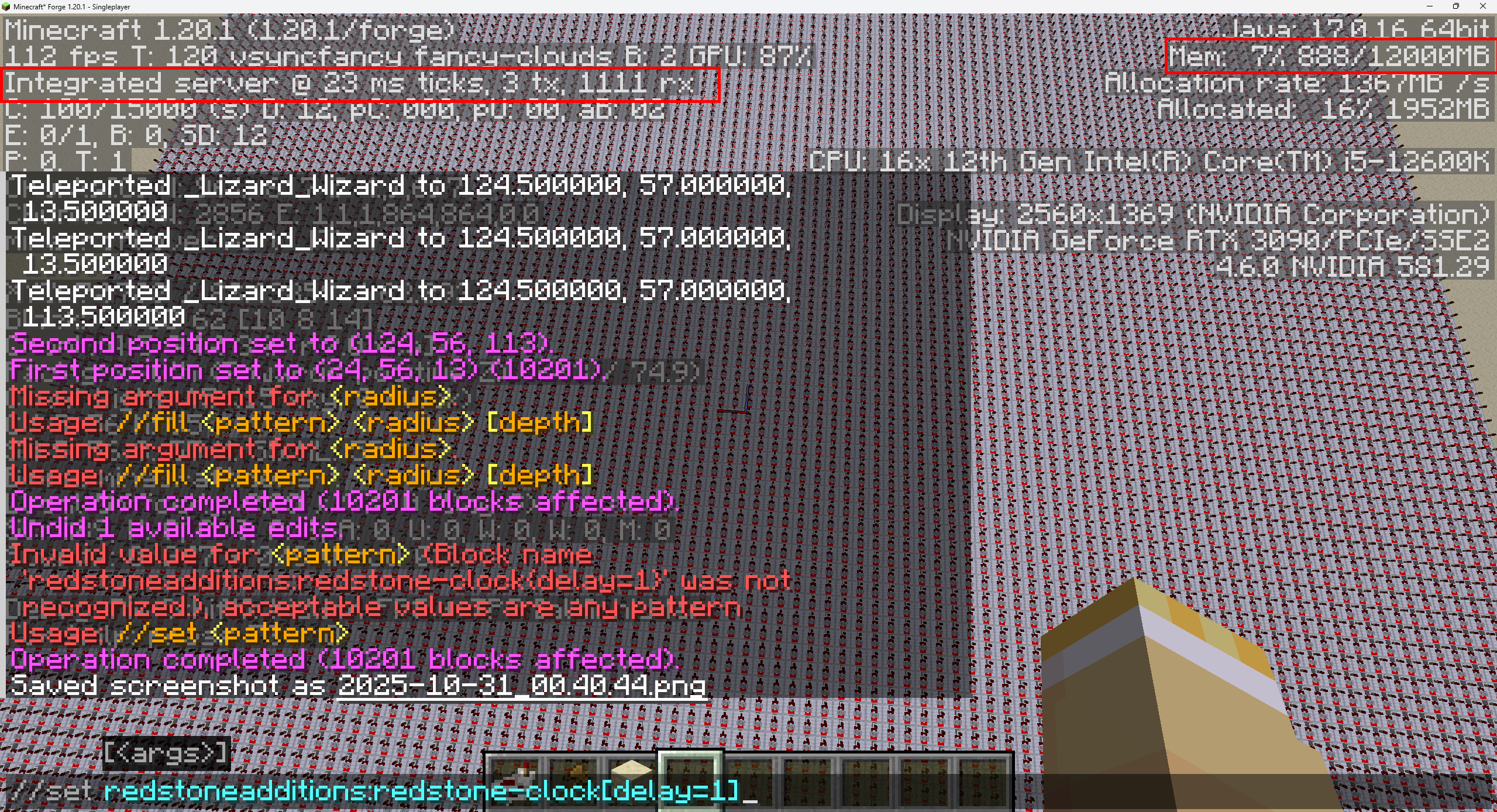
For the Redstone Additions test, 10,201 (100x100 grid) clocks were set with WorldEdit with a delay set to 1 (flips 20 times a tick).
Vanilla Clock
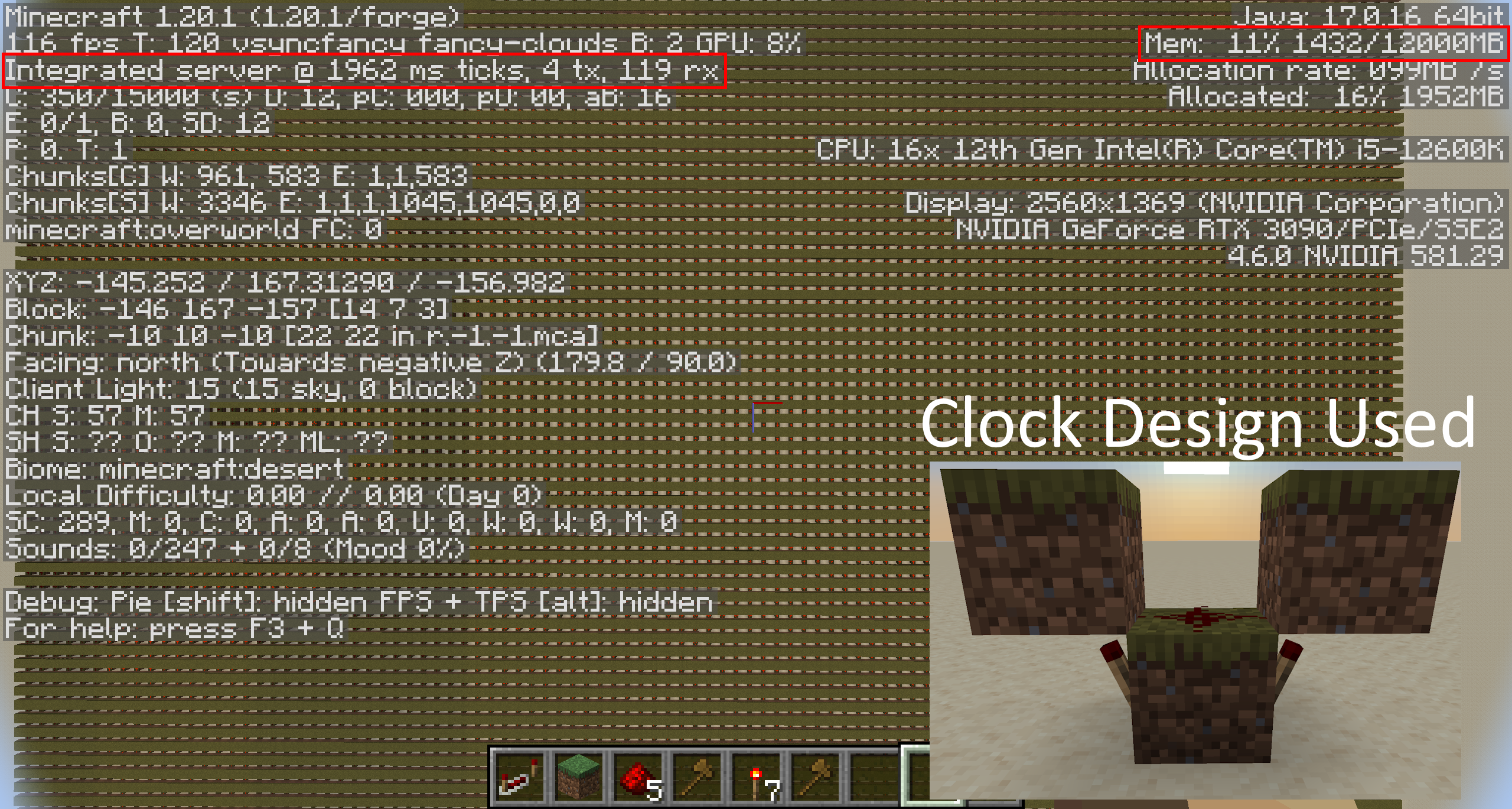
For the vanilla clock, this is a design I came across from just playing the game. I am unsure of the exact speed it flips, but just watching the flip rate, it feels similar to the speed of the Redstone Additions Clock with delay = 1. WorldEdit was also used to copy and stack in a 100x100 grid, effectively placing 10,000 individual instances of this design.
The conclusions
Through my own research on what each value means in the F3 menu (via the Minecraft Wiki), it would seem that using the mod lowers the total amount of memory while also lowering the time it takes to process a tick. The mod also has an increased number of packets received from the Integrated Server, by roughly 10x. You can compare these values and anything else I might have missed by looking at both images above.
NOTE!
I never made this mod to make a better performant way for using Redstone — I more built this to learn modding and to save space in Redstone designs. Do not download this mod for the potential performance increase.
If you have any information to add regarding whether the test is accurate or flawed, I would love to hear about it.
Project description from CurseForge.
Pick your setup
RA: Redstone Additions by Minecraft version and loader
Choose the version and loader you play, then open the matching release.
Minecraft version
1.20.1
1 loader buildCheck the dependencies, then try the file in a copied instance before changing a world you care about.
Recent files
RA: Redstone Additions versions and loaders
redstoneadditions-1.20.1-1.1.0.jar
6 Nov 2025
Client Source doesn’t say Server Source doesn’t say Dependencies No extras listed Listed on Release listing
Check the 1.20.1 · Forge setup 1.20.1Forge release
redstoneadditions-1.21.10-1.1.0.jar
6 Nov 2025
Client Source doesn’t say Server Source doesn’t say Dependencies No extras listed Listed on Release listing
Check the 1.21.10 · Forge setup 1.21.10Forge release
redstoneadditions-1.0-1.20.1.jar
1 Nov 2025
Client Source doesn’t say Server Source doesn’t say Dependencies No extras listed Listed on Release listing
Check the 1.20.1 · Forge setup 1.20.1Forge release
Looking for an older file? The official CurseForge project page is in Resources.
 mod
CurseForge · Minecraft
Logical Lasers
Adds modular lasers that function as logic gates.
 mod
CurseForge · Minecraft
SnoobKid's Zombie Hordes - Only Zombies
This mod makes zombies the only hostile mobs that spawn. It is useful for vanilla-friendly zombie apocalypse modpacks.
 mod
CurseForge + Modrinth · Minecraft
More Villagers : Re-employed
Adds more villagers with new professions and workstations. Port of the original More Villagers mod.