Minecraft version
Back to mods 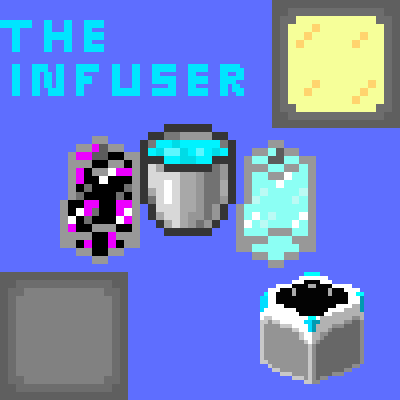
CurseForge · Minecraft mod
The Infuser
This Mod adds new crafting recipes for things like Budding Amythist.
Choose a version Pick your version below, then grab the matching file.
Quick answer
Which The Infuser release should I use?
Latest stable file Patch 4
Game version 1.21.4
Loader NeoForge
The Infuser Patch 4 targets 1.21.4 with NeoForge. The project page does not say whether this file belongs on the client, dedicated server, or both. No extra mods listed for this file.
Where it goes
Is The Infuser required on the client, server, or both?
The project page does not say whether this file belongs on the client, dedicated server, or both.
Client Source doesn’t say
Dedicated server Source doesn’t say
Loader for this release NeoForge
Required install it here Optional supported, not mandatory Not supported do not install here Source doesn’t say do not assume
The source does not explicitly classify this release as client-only or server-only.
What else does The Infuser Patch 4 need?
Patch 4. Change the file and its required mods may change too.
This file does not list any required mods. Do not add a library just because a different file uses it.
This file does not list any required or optional mods.
Before you install it
Add The Infuser without breaking your instance.
Built for The Infuser Patch 4. Pick another file and the loader, install side or required mods may change.
- 01
Stick to this file
Use Patch 4. It targets 1.21.4 with NeoForge; another release may have different loader, side or dependency requirements.
- 02
Bring the mods it needs
This file does not list any required mods. Do not add a library just because a different file uses it.
- 03
Put it on the correct side
The project page does not say whether this file belongs on the client, dedicated server, or both.
- 04
Pick the file you checked
Use the “Get this file” button beside Patch 4. It opens that exact file at the source.
About this project
What does The Infuser add?
The Infuser
Disclamer:
This Mod is finished, kind of.
All the recipes, items, and code is all done.
But the textures for most of the Liquids are the Concept Art and do not reflect the final textures.
I would recomend the "Just Enough Recipes" Mod (or jei works when searching for it) to help you with the new recipes for vanilla items (or items from this Mod, even though you unlock the recipes pretty easily).
Update Roadmap:
- Pre Textures Update - Done
- Decorative Blocks Update - Done
- Creative Tabs Update - Done
- Dimensional Fluids Update - Done
- Concept Textures Update - Done
- Lab Workers Update - Done, Latest Release
Guide:
This Mod is pretty easy to understand, but if you need a Guide, that's fine :)
Also, I didn't really add anything new (but I am planning on doing that type of thing soon...), but I did add some new items that are used to craft a few of the vanilla items and blocks that are harder to craft or even impossible to craft.
Now for the actual Guide:
- First, you'll need to get a Furnace to smelt Sand and Raw Iron.
- Next, you need to find your Sand and Raw Iron...
- (You will need at least four Raw Iron)
- Once you have Glass and Iron Ingots, you need a Bucket and at least one Canister.
- You will need to place three Glass and one Iron Ingot (in the Crafting Table) like this:
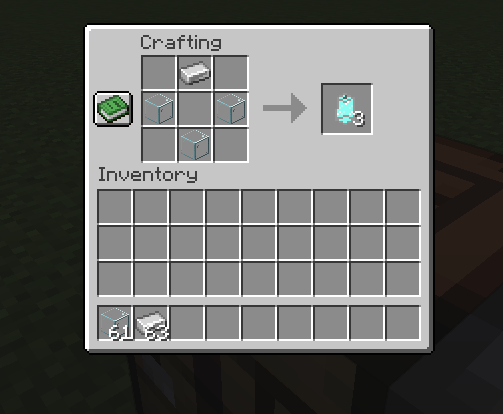
- It will make three Canisters.
- (When you craft with the Liquid Canisters, it gives you back a Canister, so you don't need to craft more)
- Crafting the Canister should give you the recipes for the Liquids.
- (Look in the "Items" right below this in the Mod description to find out what each Liquid does)
That should be enough to get you started, I hope you enjoy!
Items:
Liquids:
There are four new semi-liquids that have been added. They are liquids, but you can't place them using a bucket like water and lava.
- The Mineral Water, used to duplicate crystals and gems.
- The Enzimes, used in a few recipes like Honeycomb.
- The Poison Tonic, used to kill items like turning Raw Meat into Rotten Flesh.
- The Mystic Liquid, used in magical crafting recipes.
- The Nether Syrum, used to craft most things from the Nether.
- The Ender Syrum, used to craft most things you can get from the End.
Canisters:
To craft with these liquids, you need to put them in Canisters.
To make a Canister, you need three Glass and one Iron Ingot.
Blocks:
Usable Blocks:
- The Infuser. The job block of the Scientist Villager.
- The Distillary. The job block of the Brewer Villager.
- The Lab Bench. The job block of the Lab Construction Worker Villager.
Decortive Blocks:
- The Lab Wall Block. A clean, grey texture, this block is made for walls and maybe floors of builds.
- The Lab Bricks Block. A clean, grey block with a brick texture.
- The Lab Tiles Block. Made for the floors and detailing of laboratory builds.
- The Mossy Lab Bricks Block.
- The Cracked Lab Wall Block.
- The Lab Door Block. It's a door but with the clean, grey texture of the Lab Blocks.
- The Lab Vent Block. A slab sized block for use in laboratory build ceilings.
- The Lab Slab Block.
- The Lab Stairs Block.
- The Lab Bricks Slab Block.
- The Lab Bricks Stairs Block.
- The Lab Tiles Slab Block.
- The Lab Tiles Stairs Block.
- The Lab Lamp. It produces light.
Villager Professions:
- The Scientist. They sell the liquids as well as Canisters and Brewing Stands.
- (The Brewing Stand doesn't have a purpose in this Mod yet, but it suited the villager.)
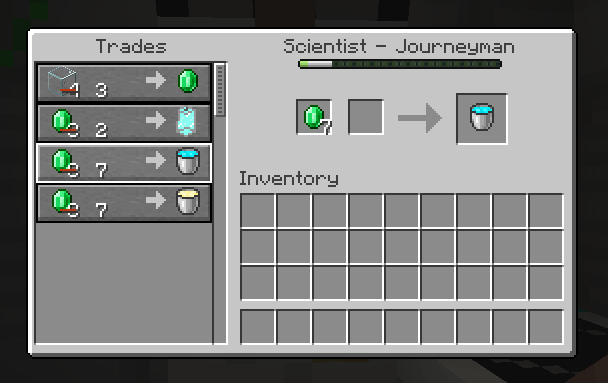
- The Lab Construction Worker. They sell Lab Blocks.
- The Brewer. They sell the Drinkable Liquids.
Creative Tabs:
- "The Infuser - All" Creative Tab.
- "The Infuser - Liquids" Creative Tab.
- "The Infuser - Blocks" Creative Tab.
For Use With Other Mods (and Modpacks):
I would love if you added this Mod to your Modpacks, but if you do please consider adding a Link back here, either way, thanks! :)
This Mod would go great with other Utillity Mods.
Project description from CurseForge.
Pick your setup
The Infuser by Minecraft version and loader
Choose the version and loader you play, then open the matching release.
Check the dependencies, then try the file in a copied instance before changing a world you care about.
Recent files
The Infuser versions and loaders
Patch 4
infuser-1.5.0-neoforge-1.21.4.jar
6 Nov 2025
Client Source doesn’t say Server Source doesn’t say Dependencies No extras listed Listed on Release listing
Check the 1.21.4 · NeoForge setup 1.21.4NeoForge release
Patch 3
infuser-1.4.8-neoforge-1.21.4.jar
6 Nov 2025
Client Source doesn’t say Server Source doesn’t say Dependencies No extras listed Listed on Release listing
Check the 1.21.4 · NeoForge setup 1.21.4NeoForge release
Patch 2
infuser-1.4.7-neoforge-1.21.4.jar
6 Nov 2025
Client Source doesn’t say Server Source doesn’t say Dependencies No extras listed Listed on Release listing
Check the 1.21.4 · NeoForge setup 1.21.4NeoForge release
Lab Workers Update
infuser-1.4.6-neoforge-1.21.4.jar
6 Nov 2025
Client Source doesn’t say Server Source doesn’t say Dependencies No extras listed Listed on Release listing
Check the 1.21.4 · NeoForge setup 1.21.4NeoForge release
Drinkable Liquids Update
infuser-1.3.9-neoforge-1.21.4.jar
5 Nov 2025
Client Source doesn’t say Server Source doesn’t say Dependencies No extras listed Listed on Release listing
Check the 1.21.4 · NeoForge setup 1.21.4NeoForge release
Surprise Update 1
infuser-1.3.4-neoforge-1.21.4.jar
5 Nov 2025
Client Source doesn’t say Server Source doesn’t say Dependencies No extras listed Listed on Release listing
Check the 1.21.4 · NeoForge setup 1.21.4NeoForge release
Patch 1
infuser-1.3.2-neoforge-1.21.4.jar
5 Nov 2025
Client Source doesn’t say Server Source doesn’t say Dependencies No extras listed Listed on Release listing
Check the 1.21.4 · NeoForge setup 1.21.4NeoForge release
Concept Textures Update
infuser-1.3.1-neoforge-1.21.4.jar
4 Nov 2025
Client Source doesn’t say Server Source doesn’t say Dependencies No extras listed Listed on Release listing
Check the 1.21.4 · NeoForge setup 1.21.4NeoForge release
Dimensional Fluids Update
infuser-1.2.3-neoforge-1.21.4.jar
4 Nov 2025
Client Source doesn’t say Server Source doesn’t say Dependencies No extras listed Listed on Release listing
Check the 1.21.4 · NeoForge setup 1.21.4NeoForge release
Creative Tabs Update
infuser-1.0.0-neoforge-1.21.4.jar
4 Nov 2025
Client Source doesn’t say Server Source doesn’t say Dependencies No extras listed Listed on Release listing
Check the 1.21.4 · NeoForge setup 1.21.4NeoForge release
Decorative Blocks Update
infuser-0.9.8-neoforge-1.21.4.jar
3 Nov 2025
Client Source doesn’t say Server Source doesn’t say Dependencies No extras listed Listed on Release listing
Check the 1.21.4 · NeoForge setup 1.21.4NeoForge release
Pre Textures Update
theinfuser-0.8.3-neoforge-1.21.4.jar
3 Nov 2025
Client Source doesn’t say Server Source doesn’t say Dependencies No extras listed Listed on Release listing
Check the 1.21.4 · NeoForge setup 1.21.4NeoForge release
Looking for an older file? The official CurseForge project page is in Resources.
 mod
mod CurseForge + Modrinth · Minecraft
Mod Recipe Book
Adds a customizable, progression-based, vanilla-friendly recipe book for modded Minecraft.
 mod
mod CurseForge + Modrinth · Minecraft
Mob Farming Supplies
Automate your mob farm in fun and exciting ways!
 mod
mod CurseForge + Modrinth · Minecraft
ColorTooltips
ColorTooltips is a mod that provides a tip box style.It has two characteristics: brilliance and flexibility.