Minecraft version
Back to mods 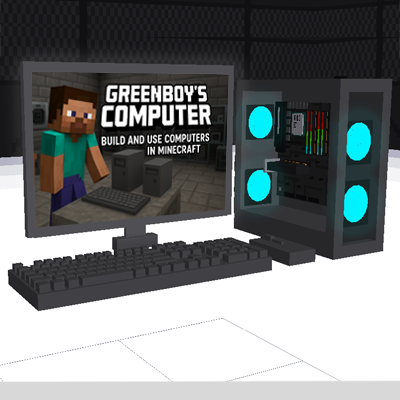
CurseForge · Minecraft mod
Greenboy's Computer
This mod Adds Working Computers To Minecraft. Which You Can Build And Use
Choose a version Pick your version below, then grab the matching file.
Quick answer
Which Greenboy's Computer release should I use?
Latest stable file greenboy_computer-2.0.0-neoforge-1.21.1.jar
Game version 1.21.1
Loader NeoForge
Greenboy's Computer greenboy_computer-2.0.0-neoforge-1.21.1.jar targets 1.21.1 with NeoForge. The project page does not say whether this file belongs on the client, dedicated server, or both. No extra mods listed for this file.
Where it goes
Is Greenboy's Computer required on the client, server, or both?
The project page does not say whether this file belongs on the client, dedicated server, or both.
Client Source doesn’t say
Dedicated server Source doesn’t say
Loader for this release NeoForge
Required install it here Optional supported, not mandatory Not supported do not install here Source doesn’t say do not assume
The source does not explicitly classify this release as client-only or server-only.
What else does Greenboy's Computer greenboy_computer-2.0.0-neoforge-1.21.1.jar need?
greenboy_computer-2.0.0-neoforge-1.21.1.jar. Change the file and its required mods may change too.
This file does not list any required mods. Do not add a library just because a different file uses it.
This file does not list any required or optional mods.
Before you install it
Add Greenboy's Computer without breaking your instance.
Built for Greenboy's Computer greenboy_computer-2.0.0-neoforge-1.21.1.jar. Pick another file and the loader, install side or required mods may change.
- 01
Stick to this file
Use greenboy_computer-2.0.0-neoforge-1.21.1.jar. It targets 1.21.1 with NeoForge; another release may have different loader, side or dependency requirements.
- 02
Bring the mods it needs
This file does not list any required mods. Do not add a library just because a different file uses it.
- 03
Put it on the correct side
The project page does not say whether this file belongs on the client, dedicated server, or both.
- 04
Pick the file you checked
Use the “Get this file” button beside greenboy_computer-2.0.0-neoforge-1.21.1.jar. It opens that exact file at the source.
About this project
What does Greenboy's Computer add?
💻 Greenboy Working Computer Mod
Greenboy Working Computer Mod adds fully functional, buildable computers to Minecraft! Assemble real PC components, build your own setup, and use interactive apps just like in real life.
🔧 About the Mod
This mod introduces realistic, working computers into Minecraft. Players must collect and assemble authentic PC components such as CPU, GPU, SSD, and RAM to build their very own computer. Once completed, the computer becomes fully usable with multiple built-in applications.
🖥️ Features (V2)
V2 Added Save And Load Feature In Notepad And Paint To The Mod. Now You Can Save And Load.
✅ Craftable Computer System
Empty Case – Crafted by placing a Motherboard in the center with Iron Ingots surrounding it in the crafting table.
Computer Cabinet (Shell Only) – Used as the base to craft a full PC.
Full Computer Setup – Crafted using:
- Cabinet
- Mouse
- Keyboard
- Monitor
✅ PC Components
- CPU
- GPU
- SSD
- RAM
✅ Extra Devices
- Mouse
- Keyboard
- Monitor
📦 Special Items
- Order Device – Automatically given when the player joins. Used to order PC parts.
- PC Builder – Automatically given when the world loads. Used to assemble all PC components. Once all parts are inserted, the fully built PC is added automatically to the player’s inventory.
🧠 Built-in Apps & Programs
- 📝 Notepad – Simple text editor
- 🎨 Paint – Slot-based drawing app
- 🎹 Piano – Fully playable virtual piano
- 🛒 Store – In-game app store
- 🖼️ Image Viewer – Displays images
- ⚙️ Specs – Shows full computer system properties
Project description from CurseForge.
Pick your setup
Greenboy's Computer by Minecraft version and loader
Choose the version and loader you play, then open the matching release.
Check the dependencies, then try the file in a copied instance before changing a world you care about.
Recent files
Greenboy's Computer versions and loaders
greenboy_computer-2.0.0-neoforge-1.21.1.jar
4 Dec 2025
Client Source doesn’t say Server Source doesn’t say Dependencies No extras listed Listed on Release listing
Check the 1.21.1 · NeoForge setup 1.21.1NeoForge release
greenboy_computer-1.0.0-neoforge-1.21.1.jar
4 Nov 2025
Client Source doesn’t say Server Source doesn’t say Dependencies No extras listed Listed on Release listing
Check the 1.21.1 · NeoForge setup NeoForge1.21.1 release
Looking for an older file? The official CurseForge project page is in Resources.
 mod
CurseForge · Minecraft
Cybernetic Enhancements
Cybernetic body upgrades and android progression for Minecraft
 mod
CurseForge · Minecraft
Quiet Please
Mute music track by track: turn any song in your modpack down or off, build your own playlist, skip songs and keep favorites.
 mod
CurseForge · Minecraft
Immersive Nature
Weathering, falling leaves, water erosion, overgrowth, realistic snow and finite flowing water in one mod — the world changes and lives on its own.