Minecraft version
Back to mods 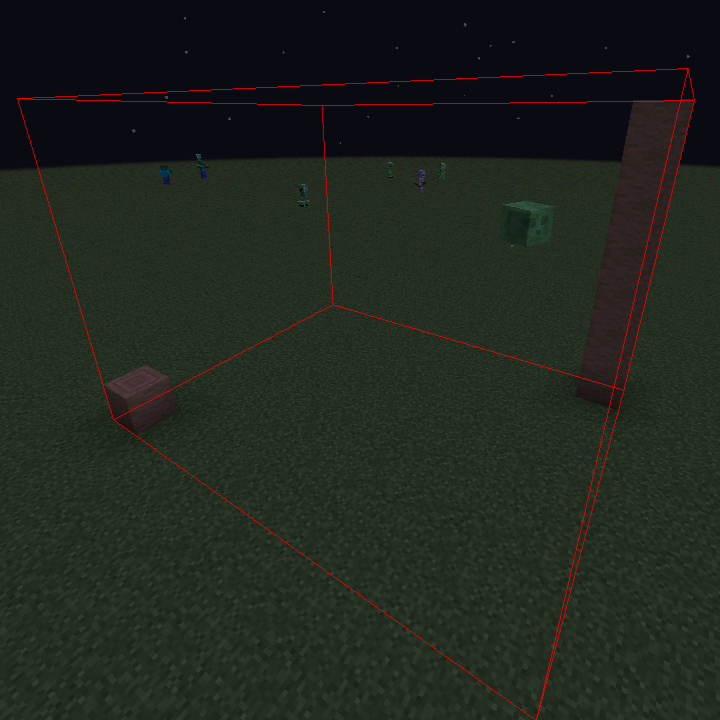
CurseForge · Minecraft mod
RegionVisualizer+Music
Regions with music in .minecraft/music using the command /region add
Choose a version Pick your version below, then grab the matching file.
Quick answer
Which RegionVisualizer+Music release should I use?
Latest stable file RegionVisualizer-NEW-1.1.1.jar
Game version 1.20.1
Loader Forge
RegionVisualizer+Music RegionVisualizer-NEW-1.1.1.jar targets 1.20.1 with Forge. The project page does not say whether this file belongs on the client, dedicated server, or both. No extra mods listed for this file.
Where it goes
Is RegionVisualizer+Music required on the client, server, or both?
The project page does not say whether this file belongs on the client, dedicated server, or both.
Client Source doesn’t say
Dedicated server Source doesn’t say
Loader for this release Forge
Required install it here Optional supported, not mandatory Not supported do not install here Source doesn’t say do not assume
The source does not explicitly classify this release as client-only or server-only.
What else does RegionVisualizer+Music RegionVisualizer-NEW-1.1.1.jar need?
RegionVisualizer-NEW-1.1.1.jar. Change the file and its required mods may change too.
This file does not list any required mods. Do not add a library just because a different file uses it.
This file does not list any required or optional mods.
Before you install it
Add RegionVisualizer+Music without breaking your instance.
Built for RegionVisualizer+Music RegionVisualizer-NEW-1.1.1.jar. Pick another file and the loader, install side or required mods may change.
- 01
Stick to this file
Use RegionVisualizer-NEW-1.1.1.jar. It targets 1.20.1 with Forge; another release may have different loader, side or dependency requirements.
- 02
Bring the mods it needs
This file does not list any required mods. Do not add a library just because a different file uses it.
- 03
Put it on the correct side
The project page does not say whether this file belongs on the client, dedicated server, or both.
- 04
Pick the file you checked
Use the “Get this file” button beside RegionVisualizer-NEW-1.1.1.jar. It opens that exact file at the source.
About this project
What does RegionVisualizer+Music add?
A Mod About Music Regions
This mod allows you to create music regions using an item called Region Selector, found under “Tools & Utilities” at the end of the creative tab. You can define an area from X to Z — the Y level is automatically calculated based on the block position. Fully compatible with Minecraft Forge 1.20.1.
Where to Add Music
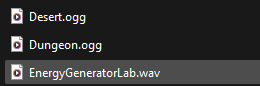
To add your own music, go to: .minecraft/music → If the folder doesn’t exist, create it manually.
Then, place your music files there using the formats: .ogg or .wav — both are supported by this mod.


Commands
/region
– /region add (add) (filemusic) (loop-> true/false) (fade-> true/false) – Defines a region with music and optional fade and loop properties.
– /region cancel – Cancels the current selection made with the Region Selector item.
– /region here – Shows which region you are currently in.
– /region info (name) – Displays information about a specific region.
– /region list – Lists all created regions in the world.
– /region remove (nameregion) – Removes a region from the world.
– /region tp (region) – Teleports you to a specific region.
/playmusic
– /playmusic (player) (volume -> 1.0 to 0.0) – Changes the music volume for a player.
– /playmusic (player) stop – Stops the currently playing music.
– /playmusic (player) (filemusic.wav/filemusic.ogg) – Plays the selected music file from .minecraft/music.
– /playmusic (player) list – Sends the list of available music files to the player.
– /playmusic (player) getvolume – Displays the player’s current music volume.
/regedit
– /regedit clear – Clears the visualization of a region.
– /regedit music (region) (filemusic) – Changes the music previously assigned to a region.
– /regedit pos (region) – Allows repositioning of the region (this feature is still being refined).
– /regedit regname (region) (newRegionTag) – Renames a specific region.
– /regedit view (region) – Visualizes a specific region (only one can be displayed at a time).
Future Updates
In future versions, the mod will support newer Minecraft versions — only on Forge (no Fabric or other loaders). It will also include various bug fixes, such as issues with large .ogg files causing playback stutters.
LICENSE
All rights reserved by Aristiva Studio and Riburitu.
Any unauthorized copying, distribution, modification, or commercial use of this mod is strictly prohibited. Doing so may result in legal action.
Project description from CurseForge.
Pick your setup
RegionVisualizer+Music by Minecraft version and loader
Choose the version and loader you play, then open the matching release.
Check the dependencies, then try the file in a copied instance before changing a world you care about.
Recent files
RegionVisualizer+Music versions and loaders
RegionVisualizer-NEW-1.1.1.jar
7 Nov 2025
Client Source doesn’t say Server Source doesn’t say Dependencies No extras listed Listed on Release listing
Check the 1.20.1 · Forge setup 1.20.1Forge release
Looking for an older file? The official CurseForge project page is in Resources.
 mod
CurseForge · Minecraft
Raw's Iron's Spellbooks Tweaks
A couple things to balance the mod and some gameplay improvements to the awesome Iron's Spells and Spellbooks mod.
 mod
CurseForge · Minecraft
Home Commandss
Homes, /back and TPA for everyone, no operator permissions needed. 100% server-side.
 mod
CurseForge · Minecraft
Death Locator
Clickable death coordinates in chat, so you never lose your items again.