Create Needed by Create: Access Denied 0.0.4+c6.0.10.mc1.21.1
requiredMatching file found Matched file: 6.0.10+mc1.21.1

CurseForge · Minecraft mod
Simple access management for stock managers in your Create logistics nework.
Quick answer
Create: Access Denied 0.0.4+c6.0.10.mc1.21.1 targets 1.21.1 with NeoForge. The project page does not say whether this file belongs on the client, dedicated server, or both. All 1 required mods have matching files.
Where it goes
The project page does not say whether this file belongs on the client, dedicated server, or both.
The source does not explicitly classify this release as client-only or server-only.
Create: Access Denied 0.0.4+c6.0.10.mc1.21.1. Change the file and its required mods may change too.
Install Create first. We found matching files for this game-version and loader setup.
We only count dependency files that match this setup. A file for another loader does not fill the gap.
Before you install it
Built for Create: Access Denied 0.0.4+c6.0.10.mc1.21.1. Pick another file and the loader, install side or required mods may change.
Use Create: Access Denied 0.0.4+c6.0.10.mc1.21.1. It targets 1.21.1 with NeoForge; another release may have different loader, side or dependency requirements.
Install Create first. We found matching files for this game-version and loader setup.
The project page does not say whether this file belongs on the client, dedicated server, or both.
Use the “Get this file” button beside Create: Access Denied 0.0.4+c6.0.10.mc1.21.1. It opens that exact file at the source.
About this project

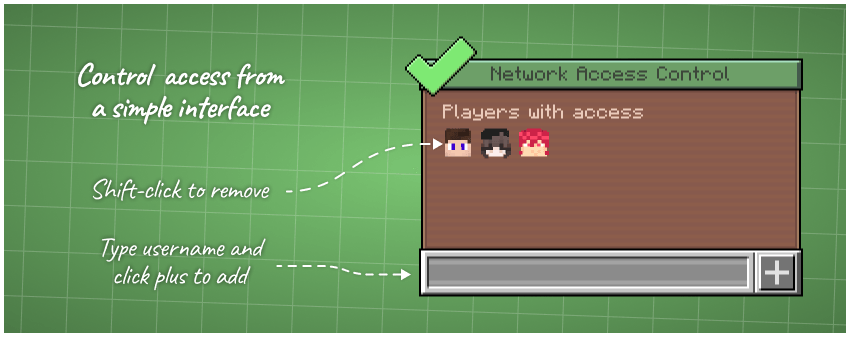


Text-based description:
Simple access management for your networks.
Control access to a logistics network from a simple interface:
Project description from CurseForge.
Pick your setup
Choose the version and loader you play, then open the matching release.
Check the dependencies, then try the file in a copied instance before changing a world you care about.
Recent files
create-access-denied-0.0.4+c6.0.10.mc1.21.1.jar
25 Apr 2026
create-access-denied-0.0.4-mc1.21.1-c6.0.6.jar
1 Dec 2025
create-access-denied-0.0.4-mc1.20.1-c6.0.6.jar
1 Dec 2025
create-access-denied-0.0.3-mc1.21.1-c6.0.6.jar
9 Nov 2025
create-access-denied-0.0.3-mc1.20.1-c6.0.6.jar
9 Nov 2025
create-access-denied-0.0.2.jar
7 Nov 2025
create-access-denied-0.0.2-neoforge-1.21.1.jar
7 Nov 2025
create-access-denied-0.0.1.jar
30 Oct 2025
Looking for an older file? The official CurseForge project page is in Resources.
 mod
An addon for Applied Energistics 2 that allows you to use AE2 cables, buses, and interfaces to power FE-compatible machines. You can also use your ME network to pull power from generators, reactors, energy cubes, and other FE energy sources!
 mod
New Era is a Forge 1.20.1 MinePiece expansion that adds powerful custom bosses, Devil Fruit transformations, advanced Haki, cinematic abilities, unique weapons, intelligent combat AI, and high-detail Blockbench models.
 mod
A client-side mod made to provide enhancements to the multiplayer experience for the Blaze Gaming Cobblemon and Pixelmon servers. Includes several fixes, optimizations and more.!