Minecraft version
Back to mods 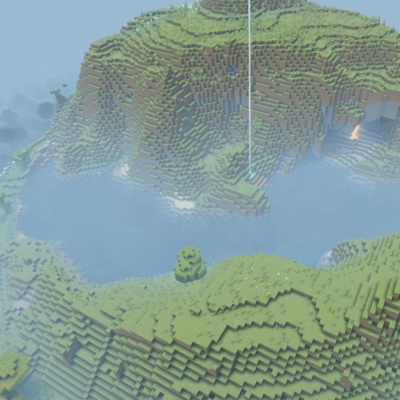
CurseForge · Minecraft mod
World Reloader
A Highly Customizable Terrain Shaper
Choose a version Pick your version below, then grab the matching file.
Quick answer
Which World Reloader release matches 1.20?
Best match for your filters worldreloader-1.0.0.201.jar
Game version 1.20.1, 1.20
Loader Fabric
World Reloader worldreloader-1.0.0.201.jar targets 1.20.1, 1.20 with Fabric. The project page does not say whether this file belongs on the client, dedicated server, or both. No extra mods listed for this file.
Where it goes
Is World Reloader required on the client, server, or both?
The project page does not say whether this file belongs on the client, dedicated server, or both.
Client Source doesn’t say
Dedicated server Source doesn’t say
Loader for this release Fabric
Required install it here Optional supported, not mandatory Not supported do not install here Source doesn’t say do not assume
The source does not explicitly classify this release as client-only or server-only.
What else does World Reloader worldreloader-1.0.0.201.jar need?
worldreloader-1.0.0.201.jar on 1.20. Every mod below is checked against that same setup.
This file does not list any required mods. Do not add a library just because a different file uses it.
This file does not list any required or optional mods.
Before you install it
Add World Reloader without breaking your instance.
Built for World Reloader worldreloader-1.0.0.201.jar on 1.20. Pick another file and the loader, install side or required mods may change.
- 01
Stick to this file
Use worldreloader-1.0.0.201.jar. It targets 1.20.1, 1.20 with Fabric; another release may have different loader, side or dependency requirements.
- 02
Bring the mods it needs
This file does not list any required mods. Do not add a library just because a different file uses it.
- 03
Put it on the correct side
The project page does not say whether this file belongs on the client, dedicated server, or both.
- 04
Pick the file you checked
Use the “Get this file” button beside worldreloader-1.0.0.201.jar. It opens that exact file at the source.
About this project
What does World Reloader add?
Tired of spending hours manually building terrain? This mod revolutionizes landscape creation in Minecraft! 🗺️
🎯 Core Features:
>>Easy To Start:Simply use a Nether Star on a Beacon to generate expansive, custom terrain right before your eyes.
>>Biome/Structure Customization:Place specific blocks around the Beacon (e.g., Sand for Desert,Target for Village) to dictate the biome/structure of the generated landscape.
>>Highly Customizable:Press "Y" to open the editing panel. There are two generation modes, multiple search modes, and free mapping for you to experience.
>>Unleash your creativity and become a master world-builder with this powerful and intuitive tool!
💡 Perfect For:
>>Builders & Architects looking for a quick start on large projects.
>>Adventure Map creators wanting unique landscapes.
>>Server owners aiming to create stunning spawn areas or custom worlds.
>>Video shower aiming to capture an attractive scenes.
本模组是一款可以高度自定义的带有生成过程的地形生成器。官方中文名:息壤。
地形生成:使用下界之星右键信标启动地形生成。生成范围为圆形,从信标处向外扩散。本模组目前带有两种生成模式,最大支持半径512地形生成。
群系/结构指定:在信标四周(其实只需要在东方,也就是x正方向放即可)放上特定方块来指定群系/结构,会生成距离最近的该群系/结构附近的地形。方块和群系/结构的对应关系可以在下文面板中修改和添加,模组也自带了十几种对应关系。使用非映射方块默认为随机生成。
高度自定义的修改面板:按下Y(按键设置可以调整)打开编辑面板。你可以切换生成模式,更改生成范围,增加过渡,乃至自定义方块和群系/结构的映射。
无论是想要惊艳的地形融合效果,还是想要快速生成建筑所需地形,亦或者拍摄地形逐渐生成的壮观画面,这款mod都不容你错过。
Project description from CurseForge.
Pick your setup
World Reloader by Minecraft version and loader
Choose the version and loader you play, then open the matching release.
Minecraft version
1.21.10
1 loader buildMinecraft version
1.21.9
1 loader buildMinecraft version
1.21.8
1 loader buildMinecraft version
1.21.7
1 loader buildMinecraft version
1.21.6
1 loader buildMinecraft version
1.21.5
1 loader buildMinecraft version
1.21.4
1 loader buildMinecraft version
1.21.3
1 loader buildMinecraft version
1.21.2
1 loader buildMinecraft version
1.21.1
1 loader buildMinecraft version
1.21
1 loader buildShowing the newest 12 of 18 game versions. Older files are in the list below.
Check the dependencies, then try the file in a copied instance before changing a world you care about.
Recent files
World Reloader versions and loaders
worldreloader-1.0.0.201.jar
8 Nov 2025
Client Source doesn’t say Server Source doesn’t say Dependencies No extras listed Listed on Release listing
Check the 1.20 · Fabric setup Fabric1.20.11.20 release
Looking for an older file? The official CurseForge project page is in Resources.
 mod
CurseForge · Minecraft
No Trade Cycling, Just Pick
Stop rerolling villagers. Press Pick trade and select any 2 trades its profession can offer (max-level enchanted books included). Fast trade and saves time.
 mod
CurseForge · Minecraft
MEGATON NUCLEAR WARFARE Pro Edition
114 nukes, from a briefcase bomb to the Tsar Bomba. Real craters, tsunamis and fallout, ICBMs with live missile cameras, plus tanks, a bomber and rocket artillery to deliver them.
 mod
CurseForge · Minecraft
Hardcore Lite - You Die You Lose a Heart (LifeDrain)
Lose hearts when dying, gain a heart when eating enchanted golden apples (similar to LifeDrain LifeSteal)