Minecraft version
Back to mods 
CurseForge · Minecraft mod
Omnisearch
Instantly search the mcmod (the largest Chinese Minecraft wiki) from in-game, say goodbye to alt-tabbing.
Choose a version Pick your version below, then grab the matching file.
Quick answer
Which Omnisearch release should I use?
Latest stable file Omnisearch 2.0.0
Game version 1.21.1
Loader NeoForge
Omnisearch 2.0.0 targets 1.21.1 with NeoForge. The project page does not say whether this file belongs on the client, dedicated server, or both. No extra mods listed for this file.
Where it goes
Is Omnisearch required on the client, server, or both?
The project page does not say whether this file belongs on the client, dedicated server, or both.
Client Source doesn’t say
Dedicated server Source doesn’t say
Loader for this release NeoForge
Required install it here Optional supported, not mandatory Not supported do not install here Source doesn’t say do not assume
The source does not explicitly classify this release as client-only or server-only.
What else does Omnisearch 2.0.0 need?
Omnisearch 2.0.0. Change the file and its required mods may change too.
This file does not list any required mods. Do not add a library just because a different file uses it.
This file does not list any required or optional mods.
Before you install it
Add Omnisearch without breaking your instance.
Built for Omnisearch 2.0.0. Pick another file and the loader, install side or required mods may change.
- 01
Stick to this file
Use Omnisearch 2.0.0. It targets 1.21.1 with NeoForge; another release may have different loader, side or dependency requirements.
- 02
Bring the mods it needs
This file does not list any required mods. Do not add a library just because a different file uses it.
- 03
Put it on the correct side
The project page does not say whether this file belongs on the client, dedicated server, or both.
- 04
Pick the file you checked
Use the “Get this file” button beside Omnisearch 2.0.0. It opens that exact file at the source.
About this project
What does Omnisearch add?
What is OmniSearch?
Playing a large modpack often means having a browser window open right next to your game. Checking a recipe, understanding a new machine, or identifying a mysterious creature constantly forces you to break your immersion by alt-tabbing to an external wiki.
OmniSearch is designed to solve this fundamental problem. It is a lightweight, client-side mod that seamlessly integrates the vast knowledge base of MC百科 (mcmod.cn) directly into the Minecraft client. It allows you to search for and read richly formatted wiki articles without ever leaving your game window, keeping your focus where it belongs: on your adventure.
How to Use
Hover & Long-Press: Hover your cursor over an item and long-press the 'TAB' key to instantly search for it.
Press the Hotkey: You can also press the 'TAB' key (configurable in controls) at any time to open the search screen and manually type in what you're looking for.
Browse & Read: A list of results will appear. Click on any entry to view its detailed wiki page, complete with images, icons, and clickable links. You can use the Back button to navigate, just like in a browser.
Core Features
- Directly In-Game: No more leaving the game window. Everything happens right inside Minecraft.
- Rich Content: Thanks to a custom-built renderer, you see the wiki pages just as they are, with full formatting.
- Smart & Simple: Supports history, multiple results, and is designed to be as intuitive as possible.
Important Notes
[!] Experimental Stage: Please be aware that OmniSearch is a brand new mod. While functional, you may still encounter some bugs or rendering issues.
[!] Feedback is Welcome: If you find any issues, please report them on our GitHub Issues Page. Your feedback is invaluable!
[!] Recommended Font: For the best visual experience, we highly recommend using the ModernUI mod for improved font rendering.
Permissions
You are free to include OmniSearch in any modpack. No need to ask. Please link back to this official page for downloads.
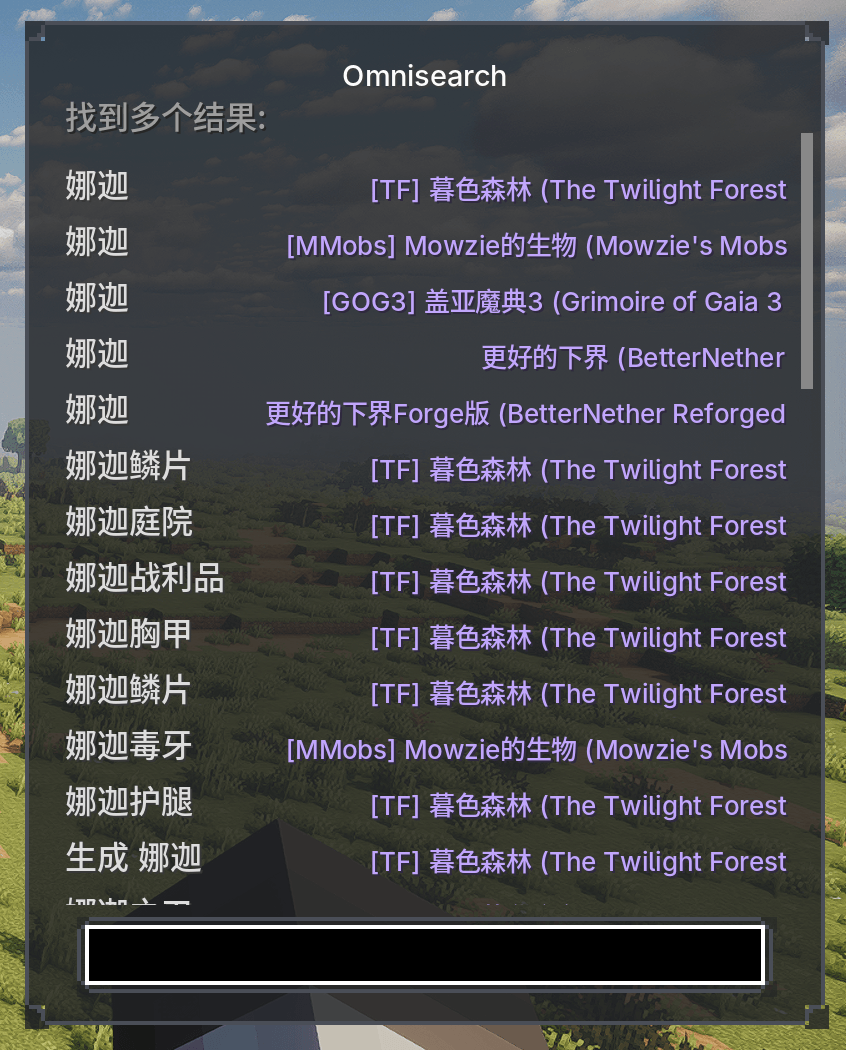
Project description from CurseForge.
Pick your setup
Omnisearch by Minecraft version and loader
Choose the version and loader you play, then open the matching release.
Check the dependencies, then try the file in a copied instance before changing a world you care about.
Recent files
Omnisearch versions and loaders
Omnisearch 2.0.0
omnisearch-2.0.0.jar
19 Aug 2026
Client Source doesn’t say Server Source doesn’t say Dependencies No extras listed Listed on Release listing
Check the 1.21.1 · NeoForge setup 1.21.1NeoForge release
Looking for an older file? The official CurseForge project page is in Resources.
 mod
mod CurseForge · Minecraft
touhou little maid: maid manager
An add-on for the Touhou Little Maid mod that introduces a handheld "Maid Management Tablet" and a "Work Block," allowing maids to be centrally managed, remotely summoned, dispatched in batches, and safely stored.
 mod
mod CurseForge · Minecraft
Some-Useless-Things
A mod that provides universal tools, super alloy furnaces, and various QOL modifications.
 mod
mod CurseForge · Minecraft
Silent Gear JEI
Added JEI support for SilentGear.