Minecraft version
Back to mods 
CurseForge · Minecraft mod
Valley
World-gen river mod
Choose a version Pick your version below, then grab the matching file.
Quick answer
Which Valley release should I use?
beta file 0.1.0-BETA-a32f519-neoforge
Game version 1.21.10
Loader NeoForge
Valley 0.1.0-BETA-a32f519-neoforge targets 1.21.10 with NeoForge. The project page does not say whether this file belongs on the client, dedicated server, or both. No extra mods listed for this file.
Where it goes
Is Valley required on the client, server, or both?
The project page does not say whether this file belongs on the client, dedicated server, or both.
Client Source doesn’t say
Dedicated server Source doesn’t say
Loader for this release NeoForge
Required install it here Optional supported, not mandatory Not supported do not install here Source doesn’t say do not assume
The source does not explicitly classify this release as client-only or server-only.
What else does Valley 0.1.0-BETA-a32f519-neoforge need?
0.1.0-BETA-a32f519-neoforge. Change the file and its required mods may change too.
This file does not list any required mods. Do not add a library just because a different file uses it.
This file does not list any required or optional mods.
Before you install it
Add Valley without breaking your instance.
Built for Valley 0.1.0-BETA-a32f519-neoforge. Pick another file and the loader, install side or required mods may change.
- 01
Stick to this file
Use 0.1.0-BETA-a32f519-neoforge. It targets 1.21.10 with NeoForge; another release may have different loader, side or dependency requirements.
- 02
Bring the mods it needs
This file does not list any required mods. Do not add a library just because a different file uses it.
- 03
Put it on the correct side
The project page does not say whether this file belongs on the client, dedicated server, or both.
- 04
Pick the file you checked
Use the “Get this file” button beside 0.1.0-BETA-a32f519-neoforge. It opens that exact file at the source.
About this project
What does Valley add?
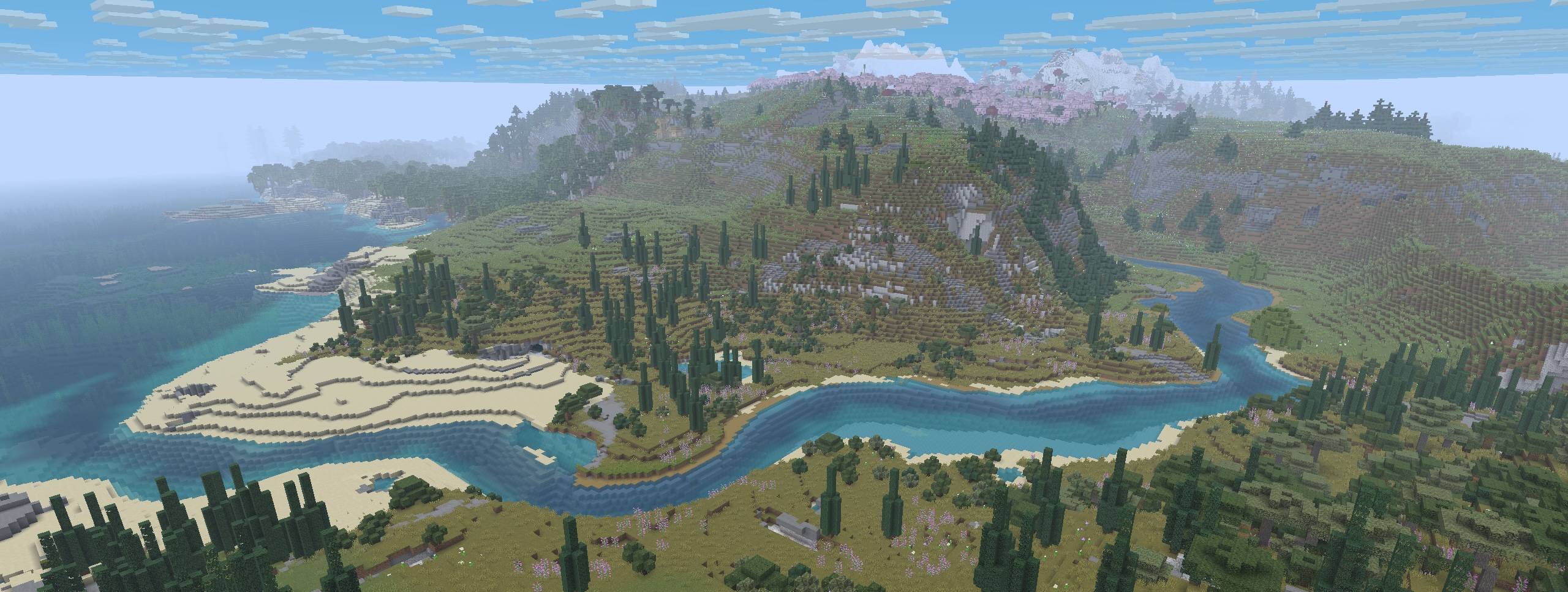
Valley
Valley is a world-gen mod that replaces vanilla rivers with ones that start inland and meander their way to the ocean.
This mod influences the terrain to generate in a more cohesive and natural-looking way creating beautiful rivers, valleys, ridgelines, and mountain chains. (And now that the rivers actually go somewhere, it makes possible a fun new form of navigation and exploration!).
Compatability
Valley is designed as a "drop-in" mod to use alongside other world-gen/biome mods and datapacks (eg Biomes'O'Plenty, Terralith, etc). Mods that entirely overhaul the world-generation or specifically change rivers or continents will probably not work with Valley.
See the gallery for some examples.
Server Setup
Valley can be installed on a modded server.
Clients do not need to have Valley installed in order to connect to the server.
Server setup steps:
- Make sure the server is not running!
- Install the Valley mod to your server's "mods" folder.
- If present, backup and remove the server's existing world.
- Launch the server allowing it to create a new world.
- Done!
Roadmap
This mod is in the early stages of development.
Our plans for future iterations include:
- General refining of the default river/continent settings
- Expose settings to make rivers and continents more easily configurable
- Make it possible to distribute 'presets' that can override Valley's defaults
- Provide GUI enhancements to allow user to preview changes before creating world
Permissions
You are of course free to use this mod in modpacks and to create content/media with it.
We only ask that you do not rehost the jar file.
Please reach out if you'd like us to host on other popular mod-hosting platforms.
Project description from CurseForge.
Pick your setup
Valley by Minecraft version and loader
Choose the version and loader you play, then open the matching release.
Check the dependencies, then try the file in a copied instance before changing a world you care about.
Recent files
Valley versions and loaders
0.1.0-BETA-a32f519-neoforge
Valley-0.1.0-BETA-neoforge-1.21.10.jar
12 Nov 2025
Client Source doesn’t say Server Source doesn’t say Dependencies No extras listed Listed on Release listing
Check the 1.21.10 · NeoForge setup NeoForge1.21.10 beta
0.1.0-BETA-a32f519-forge
Valley-0.1.0-BETA-forge-1.21.10.jar
12 Nov 2025
Client Source doesn’t say Server Source doesn’t say Dependencies No extras listed Listed on Release listing
Check the 1.21.10 · Forge setup Forge1.21.10 beta
0.1.0-BETA-a32f519-fabric
Valley-0.1.0-BETA-fabric-1.21.10.jar
12 Nov 2025
Client Source doesn’t say Server Source doesn’t say Dependencies No extras listed Listed on Release listing
Check the 1.21.10 · Fabric setup Fabric1.21.10 beta
Looking for an older file? The official CurseForge project page is in Resources.