Tetra Needed by TetraOverHoning-6.9.0-1.0.1-fix.jar
requiredMatching file found Matched file: 6.17.0

CurseForge · Minecraft mod
Allows you to continue accumulating honing progress after completing honing.
Quick answer
TetraOverHoning-6.9.0-1.0.1-fix.jar targets 1.20.1 with Forge. The project page does not say whether this file belongs on the client, dedicated server, or both. All 2 required mods have matching files.
Where it goes
The project page does not say whether this file belongs on the client, dedicated server, or both.
The source does not explicitly classify this release as client-only or server-only.
TetraOverHoning-6.9.0-1.0.1-fix.jar. Change the file and its required mods may change too.
Install Tetra, mutil first. We found matching files for this game-version and loader setup. 1 comes through another mod in the chain.
1 extra mod was pulled in by another dependency. Indented rows show who needs each one. We only count dependency files that match this setup. A file for another loader does not fill the gap.
Before you install it
Built for TetraOverHoning-6.9.0-1.0.1-fix.jar. Pick another file and the loader, install side or required mods may change.
Use TetraOverHoning-6.9.0-1.0.1-fix.jar. It targets 1.20.1 with Forge; another release may have different loader, side or dependency requirements.
Install Tetra, mutil first. We found matching files for this game-version and loader setup. 1 comes through another mod in the chain.
The project page does not say whether this file belongs on the client, dedicated server, or both.
Use the “Get this file” button beside TetraOverHoning-6.9.0-1.0.1-fix.jar. It opens that exact file at the source.
About this project
After completing honing, you can continue accumulating honing progress, known as OverHoning.
After processing an item at the crafting station, OverHoning will be converted at a certain ratio into additional honing applied to your item.
You can configure the default conversion rate and maximum conversion rate for OverHoning via the configuration file.
You can also apply the item effect over_honing:conversion to an item to increase its conversion rate.
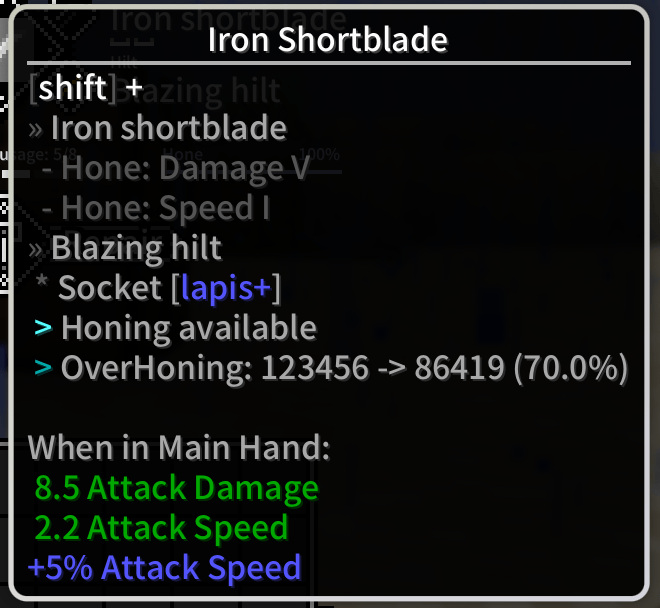
Project description from CurseForge.
Pick your setup
Choose the version and loader you play, then open the matching release.
Check the dependencies, then try the file in a copied instance before changing a world you care about.
Recent files
3 Jun 2026
17 May 2026
16 Nov 2025
Looking for an older file? The official CurseForge project page is in Resources.
 mod
A couple things to balance the mod and some gameplay improvements to the awesome Iron's Spells and Spellbooks mod.
 mod
Disables Lootr chest conversion in singleplayer while keeping per-player loot for multiplayer and LAN worlds.
 mod
It adds a wide variety of RPG-style attributes