
Minecraft version
Back to mods 
CurseForge · Minecraft mod
SpawnerFinder
A client-side Minecraft mod that displays nearby mob spawners in your HUD with color-coded information showing spawner type, coordinates, and distance to help you locate dungeons efficiently.
Choose a version Pick your version below, then grab the matching file.
Quick answer
Which SpawnerFinder release matches Fabric?
Best match for your filters spawnerfinder-2.2.0.jar
Game version 26.2
Loader Fabric
spawnerfinder-2.2.0.jar targets 26.2 with Fabric. The project page does not say whether this file belongs on the client, dedicated server, or both. No extra mods listed for this file.
Where it goes
Is SpawnerFinder required on the client, server, or both?
The project page does not say whether this file belongs on the client, dedicated server, or both.
Client Source doesn’t say
Dedicated server Source doesn’t say
Loader for this release Fabric
Required install it here Optional supported, not mandatory Not supported do not install here Source doesn’t say do not assume
The source does not explicitly classify this release as client-only or server-only.
What else does spawnerfinder-2.2.0.jar need?
spawnerfinder-2.2.0.jar on Fabric. Every mod below is checked against that same setup.
This file does not list any required mods. Do not add a library just because a different file uses it.
This file does not list any required or optional mods.
Before you install it
Add SpawnerFinder without breaking your instance.
Built for spawnerfinder-2.2.0.jar on Fabric. Pick another file and the loader, install side or required mods may change.
- 01
Stick to this file
Use spawnerfinder-2.2.0.jar. It targets 26.2 with Fabric; another release may have different loader, side or dependency requirements.
- 02
Bring the mods it needs
This file does not list any required mods. Do not add a library just because a different file uses it.
- 03
Put it on the correct side
The project page does not say whether this file belongs on the client, dedicated server, or both.
- 04
Pick the file you checked
Use the “Get this file” button beside spawnerfinder-2.2.0.jar. It opens that exact file at the source.
About this project
What does SpawnerFinder add?
SpawnerFinder


A client-side Minecraft mod that displays nearby mob spawners in your HUD with color-coded information showing spawner type, coordinates, and distance to help you locate dungeons efficiently.
[!NOTE] Exciting New Update for Minecraft 26.1! 🚀 We are thrilled to announce the release of SpawnerFinder v2.0.0 built specifically for Minecraft 26.1! This update brings a complete UI overhaul, a powerful multi-spawner grouping engine, smart in-game search functionality with modded spawner support, and massive performance improvements to keep your frame rates high. Read more about the new features below!
📸 Screenshots
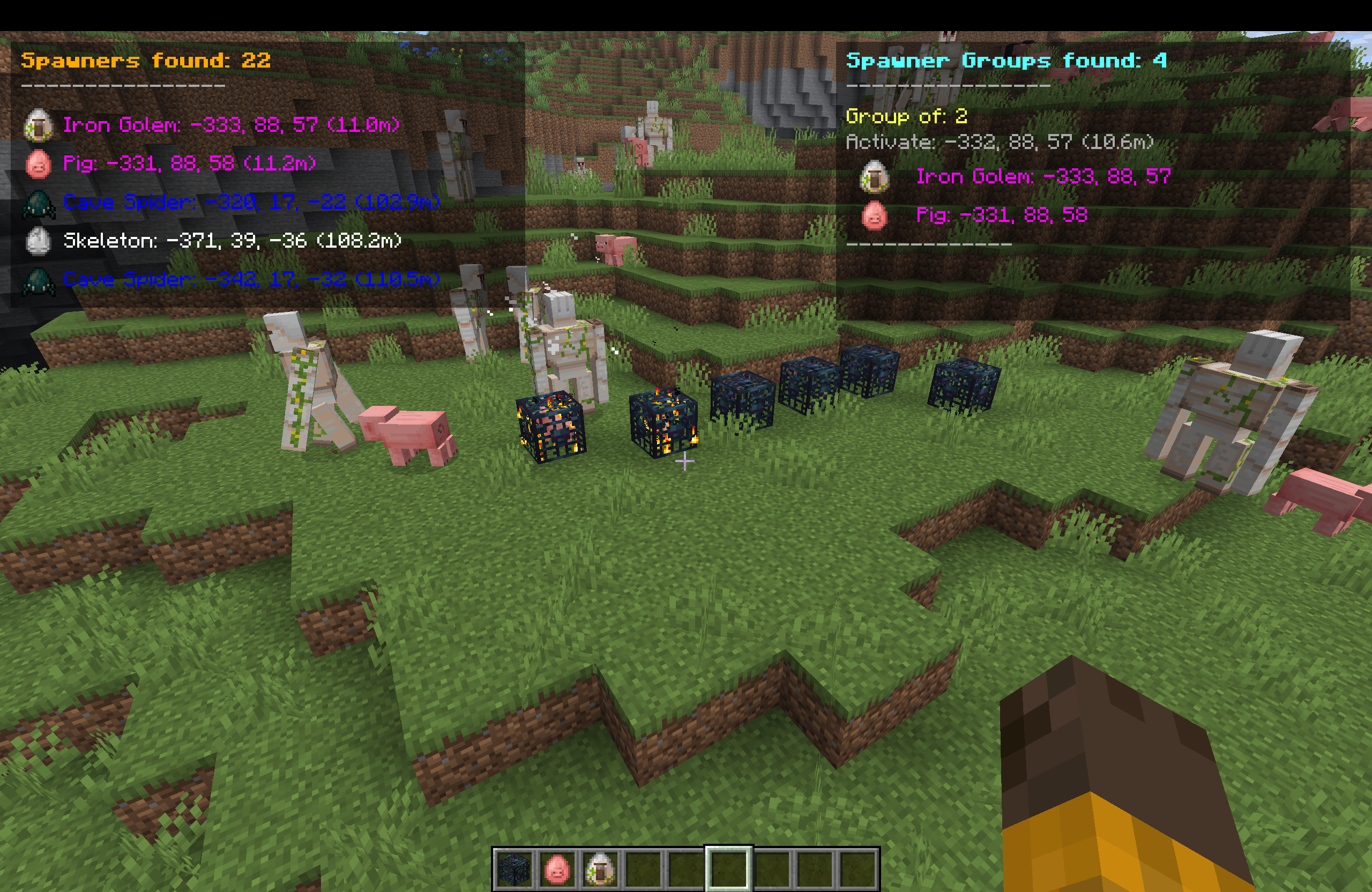 SpawnerFinder HUD displaying nearby mob spawners with coordinates and distances
🎯 Features
Core Functionality
- Real-time Spawner Detection - Automatically scans for mob spawners within a 160-block radius of your position.
- Color-Coded Display - Each mob type has a unique color for instant recognition.
- Distance Tracking - Shows exact distance to each spawner in meters.
- Coordinate Display - Provides precise X, Y, Z coordinates for easy navigation.
- High-Fidelity HUD Overlay - Clean overlay with transparent background boxes to keep stats legible in all environments.
- Mob Head / Spawn Egg Icons - Visual icon renders next to each spawner type for intuitive reading.
Advanced Features (New in v2.0.0)
- Interactive Search GUI - Open with the
Ukey to filter spawners in real-time. Features search suggestions with TAB cycling. - Custom Modpack & Server Support - Scans the game's registry dynamically to identify modded/non-vanilla spawners.
- Spawner Group Finder - Automatically detects spawners within activation range of each other (16 blocks) and calculates the exact coordinate centroid where you should stand to run multiple spawners at the same time.
- Screen-Height Expansion - Toggle between compact (top 5) and expanded list views using the
Ikey to see everything in range.
Supported Mob Types
| Mob Type | Color | Hex Code |
|---|---|---|
| Skeleton | White | #FFFFFF |
| Zombie | Green | #00FF00 |
| Spider | Red | #FF0000 |
| Cave Spider | Blue | #0000FF |
| Magma Cube | Orange | #FF8000 |
| Blaze | Yellow | #FFFF00 |
| Silverfish | Gray | #808080 |
| Unknown Types | Magenta | #FF00FF |
Client-Side Only & Anti-Cheat Safe
- ✅ 100% Client-Side - No server modifications required
- ✅ Server Safe - Cannot be detected by anti-cheat systems
- ✅ No Network Traffic - Uses only locally available data
- ✅ Works on Any Server - Compatible with vanilla and modded servers
- ✅ HUD Only Display - No visual overlays or ESP to avoid behavior detection
📋 Requirements
- Minecraft: 26.1
- Fabric Loader: 0.18.4 or higher
- Fabric API: 0.144.1+26.1 or higher
- Java: 25 or higher
🚀 Installation
- Install Fabric Loader - Download from FabricMC
- Download Fabric API - Get it from Modrinth or CurseForge
- Download SpawnerFinder - Get the latest release from the releases page
- Install the Mod - Place
spawnerfinder-2.0.0.jarin your.minecraft/mods/folder - Launch Minecraft - Start the game with the Fabric profile
🎮 Usage
Keybindings & Controls
You can customize these controls in standard Minecraft settings:
O- Toggle the entire SpawnerFinder HUD ON/OFF.I- Toggle Spawner List between Compact (shows top 5 spawners) and Expanded (shows all spawners in loaded chunks, utilizing the full screen height).U- Open the Spawner Search & Settings Screen.
In-Game Display
Once installed, the mod automatically starts working:
- Left Panel (HUD) - Shows spawners found sorted by distance (closest first) with their specific mob icon, coordinate, and distance format:
Mob Type: X, Y, Z (Distance). - Right Panel (HUD) - Shows groups of spawners found within activation proximity, along with the calculated coordinate centroid labeled
Activate: X, Y, Z. - Automatic Scanning - Scans loaded chunks every 2 seconds asynchronously, ensuring zero performance drops.
Example Display
Closest Spawners:
Skeleton: 245, 23, -156 (12.3m)
Zombie: 267, 18, -145 (28.7m)
Spider: 223, 31, -178 (35.1m)
Cave Spider: 289, 15, -134 (45.6m)
Blaze: 201, 22, -189 (52.4m)
⚠️ Important Behavioral Warnings
Why HUD-Only Design?
This mod intentionally uses HUD display only instead of visual overlays (ESP/wallhacks) for important safety reasons:
- Behavior Tracking Protection - Many servers use behavior analysis that can detect players looking directly at blocks through walls
- Anti-Cheat Evasion - Visual ESP mods can trigger anti-cheat systems when players exhibit "impossible" knowledge
- Natural Gameplay - HUD display encourages normal exploration rather than direct navigation to hidden spawners
Recommended Usage
- ✅ Use coordinates for general direction - Navigate naturally toward the area
- ✅ Explore normally - Don't beeline directly to spawners through walls
- ✅ Mine/dig naturally - Follow normal cave systems and mining patterns
- ❌ Don't stare at walls - Avoid looking directly at spawner locations through blocks
- ❌ Don't tunnel straight - Avoid digging direct paths to spawners
Server Safety Notes
While this mod is technically undetectable:
- Behavior matters more than the mod itself - How you act is what gets you caught
- Play naturally - Use the information as a guide, not a GPS
- Respect server rules - Some servers prohibit any form of spawner detection
- When in doubt, don't use - Better safe than banned
🔧 Technical Details
Performance
- Chunk-Based Scanning - Scans loaded chunk data instead of brute forcing block coordinates, giving massive FPS gains.
- Optimized Cycle - Limits chunk scans to every 2 seconds to maintain 100% stable performance.
- Optimized Range - Scans up to a 10-chunk radius (approx. 160 blocks) efficiently.
- Memory Friendly - Lightweight collections and dynamic registry lookups ensure a negligible memory footprint.
Compatibility
- Fabric Ecosystem - Built using standard Fabric APIs
- Mod Compatibility - Should work alongside most other client-side mods
- Resource Pack Safe - Doesn't interfere with texture packs or shaders
Security & Design Philosophy
- No Server Detection - Uses only client-side world data
- Anti-Cheat Safe - Behaves identically to vanilla client from server perspective
- No Visual ESP - Deliberately avoids rendering overlays to prevent behavior tracking
- HUD-Only Information - Provides data without encouraging suspicious movement patterns
- No Unfair Advantage - Only shows information about loaded chunks
🛠️ Building from Source
Prerequisites
- Java 21 or higher
- Git
Build Steps
# Clone the repository
git clone <repository-url>
cd spawnerfinder

# Build the mod
./gradlew build

# Find the built JAR
ls build/libs/spawnerfinder-2.0.0.jar
📝 License
This project is licensed under the CC0-1.0 License - see the LICENSE file for details.
🤝 Contributing
Contributions are welcome! Please feel free to submit a Pull Request.
Development Setup
- Clone the repository
- Import into your IDE (IntelliJ IDEA recommended)
- Run
./gradlew genEclipseRunsor./gradlew genIntellijRuns - Use the generated run configurations for testing
Contributing Guidelines
- Follow existing code style and patterns
- Test thoroughly before submitting PRs
- Update documentation for new features
- Consider backward compatibility for configuration changes
📞 Support
- Issues - Report bugs or request features via GitHub Issues
- Compatibility - Check the requirements section for supported versions
- Performance - If you experience lag, try reducing render distance
🔄 Version History
v1.0.0
- Initial release
- Basic spawner detection and HUD display
- Support for common mob types
- Client-side only implementation
v1.1.0 - The Massive Update
New Features:
- Spawner Group Finder: Automatically identifies groups of spawners that can be activated simultaneously!
- Displays "Spawner Groups found" on the right side of the HUD.
- Shows the optimal activation coordinates (centroid) where effective farm stacking is possible.
- Lists individual spawners within each group.
- Sorts groups by size (largest groups first) to help you find the best farm locations instantly.
- Keybind Controls:
O: Toggle the entire Mod ON/OFF.I: Expand/Collapse the spawner lists (shows top 5 vs all).
- Performance Overhaul:
- Completely rewrote the scanning engine to use "Loaded Chunks" instead of brute-force block checking.
- Zero Lag Spikes: 100% efficient CPU usage, even on low-end hardware.
- Visual Improvements:
- Improved HUD readability with cleaner fonts and removal of unnecessary shadows.
- "Spawners found" header is now clearly visible with a separator line.
- Right-side HUD for group information to keep the screen organized.
v1.2.0
- Updated to Minecraft 26.1 (Tiny Takeover update)
- Ported to Java 25 compatibility
- Migrated rendering logic to the new
HudElementRegistryAPI
v2.0.0 - The Ultimate Search & UI Update (Minecraft 26.1)
New Features & Enhancements:
- Refined HUD UI:
- Dark transparent background panels behind spawner lists for readability.
- Interactive screen height expansion (toggle between Compact and Expanded view using the
Ikey). - High-fidelity mob icon rendering (using custom mob heads or spawn eggs) right next to each entry on the HUD and in the search screen.
- Advanced Grouping System:
- Automatically identifies groups of spawners located within activation proximity (16-block radius).
- Calculates the exact coordinate centroid where players should stand to activate and run multiple spawners simultaneously.
- Displays groups on the right side of the HUD, sorted by group size (largest first) and distance.
- Dynamic Search & Filtering:
- Brand-new interactive search screen (default keybind:
U). - Real-time search filter by typing mob names to narrow down spawners on the HUD.
- TAB-completion support to cycle through available mob names quickly in the search box.
- Complete support for non-vanilla and modded spawners (dynamically loaded from registry).
- "Vanilla Only" filter toggle to easily switch between base game and custom modded mobs.
- Brand-new interactive search screen (default keybind:
- Significant Performance Tuning:
- Scanning engine uses chunk loading tracking (
LevelChunk) rather than brute-force block inspection, resulting in zero lag spikes and high FPS. - Scanning interval optimized to 2 seconds to run smoothly even on lower-end systems.
- Scanning engine uses chunk loading tracking (
🚨 Disclaimer
This mod is designed for exploration and convenience, not cheating.
Key Points:
- Information Only - Shows data about spawners in loaded chunks, doesn't provide ESP/wallhacks
- Behavior Responsibility - How you use this information determines if you get caught, not the mod itself
- Server Rules - Always check and respect individual server policies regarding client modifications
- Natural Play Encouraged - Use coordinates as guidance for exploration, not direct navigation
Legal Notice:
- This mod only accesses data already available to your Minecraft client
- No server-side detection is possible through technical means
- Player behavior and movement patterns are your responsibility
- The developers are not responsible for any bans resulting from suspicious gameplay behavior
Remember: The goal is enhanced exploration, not circumventing game mechanics. Play responsibly!
Project description from CurseForge.
Pick your setup
SpawnerFinder by Minecraft version and loader
Choose the version and loader you play, then open the matching release.
Minecraft version
26.1.2
1 loader buildMinecraft version
26.1.1
1 loader buildMinecraft version
26.1
1 loader buildMinecraft version
1.21.11-snapshot
1 loader buildMinecraft version
1.21.11
1 loader buildMinecraft version
1.21.10
1 loader buildMinecraft version
1.21.9-snapshot
1 loader buildMinecraft version
1.21.9
1 loader buildMinecraft version
1.21.8
1 loader buildMinecraft version
1.21.7
1 loader buildMinecraft version
1.21.6-snapshot
1 loader buildShowing the newest 12 of 24 game versions. Older files are in the list below.
Check the dependencies, then try the file in a copied instance before changing a world you care about.
Recent files
SpawnerFinder versions and loaders
spawnerfinder-2.2.0.jar
22 Jul 2026
Client Source doesn’t say Server Source doesn’t say Dependencies No extras listed Listed on Release listing
Check the 26.2 · Fabric setup Fabric26.2 release
spawnerfinder-2.1.1.jar
22 Jun 2026
Client Source doesn’t say Server Source doesn’t say Dependencies No extras listed Listed on Release listing
Check the 26.2 · Fabric setup Fabric26.2 release
spawnerfinder-2.1.0.jar
21 Jun 2026
Client Source doesn’t say Server Source doesn’t say Dependencies No extras listed Listed on Release listing
Check the 26.1.2 · Fabric setup Fabric26.126.1.126.1.2 release
spawnerfinder-2.0.0.jar
21 Jun 2026
Client Source doesn’t say Server Source doesn’t say Dependencies No extras listed Listed on Release listing
Check the 26.2 · Fabric setup Fabric26.126.1.126.1.2 release
spawnerfinder-1.2.0.jar
20 Jun 2026
Client Source doesn’t say Server Source doesn’t say Dependencies No extras listed Listed on Release listing
Check the 26.1.2 · Fabric setup Fabric26.126.1.126.1.2 release
spawnerfinder-1.1.2.jar
22 Feb 2026
Client Source doesn’t say Server Source doesn’t say Dependencies No extras listed Listed on Release listing
Check the 1.21.11-snapshot · Fabric setup 1.21.2-Snapshot1.211.21.6-snapshot1.21.1-Snapshot release
spawnerfinder-1.1.1.jar
22 Feb 2026
Client Source doesn’t say Server Source doesn’t say Dependencies No extras listed Listed on Release listing
Check the 1.21.11 · Fabric setup Fabric1.21.11 release
spawnerfinder-1.1.0.jar
23 Jan 2026
Client Source doesn’t say Server Source doesn’t say Dependencies No extras listed Listed on Release listing
Check the 1.21.8 · Fabric setup Fabric1.21.8 release
spawnerfinder-1.0.0.jar
16 Nov 2025
Client Source doesn’t say Server Source doesn’t say Dependencies No extras listed Listed on Release listing
Check the 1.21.8 · Fabric setup Fabric1.21.81.21.61.21.7 release
Looking for an older file? The official CurseForge project page is in Resources.
 mod
mod CurseForge · Minecraft
MineColonies Unofficial Fabric
Unofficial Fabric port of MineColonies for Minecraft 26.2: a colony builder with NPC workers, research and raids, plus boats, block-precise borders and outposts.
 mod
mod CurseForge · Minecraft
Sonic The Hedgehog_
Adds Sonic the Hedgehog
 mod
mod CurseForge · Minecraft
Advanced Mob Leveling
An unofficial Auto Leveling continuation featuring formula-based attributes, KubeJS level controls, LootJS compatibility, and improved configuration formatting.