Minecraft version
Back to mods 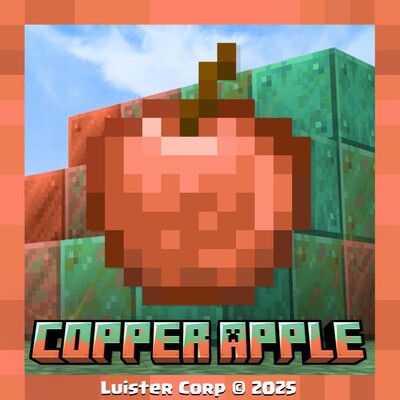
CurseForge · Minecraft mod
Copper Apples
Adds a new Copper Apple to Minecraft, with crafting, advancements, translated into multiple languages, compatible with versions 1.20.5 to 1.21.10!
Choose a version Pick your version below, then grab the matching file.
Quick answer
Which Copper Apples release should I use?
Latest stable file copper-apples-2.13.jar
Game version 1.21.11
Loader Fabric, Forge, NeoForge
Copper Apples copper-apples-2.13.jar targets 1.21.11 with Fabric, Forge, NeoForge. The project page does not say whether this file belongs on the client, dedicated server, or both. No extra mods listed for this file.
Where it goes
Is Copper Apples required on the client, server, or both?
The project page does not say whether this file belongs on the client, dedicated server, or both.
Client Source doesn’t say
Dedicated server Source doesn’t say
Loader for this release Fabric, Forge, NeoForge
Required install it here Optional supported, not mandatory Not supported do not install here Source doesn’t say do not assume
The source does not explicitly classify this release as client-only or server-only.
What else does Copper Apples copper-apples-2.13.jar need?
copper-apples-2.13.jar. Change the file and its required mods may change too.
This file does not list any required mods. Do not add a library just because a different file uses it.
This file does not list any required or optional mods.
Before you install it
Add Copper Apples without breaking your instance.
Built for Copper Apples copper-apples-2.13.jar. Pick another file and the loader, install side or required mods may change.
- 01
Stick to this file
Use copper-apples-2.13.jar. It targets 1.21.11 with Fabric, Forge, NeoForge; another release may have different loader, side or dependency requirements.
- 02
Bring the mods it needs
This file does not list any required mods. Do not add a library just because a different file uses it.
- 03
Put it on the correct side
The project page does not say whether this file belongs on the client, dedicated server, or both.
- 04
Pick the file you checked
Use the “Get this file” button beside copper-apples-2.13.jar. It opens that exact file at the source.
About this project
What does Copper Apples add?
Copper Apples
This Mod adds a new Copper Apple to Minecraft  , when consumed, it will give you the effect of Hatste, it can be crafted as follows:
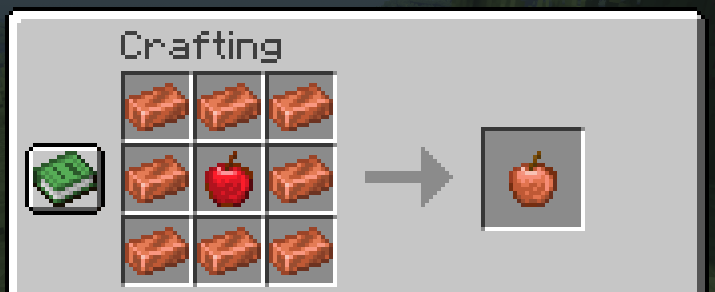
LuisterCorp © - 2025
Notas📝 (Notes)
- Copper Apples is translated into both Spanish, English, French, German, and Russian📇
- Copper Apples is compatible with versions 1.20.5 to 1.21.10🏷️
- Copper Apples adds new (apples) to crafting table🌐
- Copper Apples is compatible with any food Mod
- No it is necessary to unzip the downloaded file 🗂️
- (ResourcePack Requeried)
Nuevo Logro 🏆 (New Advancement)
When you eat the new copper apple, you will receive a new advancement called “Delicius and Rusty” and it will appear as follows:
◾ Imagen (Image) :
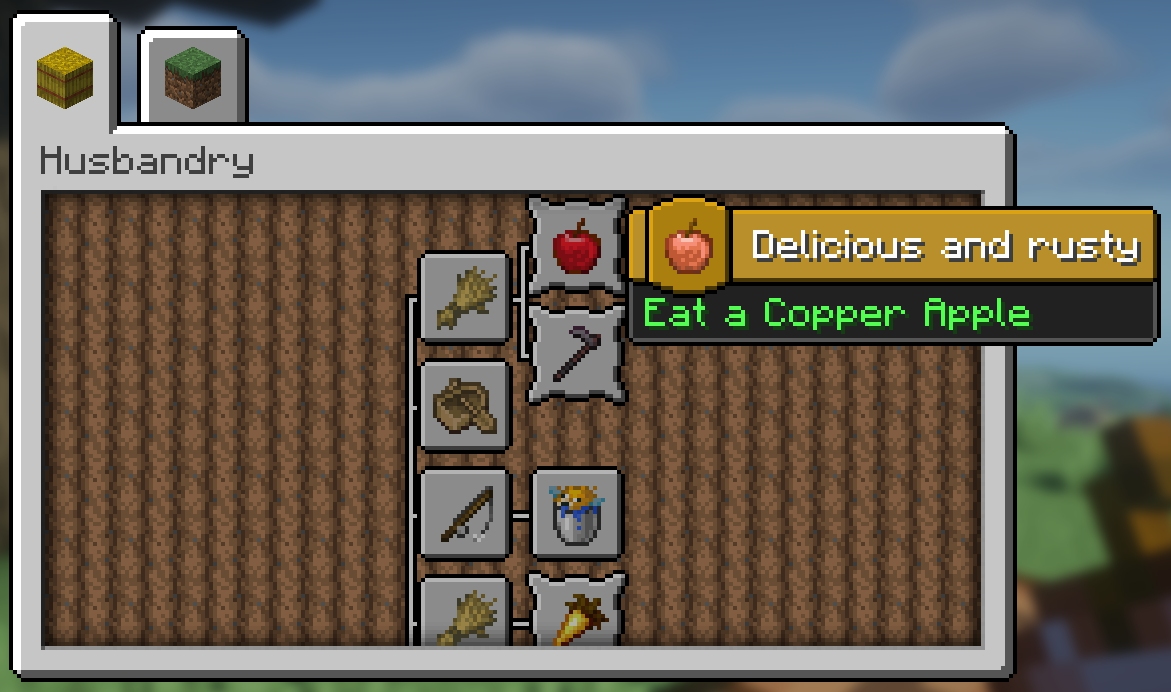
Project description from CurseForge.
Pick your setup
Copper Apples by Minecraft version and loader
Choose the version and loader you play, then open the matching release.
Minecraft version
1.21.10
4 loader buildsMinecraft version
1.21.9
4 loader buildsMinecraft version
1.21.8
4 loader buildsMinecraft version
1.21.7
4 loader buildsMinecraft version
1.21.6
4 loader buildsMinecraft version
1.21.5
4 loader buildsMinecraft version
1.21.4
4 loader buildsMinecraft version
1.21.3
4 loader buildsMinecraft version
1.21.2
4 loader buildsMinecraft version
1.21.1
4 loader buildsMinecraft version
1.21
4 loader buildsShowing the newest 12 of 14 game versions. Older files are in the list below.
Check the dependencies, then try the file in a copied instance before changing a world you care about.
Recent files
Copper Apples versions and loaders
copper-apples-2.13.jar
11 Dec 2025
Client Source doesn’t say Server Source doesn’t say Dependencies No extras listed Listed on Release listing
Check the 1.21.11 · Fabric setup FabricForgeNeoForgeQuilt release
copper-apples-2.12.jar
20 Nov 2025
Client Source doesn’t say Server Source doesn’t say Dependencies No extras listed Listed on Release listing
Check the 1.21.10 · Fabric setup FabricForgeNeoForgeQuilt release
copper-apples-2.11.jar
20 Nov 2025
Client Source doesn’t say Server Source doesn’t say Dependencies No extras listed Listed on Release listing
Check the 1.21.9 · Fabric setup FabricForgeNeoForgeQuilt release
copper-apples-2.10.jar
20 Nov 2025
Client Source doesn’t say Server Source doesn’t say Dependencies No extras listed Listed on Release listing
Check the 1.21.8 · Fabric setup Fabric1.21.8ForgeNeoForge release
copper-apples-2.9.jar
20 Nov 2025
Client Source doesn’t say Server Source doesn’t say Dependencies No extras listed Listed on Release listing
Check the 1.21.7 · Fabric setup FabricForge1.21.7NeoForge release
copper-apples-2.8.jar
20 Nov 2025
Client Source doesn’t say Server Source doesn’t say Dependencies No extras listed Listed on Release listing
Check the 1.21.6 · Fabric setup FabricForge1.21.6NeoForge release
copper-apples-2.7.jar
20 Nov 2025
Client Source doesn’t say Server Source doesn’t say Dependencies No extras listed Listed on Release listing
Check the 1.21.5 · Fabric setup Fabric1.21.5ForgeNeoForge release
copper-apples-2.6.jar
20 Nov 2025
Client Source doesn’t say Server Source doesn’t say Dependencies No extras listed Listed on Release listing
Check the 1.21.4 · Fabric setup Fabric1.21.4ForgeNeoForge release
copper-apples-2.5.jar
20 Nov 2025
Client Source doesn’t say Server Source doesn’t say Dependencies No extras listed Listed on Release listing
Check the 1.21.3 · Fabric setup FabricForge1.21.3NeoForge release
copper-apples-2.4.jar
20 Nov 2025
Client Source doesn’t say Server Source doesn’t say Dependencies No extras listed Listed on Release listing
Check the 1.21.1 · Fabric setup 1.21FabricForge1.21.1 release
copper-apples-2.3.jar
20 Nov 2025
Client Source doesn’t say Server Source doesn’t say Dependencies No extras listed Listed on Release listing
Check the 1.20.6 · Fabric setup Fabric1.20.5Forge1.20.6 release
Looking for an older file? The official CurseForge project page is in Resources.
 mod
CurseForge + Modrinth · Minecraft
ChatSphere
A sleek social chat mod for Minecraft that replaces vanilla chat with channels, private messaging, and a modern GUI.
 mod
CurseForge + Modrinth · Minecraft
ServerUtilities - GTNH
Various utilities for players and admins
 mod
CurseForge + Modrinth · Minecraft
Multi Builder Tool
Build Multiblocks with one click