Minecraft version
Back to mods ![Potion Combiner [Potion Blending Combiner] project artwork](https://media.forgecdn.net/avatars/1548/209/639004788147412831.webp)
CurseForge · Minecraft mod
Potion Combiner [Potion Blending Combiner]
Now you can combine several potions into one, merging all their effects into a single brew.
Choose a version Pick your version below, then grab the matching file.
Quick answer
Which Potion Combiner [Potion Blending Combiner] release should I use?
Latest stable file Potion Combiner - Neoforge - 1.21.1-1.0.0
Game version 1.21.1
Loader NeoForge
Potion Combiner [Potion Blending Combiner] Potion Combiner - Neoforge - 1.21.1-1.0.0 targets 1.21.1 with NeoForge. The project page does not say whether this file belongs on the client, dedicated server, or both. No extra mods listed for this file.
Where it goes
Is Potion Combiner [Potion Blending Combiner] required on the client, server, or both?
The project page does not say whether this file belongs on the client, dedicated server, or both.
Client Source doesn’t say
Dedicated server Source doesn’t say
Loader for this release NeoForge
Required install it here Optional supported, not mandatory Not supported do not install here Source doesn’t say do not assume
The source does not explicitly classify this release as client-only or server-only.
What else does Potion Combiner [Potion Blending Combiner] Potion Combiner - Neoforge - 1.21.1-1.0.0 need?
Potion Combiner - Neoforge - 1.21.1-1.0.0. Change the file and its required mods may change too.
This file does not list any required mods. Do not add a library just because a different file uses it.
This file does not list any required or optional mods.
Before you install it
Add Potion Combiner [Potion Blending Combiner] without breaking your instance.
Built for Potion Combiner [Potion Blending Combiner] Potion Combiner - Neoforge - 1.21.1-1.0.0. Pick another file and the loader, install side or required mods may change.
- 01
Stick to this file
Use Potion Combiner - Neoforge - 1.21.1-1.0.0. It targets 1.21.1 with NeoForge; another release may have different loader, side or dependency requirements.
- 02
Bring the mods it needs
This file does not list any required mods. Do not add a library just because a different file uses it.
- 03
Put it on the correct side
The project page does not say whether this file belongs on the client, dedicated server, or both.
- 04
Pick the file you checked
Use the “Get this file” button beside Potion Combiner - Neoforge - 1.21.1-1.0.0. It opens that exact file at the source.
About this project
What does Potion Combiner [Potion Blending Combiner] add?
Potion Combiner adds a new table capable of mixing up to three potions into a single bottle, combining and unifying all their effects to create much more powerful concoctions.

With this mod, you can combine any type of potion, both normal and splash, and merge their effects into a single bottle. To do this, a new table called Potion Blending Combiner is introduced, a special block created to mix different potions in a simple and intuitive way.
The table is constructed by surrounding a potion table with blocks placed in a ‘U’ shape, as shown in the image. Once in place, the table will react visually to the ingredients: its colour will change depending on the potion you add, indicating which effects you are about to merge.
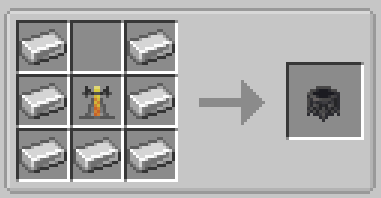
The system allows you to mix up to 3 potions simultaneously, combining all their effects into a single final result. It is ideal for creating advanced potions that are more efficient and have multiple uses during your adventure.
Want to play with friends?
Get your own Minecraft server today and enjoy endless adventures with your friends! With top performance and reliable uptime, our servers guarantee a smooth and fun gaming experience for everyone. Use code THEWIZARDfor a 25% discount!

Project description from CurseForge.
Pick your setup
Potion Combiner [Potion Blending Combiner] by Minecraft version and loader
Choose the version and loader you play, then open the matching release.
Minecraft version
1.20.1
2 loader buildsCheck the dependencies, then try the file in a copied instance before changing a world you care about.
Recent files
Potion Combiner [Potion Blending Combiner] versions and loaders
Potion Combiner - Neoforge - 1.21.1-1.0.0
potion_combiner-1.21.1-Neoforge-1.0.0.jar
24 Nov 2025
Client Source doesn’t say Server Source doesn’t say Dependencies No extras listed Listed on Release listing
Check the 1.21.1 · NeoForge setup 1.21.1NeoForge release
Potion Combiner - Fabric - 1.21.1-1.0.0
potion_combiner-1.21.1-Fabric-1.0.0.jar
24 Nov 2025
Client Source doesn’t say Server Source doesn’t say Dependencies No extras listed Listed on Release listing
Check the 1.21.1 · Fabric setup Fabric1.21.1 release
Potion Combiner - Forge - 1.20.1-1.0.0
potion_combiner-Forge-1.20.1-1.0.0.jar
24 Nov 2025
Client Source doesn’t say Server Source doesn’t say Dependencies No extras listed Listed on Release listing
Check the 1.20.1 · Forge setup 1.20.1Forge release
Potion Combiner - Fabric - 1.20.1-1.0.0
potion_combiner-Fabric-1.20.1-1.0.0.jar
24 Nov 2025
Client Source doesn’t say Server Source doesn’t say Dependencies No extras listed Listed on Release listing
Check the 1.20.1 · Fabric setup Fabric1.20.1 release
Looking for an older file? The official CurseForge project page is in Resources.
 mod
mod CurseForge · Minecraft
Ars Nouveau's Flavors & Delight
Adding 49+ food made with Ars Nouveau's ingredients in Farmer's Delight style, and mechanics interact with spells
 mod
mod CurseForge · Minecraft
RaceCraft RPG - Playable Mob Races & Abilities
A race and gacha system mod that grants unique abilities, attribute boosts, and summonable allies.
 mod
mod CurseForge · Minecraft
AttributeCardExtension
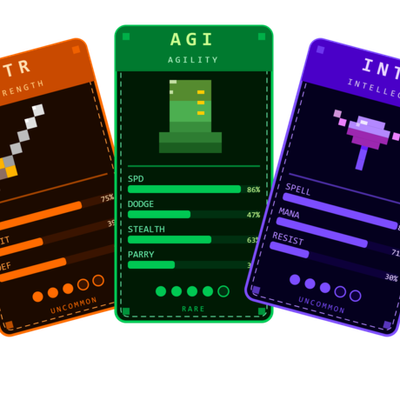
Provides 80+ random attribute upgrade cards to choose !!!