Minecraft version
Back to mods 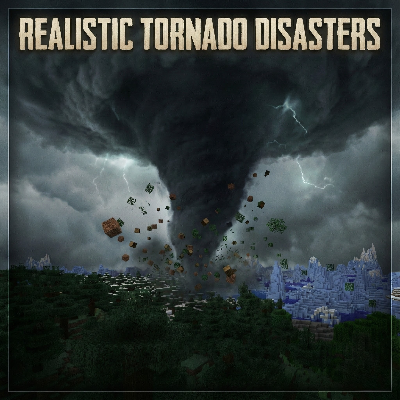
CurseForge · Minecraft mod
Realistic Tornado Disasters
Developing supercells, destructive tornadoes, volumetric clouds, live storm radar and warning instruments. Chase the weather or take shelter.
Choose a version Pick your version below, then grab the matching file.
Quick answer
Which Realistic Tornado Disasters release should I use?
Latest stable file 1.4.4 - Thunder Crackle Fix
Game version 1.21.1
Loader NeoForge
Realistic Tornado Disasters 1.4.4 - Thunder Crackle Fix targets 1.21.1 with NeoForge. The project page does not say whether this file belongs on the client, dedicated server, or both. No extra mods listed for this file.
Where it goes
Is Realistic Tornado Disasters required on the client, server, or both?
The project page does not say whether this file belongs on the client, dedicated server, or both.
Client Source doesn’t say
Dedicated server Source doesn’t say
Loader for this release NeoForge
Required install it here Optional supported, not mandatory Not supported do not install here Source doesn’t say do not assume
The source does not explicitly classify this release as client-only or server-only.
What else does Realistic Tornado Disasters 1.4.4 - Thunder Crackle Fix need?
1.4.4 - Thunder Crackle Fix. Change the file and its required mods may change too.
This file does not list any required mods. Do not add a library just because a different file uses it.
This file does not list any required or optional mods.
Before you install it
Add Realistic Tornado Disasters without breaking your instance.
Built for Realistic Tornado Disasters 1.4.4 - Thunder Crackle Fix. Pick another file and the loader, install side or required mods may change.
- 01
Stick to this file
Use 1.4.4 - Thunder Crackle Fix. It targets 1.21.1 with NeoForge; another release may have different loader, side or dependency requirements.
- 02
Bring the mods it needs
This file does not list any required mods. Do not add a library just because a different file uses it.
- 03
Put it on the correct side
The project page does not say whether this file belongs on the client, dedicated server, or both.
- 04
Pick the file you checked
Use the “Get this file” button beside 1.4.4 - Thunder Crackle Fix. It opens that exact file at the source.
About this project
What does Realistic Tornado Disasters add?
Realistic Tornado Disasters brings developing supercells, changing tornadoes and storm chasing to Minecraft. Watch clouds organize overhead, follow a storm on radar, or get indoors before the wind starts pulling your roof apart.
1.4.2 is a major overhaul of the old version previously available on this page. The weather system, instruments, funnel shapes and terrain handling have all changed, and every custom storm sound has been replaced.
Back up your world before installing. Tornado destruction is enabled by default.
A sky that changes
Volumetric clouds drift across the Overworld even in calm weather. Severe storms grow through thunderstorm and supercell stages, develop a rotating base, and can lower a funnel before weakening and dispersing. Not every storm produces a tornado.
Natural severe-weather opportunities occur every 40–80 active Overworld minutes by default. Storms usually last 8–12 minutes, with tornadoes active for roughly 1–3 minutes. You can change these timings and the number of storms in the config.
Cone, wedge, rope, stovepipe and drill funnels vary in width, strength and motion. Some parent storms can produce up to three tornado cycles. Funnels follow hills and valleys through their lower section while the upper funnel stays connected to its cloud.
Follow the storm
- Craft a Storm Radar to view rain echoes, Doppler wind and hail. Select storms, change range, follow observed tracks and see projected wind corridors. Holding it also displays a compact warning.
- Place a Tornado Detector for watch, warning and take-shelter alerts. Its lamp, siren and redstone output respond to nearby threats; a comparator distinguishes warning levels.
- Use a Weather Probe to read local wind, peak gusts, modeled pressure, rain and hail. It remembers extremes until reset and provides comparator output.
Radar estimates use the storm's current movement. A change in direction or strength can change what reaches you. The instruments are gameplay models, not scientific measurements.
Get under cover
Wind pulls exposed entities, throws debris and damages vulnerable blocks. Material resistance matters: exposed wood, leaves and roofs are more vulnerable than strong masonry. Rain cores bring outflow wind, and hail can hurt exposed players and animals.
Walls reduce wind exposure, while overhead cover blocks local rain and hail. Containers, block entities, fluids and essential world blocks are protected. Tornado damage and shelter checks stay within loaded chunks.
For a gentler world, use NATURAL_ONLY destruction or VISUAL_ONLY in config/realistictornado-common.toml. VISUAL_ONLY preserves blocks but can still apply entity wind. Set terrainDamage=false or disable mobGriefing to prevent terrain damage. Hail damage and storm outflow have separate switches.
Storm sound and graphics
The new sound set includes gusting wind, a sustained tornado roar, heavy rain, rolling thunder and detector sirens. Wind and rain become muffled indoors. Looping ambience fades with storm strength and distance, and thunder arrives after the lightning flash.
The mod renders its own volumetric clouds, funnels, rain and dust. Use Minecraft's Fast or Fancy graphics. Fabulous and external shader packs are not supported for this release. No external shader pack is required.
Volumetric weather can be demanding. Start with the Medium preset, lower it if needed, and adjust cloud distance/count or severe-weather distance in config/realistictornado-client.toml. Optional adaptive resolution reduces weather rendering cost when more than two storms are visible. Block checks, removals, entity checks and debris have shared limits, but large storms can still affect performance.
Installation
Requires Minecraft Java 1.21.1, NeoForge 21.1.250 or newer in the 1.21.1 series, and Java 21. Install realistictornado-1.4.2.jar on the client and server. Remove the old tornado mod JAR first; do not run both versions together. Everyone joining a server should use the same release.
If you are upgrading from the old public build, keep a world backup and test a copy first. Moving a world from that old build to this one has not been tested.
Commands
Use /storm help, /storm status, /storm forecast and /storm inspect for information.
With cheats or operator permission:
/storm spawn supercell
/tornado spawn 3
/tornado demo wedge 5
/tornado outbreak 4 3
/storm clear nearest
/storm clear all
Tornado strengths run from 0–5. Demo shapes are cone, wedge, rope, stovepipe and drill. Spawn commands form storms gradually rather than producing a full tornado instantly.
This project was inspired by ProtoManly's Weather. It is still in development. When reporting a bug, include the mod version, graphics settings and what happened.
Project description from CurseForge.
Pick your setup
Realistic Tornado Disasters by Minecraft version and loader
Choose the version and loader you play, then open the matching release.
Check the dependencies, then try the file in a copied instance before changing a world you care about.
Recent files
Realistic Tornado Disasters versions and loaders
1.4.4 - Thunder Crackle Fix
realistictornado-1.4.4.jar
8 Oct 2026
Client Source doesn’t say Server Source doesn’t say Dependencies No extras listed Listed on Release listing
Check the 1.21.1 · NeoForge setup 1.21.1NeoForge release
1.4.3 - Invisible Tornado & Sound Fix
realistictornado-1.4.3.jar
8 Oct 2026
Client Source doesn’t say Server Source doesn’t say Dependencies No extras listed Listed on Release listing
Check the 1.21.1 · NeoForge setup 1.21.1NeoForge release
1.4.2 - Major Weather Overhaul
realistictornado-1.4.2.jar
16 Sept 2026
Client Source doesn’t say Server Source doesn’t say Dependencies No extras listed Listed on Release listing
Check the 1.21.1 · NeoForge setup 1.21.1NeoForge release
tornado-1.1.0.jar
tornado-1.0.0.jar
28 Nov 2025
Client Source doesn’t say Server Source doesn’t say Dependencies No extras listed Listed on Release listing
Check the 1.21.1 · NeoForge setup 1.21.1NeoForge release
tornado-1.0.1.jar
tornado-1.0.0.jar
28 Nov 2025
Client Source doesn’t say Server Source doesn’t say Dependencies No extras listed Listed on Release listing
Check the 1.21.1 · NeoForge setup 1.21.1NeoForge release
realistic-tornado-1.0.0.jar
tornado-1.0.0.jar
28 Nov 2025
Client Source doesn’t say Server Source doesn’t say Dependencies No extras listed Listed on Release listing
Check the 1.21.1 · NeoForge setup 1.21.1NeoForge release
Looking for an older file? The official CurseForge project page is in Resources.
 mod
CurseForge · Minecraft
Sertão
Brazil's sertão in Minecraft: Caatinga biomes, native trees, northeastern food, a harsh sun and the cowboy's leather gear.
 mod
CurseForge · Minecraft
[CS] Foundation
The Foundational Mod of the [CS] Family
 mod
CurseForge · Minecraft
Ambient Odyssey Campaign
Additive boss rewards, per-player boss milestones and a guarded mastery upgrade for Apotheosis packs.