Architectury API Needed by Block Pops 2.0.2 [NeoForge] [MC 26.3]
requiredMatching file found Matched file: [NeoForge 26.3] v22.0.5
CurseForge · Minecraft mod
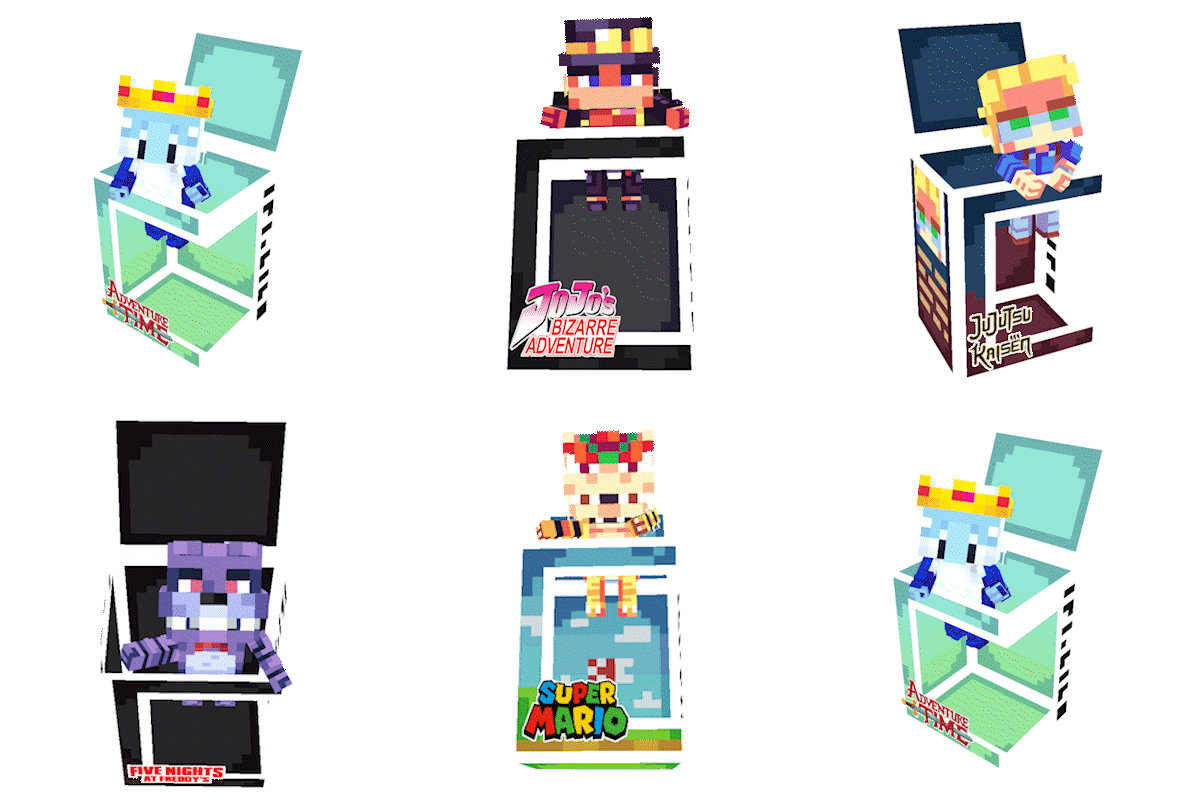
Collectible figures of players from your server and from multiple series/anime/games
Quick answer
Block Pops 2.0.2 [NeoForge] [MC 26.3] targets 26.3 with NeoForge. The project page does not say whether this file belongs on the client, dedicated server, or both. All 2 required mods have matching files.
Where it goes
The project page does not say whether this file belongs on the client, dedicated server, or both.
The source does not explicitly classify this release as client-only or server-only.
Block Pops 2.0.2 [NeoForge] [MC 26.3]. Change the file and its required mods may change too.
Install Architectury API, GeckoLib first. We found matching files for this game-version and loader setup.
We only count dependency files that match this setup. A file for another loader does not fill the gap.
Before you install it
Built for Block Pops 2.0.2 [NeoForge] [MC 26.3]. Pick another file and the loader, install side or required mods may change.
Use Block Pops 2.0.2 [NeoForge] [MC 26.3]. It targets 26.3 with NeoForge; another release may have different loader, side or dependency requirements.
Install Architectury API, GeckoLib first. We found matching files for this game-version and loader setup.
The project page does not say whether this file belongs on the client, dedicated server, or both.
Use the “Get this file” button beside Block Pops 2.0.2 [NeoForge] [MC 26.3]. It opens that exact file at the source.
About this project
Block Pops introduces a collectible figure system to Minecraft. Whether you want to collect characters from your favorite media or miniature versions of your friends, Block Pops brings the thrill of the hunt to your world.
The mod comes with built-in collections with over 150 different starting figures.

This mod is compatible with servers, featuring a special dynamic collection that allows you to obtain figures of all players who have visited the server.

Block Pops uses a fair, time-based token system to help you build your collection. This gives players an incentive to play.

When you first enter the world, you can choose your favorite color. That way, when a player gets your figurine, it will come out of the box in the color you chose.

If you find any conflicts or bug, please report them!
Project description from CurseForge.
Pick your setup
Choose the version and loader you play, then open the matching release.
Check the dependencies, then try the file in a copied instance before changing a world you care about.
Recent files
BlockPops - NeoForge - 26.3-2.0.2.jar
25 Oct 2026
BlockPops - NeoForge - 26.2-2.0.2.jar
25 Oct 2026
BlockPops - NeoForge - 26.1.2-2.0.2.jar
25 Oct 2026
BlockPops - NeoForge - 1.21.8-2.0.2.jar
25 Oct 2026
BlockPops - NeoForge - 1.21.7-2.0.2.jar
25 Oct 2026
BlockPops - NeoForge - 1.21.6-2.0.2.jar
25 Oct 2026
BlockPops - NeoForge - 1.21.5-2.0.2.jar
25 Oct 2026
BlockPops - NeoForge - 1.21.4-2.0.2.jar
25 Oct 2026
BlockPops - NeoForge - 1.21.1-2.0.2.jar
25 Oct 2026
BlockPops - Forge - 1.20.1-2.0.2.jar
25 Oct 2026
BlockPops - Fabric - 26.3-2.0.2.jar
25 Oct 2026
BlockPops - Fabric - 26.2-2.0.2.jar
25 Oct 2026
Looking for an older file? The official CurseForge project page is in Resources.
 mod
modAdd more Jack O' Lantern blocks and light sources! Add any block ID to the configs to add your own!
 mod
modA mod that aims at upgrading and overhauling the basic Minecraft's tools and armors crafting with the introduction of forging to make it more engaging.
 mod
modConfigurable Resource + Data pack loader