Fabric API Needed by Construction Wands Revived ConstructionWandsRevived-26.2-4.0.14-Fabric
requiredMatching file found Matched file: [26.2] Fabric API 0.161.0+26.2
CurseForge · Minecraft mod
Construction Wands make building easier! (A new take on the Builder's Wand) ported 1.21.1 NeoForge
Quick answer
Construction Wands Revived ConstructionWandsRevived-26.2-4.0.14-Fabric targets 26.2 with Fabric. The project page does not say whether this file belongs on the client, dedicated server, or both. All 1 required mods have matching files.
Where it goes
The project page does not say whether this file belongs on the client, dedicated server, or both.
The source does not explicitly classify this release as client-only or server-only.
ConstructionWandsRevived-26.2-4.0.14-Fabric on 26.2. Every mod below is checked against that same setup.
Install Fabric API first. We found matching files for this game-version and loader setup.
We only count dependency files that match this setup. A file for another loader does not fill the gap.
Before you install it
Built for Construction Wands Revived ConstructionWandsRevived-26.2-4.0.14-Fabric on 26.2. Pick another file and the loader, install side or required mods may change.
Use ConstructionWandsRevived-26.2-4.0.14-Fabric. It targets 26.2 with Fabric; another release may have different loader, side or dependency requirements.
Install Fabric API first. We found matching files for this game-version and loader setup.
The project page does not say whether this file belongs on the client, dedicated server, or both.
Use the “Get this file” button beside ConstructionWandsRevived-26.2-4.0.14-Fabric. It opens that exact file at the source.
About this project
Construction Wand Revived Construction Wand Revived
This is an unofficial port of the original version by ThetaDev.
Since the mod is licensed under MIT, I am allowed to fork and update it.
With a Construction Wand you can place multiple blocks (up to 1024) at once, extending your build on the side you're facing. If that's not enough: you can upgrade your wand with additional cores, allowing you to place a block behind the block you are facing, conjure blocks in mid air, destroy lots of blocks very fast or replace a whole wall with another block.

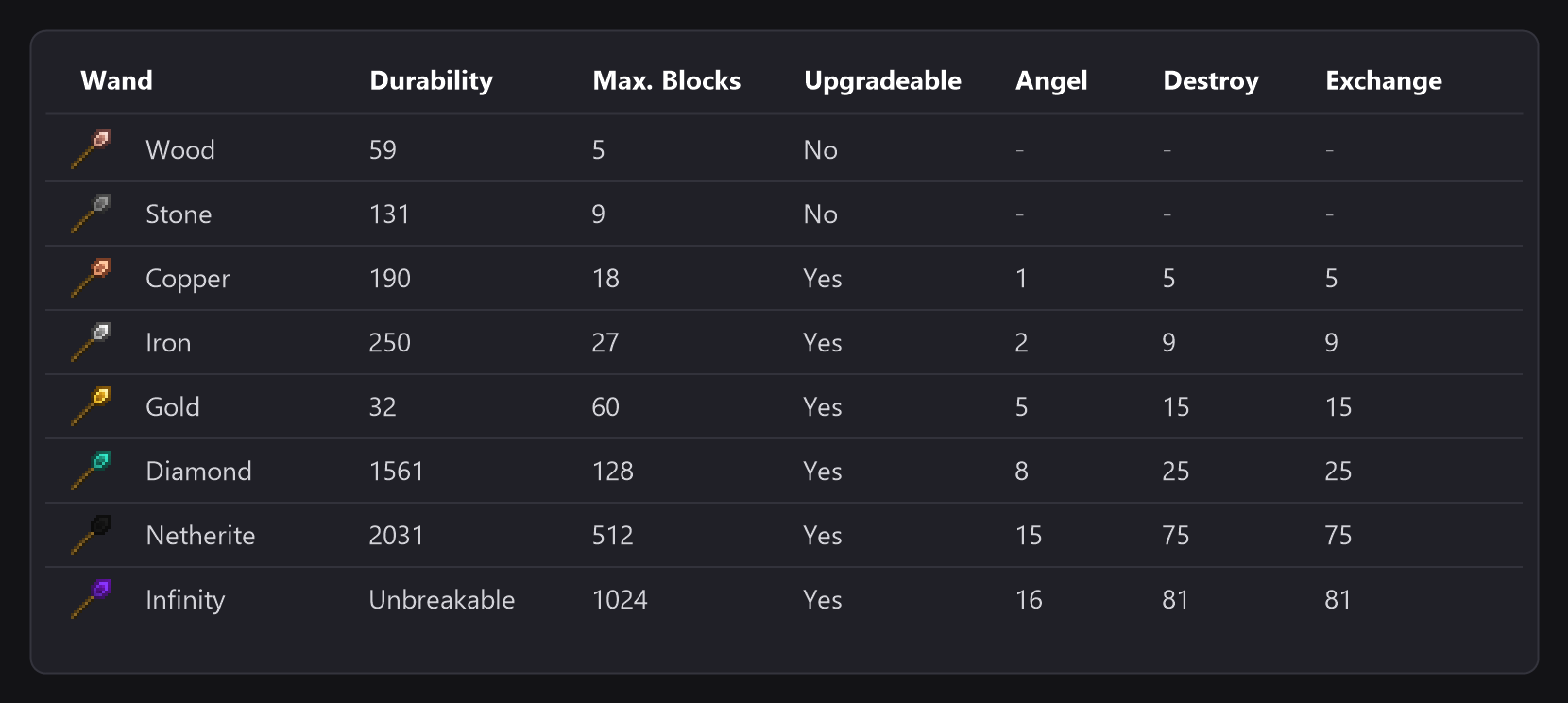
There are basic wands made from wood, stone, copper, iron, gold, diamond and netherite, and the Infinity wand. Wands from higher tiers are more powerful and last longer. These properties can be changed in the config.
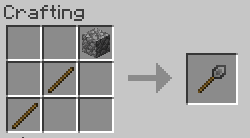
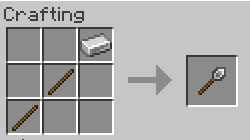
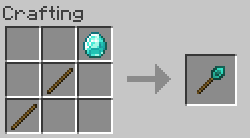
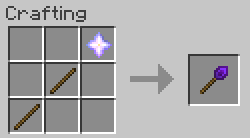
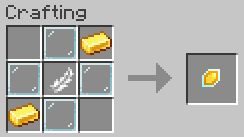
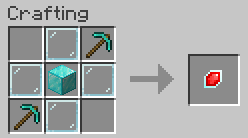
The Copper wand is crafted like the other wands, with copper ingots. Every wand can be enchanted with Silk Touch.
To change a wand's core and options or undo your placement you need to hold down the wand option key (refered as OPTKEY). By default, this is CTRL, but it can be changed in the client config file. To prevent unwanted changes to your options, you can configure that you have to hold down SNEAK as well to change options or open up the GUI.
Wand cores are magical gemstones that make your wand do its thing. Every core has its own overlay on the wand, so you can see which one is active.
Every wand comes with a Construction core. You can make your wand even better by putting aditional cores into it. Put your new core together with your wand in a crafting grid to install it. To switch between cores, hold down OPTKEY and left click empty space with your wand. Stone wands can't be upgraded.
Construction core
Extend your build on the side facing you. Maximum number of blocks depends on wand tier. Hold down OPTKEY and scroll to change placement restriction (Horizontal, Vertical, North/South, East/West, No lock).
Angel core
Place a block on the opposite side of the block (or row of blocks) you are facing. Maximum distance depends on wand tier. Right click empty space to place a block in midair (similar to angel blocks, hence the name). To do that, you'll need to have the block you want to place in your offhand. You can't place a block in midair if you've fallen more than 10 blocks deep (no easy rescue tool from falling into the void).
Destruction core
Destroy blocks (no tile entities) on the side facing you. Maximum number of blocks depends on wand tier. Restrictions work just like with the Construction core.
The drops of the destroyed blocks go to your inventory, or into an active Void Sack. In creative mode, and without a Void Sack, the blocks are simply destroyed. If you don't want the drops in survival either, set DestructionGivesDrops to false in the server config. If the wand is enchanted with Silk Touch, the blocks are broken as a Silk Touch tool would break them. You can use the undo feature if you've made a mistake.
Exchange core
Replace the blocks on the side facing you (or a row of blocks) with another block. To choose the block, look at it with the Exchange core active and press the Select Exchange Block key (Numpad 7 by default, you can change it in the controls). Maximum number of blocks depends on wand tier.
The Energy Upgrade makes a wand run on energy instead of durability. Put it together with the wand in a crafting grid, like a core (it is crafted with 8 copper ingots around a block of redstone). A wand with the upgrade stores up to 100000 FE, every block costs 100 FE (both can be changed in the server config) and the item bar shows the charge. The Infinity wand does not take it.
You can charge the wand with any charger or cable that speaks FE or Team Reborn Energy, and in the AE2 Charger when Applied Energistics 2 is installed.
The Void Sack catches the items the Destruction core breaks (and the ones you pick up) and keeps them in its internal inventory or in a container you link to it. Press the toggle key (M by default) to activate it.
SNEAK+OPTKEY+Right clicking empty space opens the option screen of your wand.
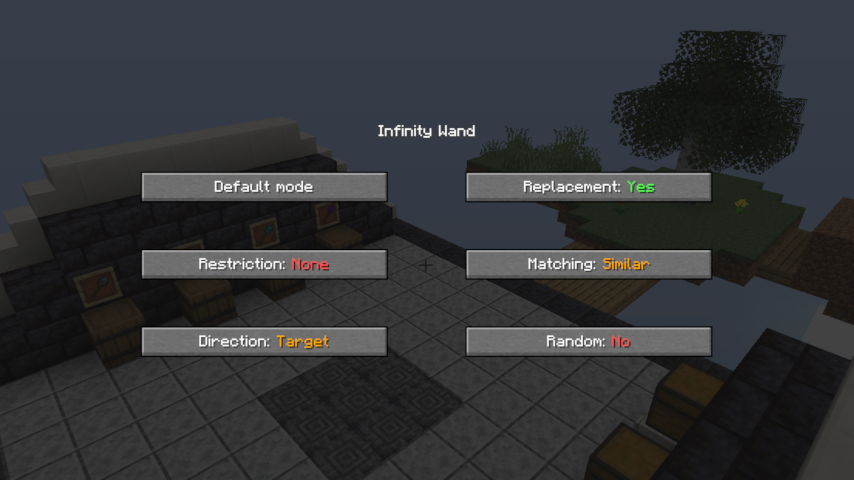
Restriction: If restriction is enabled the wand will only place blocks in one row or column (choose between North/South, East/West on a horizontal plane and Horizontal, Vertical on a vertical plane). If the direction lock is switched off, the wand will extend the entire face of the building it's pointed at. This option has no effect in Angel mode.
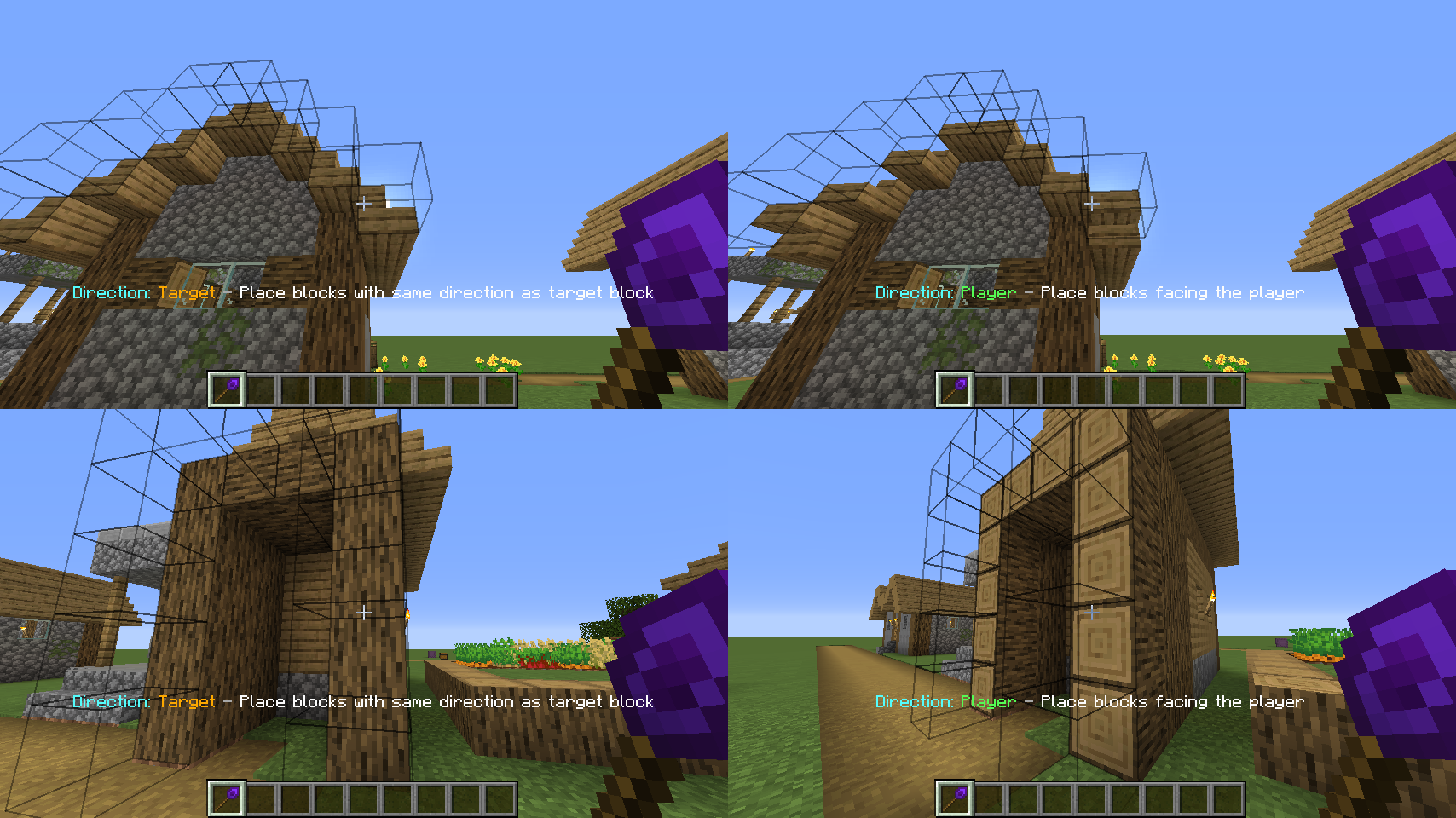
Direction: If set to "Player" the wand places blocks in the same direction as if they were placed by yourself. Target mode places the blocks in the same direction as their supporting block. See the picture below:
Replacement: Enables/disables the replacement of replaceable blocks (Fluids, snow, tallgrass).
Matching: Select which blocks are extended by the wand. If set to "EXACT" it will only extend blocks that are exactly the same as the selected block.
"SIMILAR" will treat similar blocks equally (e.g. extend dirt and grass blocks).
"ANY" will extend any block on the face of the building you're looking at.
Random: If random mode is enabled, the wand places random blocks from your hotbar.Shamelessly stolen Inspired by the Trowel from Quark.
The wand remembers your last operations (3 by default, it can be changed in the server config) and you can undo them in two ways:
What an undo does depends on the core:
Some modded TileEntitys can cause issues when placed using a wand. They may turn into invisible and unremovable ghost blocks, become unbreakable or cause other unwanted effects.
That's why I've included a Black/Whitelist system for TileEntities in CW Version 1.7. Chisels&Bits blocks are blacklisted by default. There are probably a few other tile entities from other mods out there which may cause issues as well. If you find some of them you can tell me by creating an issue, commenting on Curse or editing the default blacklist yourself (it is located at https://github.com/NadienDevMC/Construction-Wands-Revived/blob/multiloader/1.21.1/src/main/java/nadiendev/constructionwand/basics/ConfigServer.java#L31 and making a PR.
Project description from CurseForge.
Pick your setup
Choose the version and loader you play, then open the matching release.
Showing the newest 12 of 15 game versions. Older files are in the list below.
Check the dependencies, then try the file in a copied instance before changing a world you care about.
Recent files
ConstructionWandsRevived-26.2-4.0.14-Fabric.jar
9 Nov 2026
ConstructionWandsRevived-26.2-4.0.14-NeoForge.jar
9 Nov 2026
ConstructionWandsRevived-26.2-4.0.13-Fabric.jar
23 Oct 2026
ConstructionWandsRevived-26.2-4.0.13-NeoForge.jar
23 Oct 2026
ConstructionWandsRevived-26.2-4.0.12-Fabric.jar
22 Oct 2026
ConstructionWandsRevived-26.2-4.0.12-NeoForge.jar
22 Oct 2026
Looking for an older file? The official CurseForge project page is in Resources.
 mod
Make creepers ask for permission before blowing up everything around you!
 mod
Alexandria is a lightweight Minecraft library mod that provides shared utilities and a common foundation for other mods. It doesn’t add gameplay on its own but serves as a core dependency to make mods easier to build and maintain.
 mod
Extend Waystones with compressed and decompressed item payments and combined item costs.