Minecraft version
Back to mods 
CurseForge · Minecraft mod
SwordSight
SwordSight makes weapons ignore grass tall grass and so on! Customizeable to any block.
Choose a version Pick your version below, then grab the matching file.
Quick answer
Which SwordSight release should I use?
Latest stable file SwordSight.jar
Game version 26.3
Loader Fabric
SwordSight.jar targets 26.3 with Fabric. The project page does not say whether this file belongs on the client, dedicated server, or both. No extra mods listed for this file.
Where it goes
Is SwordSight required on the client, server, or both?
The project page does not say whether this file belongs on the client, dedicated server, or both.
Client Source doesn’t say
Dedicated server Source doesn’t say
Loader for this release Fabric
Required install it here Optional supported, not mandatory Not supported do not install here Source doesn’t say do not assume
The source does not explicitly classify this release as client-only or server-only.
What else does SwordSight.jar need?
SwordSight.jar. Change the file and its required mods may change too.
This file does not list any required mods. Do not add a library just because a different file uses it.
This file does not list any required or optional mods.
Before you install it
Add SwordSight without breaking your instance.
Built for SwordSight.jar. Pick another file and the loader, install side or required mods may change.
- 01
Stick to this file
Use SwordSight.jar. It targets 26.3 with Fabric; another release may have different loader, side or dependency requirements.
- 02
Bring the mods it needs
This file does not list any required mods. Do not add a library just because a different file uses it.
- 03
Put it on the correct side
The project page does not say whether this file belongs on the client, dedicated server, or both.
- 04
Pick the file you checked
Use the “Get this file” button beside SwordSight.jar. It opens that exact file at the source.
About this project
What does SwordSight add?
⚔️ SwordSight: Server-Authoritative Hit Through the Clutter
SwordSight enhances combat by preventing blocks like tall grass, flowers, and other non-solid clutter from blocking your weapon's line of sight, allowing you to hit enemies behind them seamlessly.
Alongside the original server-authoritative configuration system, SwordSight ships with a full in-game configuration menu — a JEI/REI-style dual-list picker for choosing exactly which blocks are ignored, with dedicated handling for growth-stage crops so you can decide whether a fully-grown plant should still be farmable with your weapon.
🎯 Features
🖱️ In-Game Configuration Menu
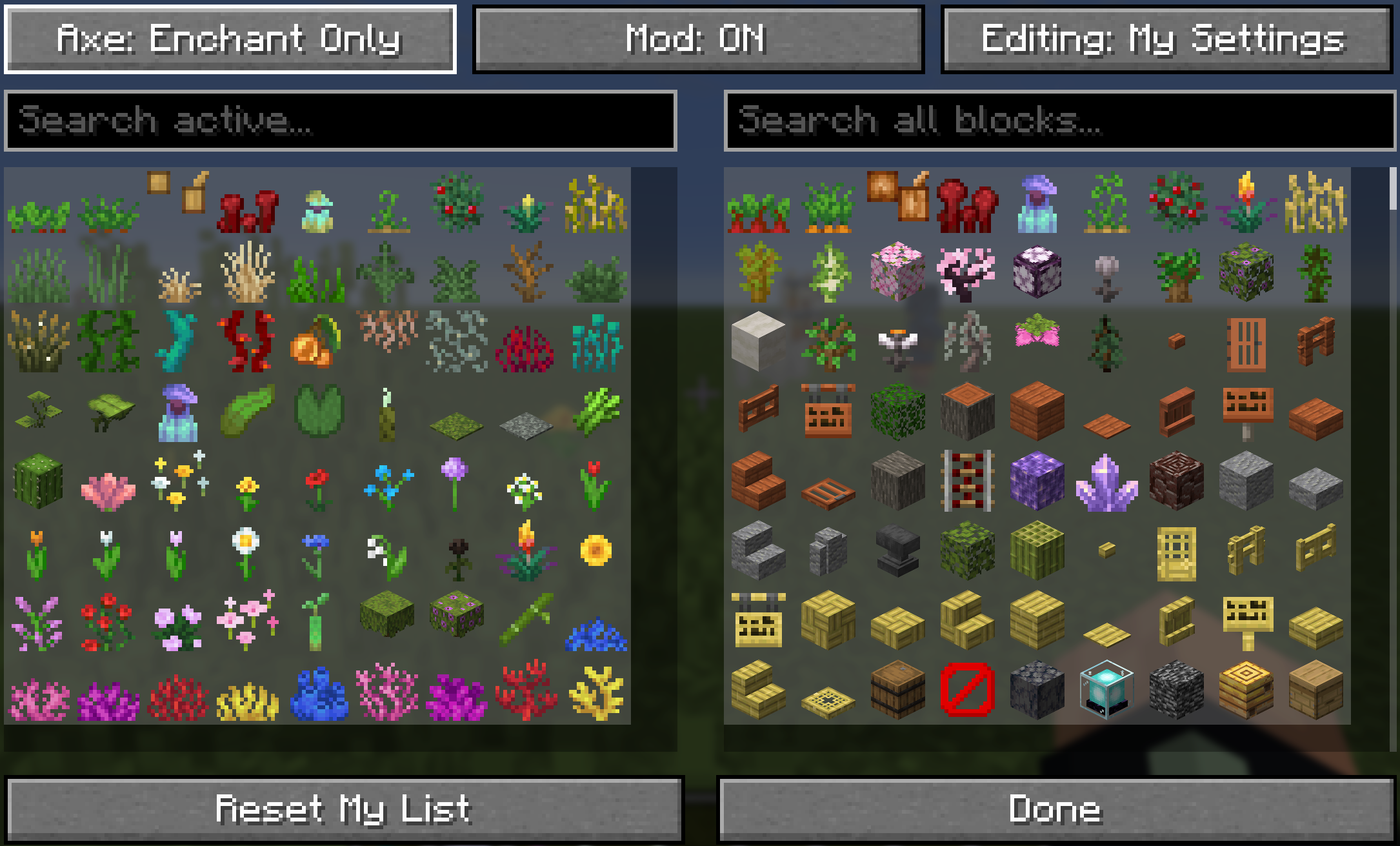
Press M (default, fully rebindable in Controls) or run /swordsight or /swords to open the configuration menu directly.
- Two-List Picker: An Active list on the left (blocks currently ignored) and an All Blocks list on the right (everything else you can enable), just like a JEI/REI item browser. Click an entry on either side to move it across.
- Smart Sorting: The Active list follows a curated order: grasses → other greens → flowers → saplings → coral fans → coral → vanilla creative inventory order. The All Blocks list prioritizes plant matter and modded flora over solid blocks.
- Two Editing Profiles:
My Settings: Always yours to edit, personal, and independent of any server.Editing: Server: Available only in single-player or to authenticated server operators. Server-editing mode tints the list yellow to prevent accidental global overrides.
- Growth-Stage Crops: Wheat, carrots, potatoes, beetroots, cocoa, nether wart, torchflowers, pitcher plants, and sweet berry bushes each get two dedicated entries rendered with their real growth textures:
- Second-to-last stage active: Hits pass through early growth stages, but the fully-grown plant still blocks hits so it remains easily farmable.
- Fully-grown stage active: Hits pass through the plant across all growth stages.
- Clean Icons: Textureless blocks are filtered out, custom player skulls are excluded, and block variants (like torches vs. wall torches) are merged into single entries.
- Reset Profile: Restore your personal profile back to default values at any time.
🌐 Server-Authoritative Configuration
- Multiplayer Consistency: On dedicated servers, the server's block list serves as the source of truth for what can be bypassed.
- Your Settings, Server Permitting: Your personal preferences remain intact, but operate strictly within the bounds of what the server allows.
- Server Operators: Players with operator permissions can toggle to
Editing: Serverto configure the global whitelist in real time. - Vanilla Server Fallback: Connecting to a server without SwordSight automatically switches the client to a bundled, safe fallback list.
- Single-Player: Functions as a self-contained local setup where personal preferences govern all behavior.
🤺 Combat & Weapon Mechanics
- Raycast Override: Intercepts the engine's targeted raycast check, treating non-solid clutter on the whitelist as an empty hitbox for combat swings.
- Performance Cached: Ignored blocks are cached internally as resolved
Blockreferences to maintain zero tick-rate or hit latency. - Automatic Weapon Eligibility: Works automatically with Swords (via the
#minecraft:swordsitem tag), Tridents, and Maces. - Toggleable Axe Support: Configure axe behavior via the menu or chat commands (
Disabled→Enchant Only→Always Enabled).- Enchant Only requires Sharpness, Smite, Bane of Arthropods, or Fire Aspect before hit-through activates.
📧 Contact Me & Support Information
💬 Primary Support Channel (Preferred)
All general questions, feature requests, and non-urgent bug reports should be posted in the appropriate channels on our Discord Server. We actively monitor the server and will respond as soon as possible. This ensures that the whole community can benefit from the discussion and solutions.
🆘 Urgent Private Messaging (PM) Policy
While we prefer all issues to be handled via Discord first, you are welcome to PM me directly under specific urgent circumstances:
- Allowed Reason: Your server is crashing or experiencing critical, game-breaking errors directly related to one of my mods/plugins.
- Requirement: You must be the owner of the server.
- Time Zone: Operating in the Central European Time zone (CET / CEST).
- PM Hours: Please only send private messages between 10:00 AM and 10:00 PM (Brussels Time).
Immediate responses are not guaranteed; private messaging is a professional courtesy, not an entitlement. Thank you for your understanding and cooperation!
📝 Default Ignored Blocks
The shipped default configuration includes a comprehensive list of non-solid plant and clutter blocks:
// --- GRASSES, FERNS, BUSHES ---
"minecraft:short_grass",
"minecraft:tall_grass",
"minecraft:dead_bush",
"minecraft:fern",
"minecraft:large_fern",
"minecraft:short_dry_grass",
"minecraft:tall_dry_grass",
"minecraft:bush",
"minecraft:firefly_bush",

// --- CROPS & GROWABLES ---
"minecraft:sugar_cane",
"minecraft:wheat",
"minecraft:carrots",
"minecraft:potatoes",
"minecraft:beetroots",
"minecraft:cocoa",
"minecraft:nether_wart",
"minecraft:torchflower_crop",
"minecraft:pitcher_crop",
"minecraft:sweet_berry_bush",
"minecraft:bamboo",
"minecraft:bamboo_sapling",
"minecraft:cactus",
"minecraft:cactus_flower",

// --- FLOWERS (Short & Tall) ---
"minecraft:poppy",
"minecraft:dandelion",
"minecraft:allium",
"minecraft:azure_bluet",
"minecraft:red_tulip",
"minecraft:orange_tulip",
"minecraft:white_tulip",
"minecraft:pink_tulip",
"minecraft:oxeye_daisy",
"minecraft:cornflower",
"minecraft:lily_of_the_valley",
"minecraft:wither_rose",
"minecraft:blue_orchid",
"minecraft:torchflower",
"minecraft:sunflower",
"minecraft:lilac",
"minecraft:rose_bush",
"minecraft:peony",
"minecraft:pink_petals",
"minecraft:wildflowers",

// --- VINES, ROOTS, FOLIAGE ---
"minecraft:vine",
"minecraft:twisting_vines",
"minecraft:twisting_vines_plant",
"minecraft:weeping_vines",
"minecraft:weeping_vines_plant",
"minecraft:cave_vines",
"minecraft:cave_vines_plant",
"minecraft:hanging_roots",
"minecraft:glow_lichen",
"minecraft:mangrove_propagule",
"minecraft:mushroom_stem",
"minecraft:crimson_roots",
"minecraft:warped_roots",
"minecraft:azalea",
"minecraft:flowering_azalea",
"minecraft:small_dripleaf",
"minecraft:big_dripleaf",
"minecraft:pitcher_plant",

// --- WATER PLANTS & CORALS ---
"minecraft:seagrass",
"minecraft:tall_seagrass",
"minecraft:kelp",
"minecraft:kelp_plant",
"minecraft:lily_pad",
"minecraft:tube_coral",
"minecraft:brain_coral",
"minecraft:bubble_coral",
"minecraft:fire_coral",
"minecraft:horn_coral",
"minecraft:tube_coral_fan",
"minecraft:brain_coral_fan",
"minecraft:bubble_coral_fan",
"minecraft:fire_coral_fan",
"minecraft:horn_coral_fan",
"minecraft:sea_pickle",
"minecraft:moss_carpet",
"minecraft:pale_moss_carpet"
⚙️ In-Game Commands
Commands accept either /swordsight or /swords. In multiplayer, players without operator permissions can view configuration parameters or modify their personal profile, while server-wide changes require elevated permissions.
| Command | Description | Permission / Context |
|---|---|---|
/swordsight |
Displays command usage links and launches the config menu. | All Players |
/swordsight reload |
Reloads config from disk and refreshes the runtime cache. | Singleplayer / Operators |
/swordsight list |
Prints all active ignored blocks in chat. | All Players |
/swordsight list <item_id> |
Toggles a specific block in the active list. | Singleplayer / Operators |
/swordsight axe |
Cycles Axe Hit-Through (Disabled / Enchant Only / Always Enabled). | Singleplayer / Operators |
/swordsight axe enchant |
Toggles the combat enchantment requirement for axes. | Singleplayer / Operators |
📦 Modpack Policy
- Permitted: You are free to include this mod in any public or private modpack.
- Integrity: Do not modify, re-host, or alter the original mod binary/JAR file directly.
- Monetization: Neither the modpack itself nor access to this mod within the pack may be monetized or locked behind a paywall.
Project description from CurseForge.
Pick your setup
SwordSight by Minecraft version and loader
Choose the version and loader you play, then open the matching release.
Minecraft version
26.2
1 loader buildMinecraft version
26.1.2
1 loader buildMinecraft version
26.1.1
1 loader buildMinecraft version
26.1
1 loader buildMinecraft version
1.21.11
1 loader buildMinecraft version
1.21.10
1 loader buildMinecraft version
1.21.9
1 loader buildMinecraft version
1.21.8
1 loader buildMinecraft version
1.21.7
1 loader buildMinecraft version
1.21.6
1 loader buildMinecraft version
1.21.5
1 loader buildShowing the newest 12 of 17 game versions. Older files are in the list below.
Check the dependencies, then try the file in a copied instance before changing a world you care about.
Recent files
SwordSight versions and loaders
SwordSight.jar
swordsight-1.2.jar
15 Sept 2026
Client Source doesn’t say Server Source doesn’t say Dependencies No extras listed Listed on Release listing
Check the 26.3 · Fabric setup Fabric26.3 release
SwordSight.jar
swordsight-1.2.jar
10 Sept 2026
Client Source doesn’t say Server Source doesn’t say Dependencies No extras listed Listed on Release listing
Check the 26.2 · Fabric setup Fabric26.2 release
SwordSight.jar
swordsight-1.2.jar
10 Sept 2026
Client Source doesn’t say Server Source doesn’t say Dependencies No extras listed Listed on Release listing
Check the 26.1.2 · Fabric setup Fabric26.126.1.126.1.2 release
SwordSight.jar
swordsight-1.2.jar
9 Sept 2026
Client Source doesn’t say Server Source doesn’t say Dependencies No extras listed Listed on Release listing
Check the 1.21.11 · Fabric setup Fabric1.21.11 release
SwordSight.jar
swordsight-1.2.jar
9 Sept 2026
Client Source doesn’t say Server Source doesn’t say Dependencies No extras listed Listed on Release listing
Check the 1.21.10 · Fabric setup Fabric1.21.91.21.10 release
SwordSight.jar
swordsight-1.2.jar
9 Sept 2026
Client Source doesn’t say Server Source doesn’t say Dependencies No extras listed Listed on Release listing
Check the 1.21.8 · Fabric setup Fabric1.21.81.21.61.21.7 release
SwordSight.jar
swordsight-1.2.jar
9 Sept 2026
Client Source doesn’t say Server Source doesn’t say Dependencies No extras listed Listed on Release listing
Check the 1.21.5 · Fabric setup Fabric1.21.5 release
SwordSight.jar
swordsight-1.2.jar
9 Sept 2026
Client Source doesn’t say Server Source doesn’t say Dependencies No extras listed Listed on Release listing
Check the 1.21.4 · Fabric setup Fabric1.21.4 release
SwordSight.jar
swordsight-1.2.jar
9 Sept 2026
Client Source doesn’t say Server Source doesn’t say Dependencies No extras listed Listed on Release listing
Check the 1.21.3 · Fabric setup Fabric1.21.31.21.2 release
SwordSight.jar
swordsight-1.2.jar
9 Sept 2026
Client Source doesn’t say Server Source doesn’t say Dependencies No extras listed Listed on Release listing
Check the 1.21.1 · Fabric setup 1.21Fabric1.21.1 release
SwordSight.jar
swordsight-1.1.jar
9 Sept 2026
Client Source doesn’t say Server Source doesn’t say Dependencies No extras listed Listed on Release listing
Check the 26.2 · Fabric setup Fabric26.2 release
swordsight.jar
swordsight-1.1.jar
9 Sept 2026
Client Source doesn’t say Server Source doesn’t say Dependencies No extras listed Listed on Release listing
Check the 26.1.2 · Fabric setup Fabric26.126.1.126.1.2 release
Looking for an older file? The official CurseForge project page is in Resources.
 mod
mod CurseForge · Minecraft
Passive Mobs
Make all mobs passive
 mod
mod CurseForge · Minecraft
Equipment Stealer
Steal weapons and armor directly from mobs in real time with immersive 3D animations custom sounds and dynamic visual effects!
 mod
mod CurseForge · Minecraft
Bagus Lib
This mod is using baguchi's mod and you can use too!