Minecraft version
Back to mods ![Multi Arrow Effects [Multiple Effects on One Arrow] project artwork](https://media.forgecdn.net/avatars/1579/683/639022811071378857.webp)
CurseForge · Minecraft mod
Multi Arrow Effects [Multiple Effects on One Arrow]
Combine arrows with potion effects and carry multiple effects in a single shot.
Choose a version Pick your version below, then grab the matching file.
Quick answer
Which Multi Arrow Effects [Multiple Effects on One Arrow] release should I use?
Latest stable file MultiArrowEffects-Neoforge-1.21.1-1.0.0
Game version 1.21.1
Loader NeoForge
Multi Arrow Effects [Multiple Effects on One Arrow] MultiArrowEffects-Neoforge-1.21.1-1.0.0 targets 1.21.1 with NeoForge. The project page does not say whether this file belongs on the client, dedicated server, or both. No extra mods listed for this file.
Where it goes
Is Multi Arrow Effects [Multiple Effects on One Arrow] required on the client, server, or both?
The project page does not say whether this file belongs on the client, dedicated server, or both.
Client Source doesn’t say
Dedicated server Source doesn’t say
Loader for this release NeoForge
Required install it here Optional supported, not mandatory Not supported do not install here Source doesn’t say do not assume
The source does not explicitly classify this release as client-only or server-only.
What else does Multi Arrow Effects [Multiple Effects on One Arrow] MultiArrowEffects-Neoforge-1.21.1-1.0.0 need?
MultiArrowEffects-Neoforge-1.21.1-1.0.0. Change the file and its required mods may change too.
This file does not list any required mods. Do not add a library just because a different file uses it.
This file does not list any required or optional mods.
Before you install it
Add Multi Arrow Effects [Multiple Effects on One Arrow] without breaking your instance.
Built for Multi Arrow Effects [Multiple Effects on One Arrow] MultiArrowEffects-Neoforge-1.21.1-1.0.0. Pick another file and the loader, install side or required mods may change.
- 01
Stick to this file
Use MultiArrowEffects-Neoforge-1.21.1-1.0.0. It targets 1.21.1 with NeoForge; another release may have different loader, side or dependency requirements.
- 02
Bring the mods it needs
This file does not list any required mods. Do not add a library just because a different file uses it.
- 03
Put it on the correct side
The project page does not say whether this file belongs on the client, dedicated server, or both.
- 04
Pick the file you checked
Use the “Get this file” button beside MultiArrowEffects-Neoforge-1.21.1-1.0.0. It opens that exact file at the source.
About this project
What does Multi Arrow Effects [Multiple Effects on One Arrow] add?

Multi Arrow Effects adds a new crafting mechanic that lets you merge up to three potion effects into a single arrow, unifying all their properties to create incredibly versatile and strategic projectiles.

This mod allows you to combine potion arrows and merge their properties into a single shot. You can stack up to 3 different potion effects on one arrow, creating powerful projectiles that apply multiple effects at once.
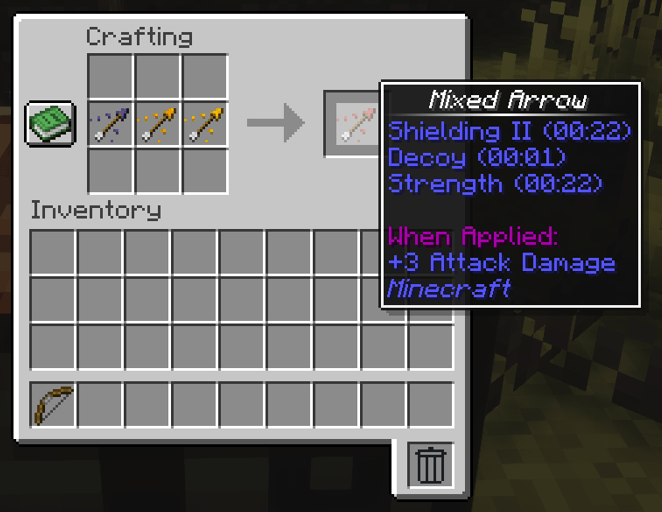
All settings are fully configurable: you can adjust the maximum number of combined effects, tweak durations, block specific potions, or change crafting behavior directly from the config file, making the system fit any world or modpack.
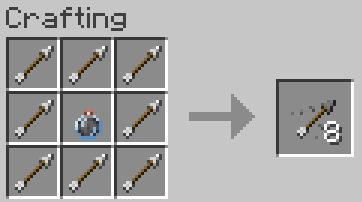
It is fully compatible with other arrow and potion mods, allowing effects from any potion in the game. Potion arrows are created by surrounding a lingering potion with arrows, letting you apply any effect and later merge them into a single enhanced projectile.
Want to play with friends?
Get your own Minecraft server today and enjoy endless adventures with your friends! With top performance and reliable uptime, our servers guarantee a smooth and fun gaming experience for everyone. Use code THEWIZARDfor a 25% discount!

Project description from CurseForge.
Pick your setup
Multi Arrow Effects [Multiple Effects on One Arrow] by Minecraft version and loader
Choose the version and loader you play, then open the matching release.
Minecraft version
1.20.1
2 loader buildsCheck the dependencies, then try the file in a copied instance before changing a world you care about.
Recent files
Multi Arrow Effects [Multiple Effects on One Arrow] versions and loaders
MultiArrowEffects-Neoforge-1.21.1-1.0.0
MultiArrowEffects-Neoforge-1.21.1-1.0.0.jar
2 Dec 2025
Client Source doesn’t say Server Source doesn’t say Dependencies No extras listed Listed on Release listing
Check the 1.21.1 · NeoForge setup 1.21.1NeoForge release
MultiArrowEffects-Fabric-1.21.1-1.0.0
MultiArrowEffects-Fabric-1.21.1-1.0.0.jar
2 Dec 2025
Client Source doesn’t say Server Source doesn’t say Dependencies No extras listed Listed on Release listing
Check the 1.21.1 · Fabric setup Fabric1.21.1 release
MultiArrowEffects-Forge-1.20.1-1.0.0
MultiArrowEffects-Forge-1.20.1-1.0.0.jar
2 Dec 2025
Client Source doesn’t say Server Source doesn’t say Dependencies No extras listed Listed on Release listing
Check the 1.20.1 · Forge setup 1.20.1Forge release
MultiArrowEffects-Fabric-1.20.1-1.0.0
MultiArrowEffects-Fabric-1.20.1-1.0.0.jar
2 Dec 2025
Client Source doesn’t say Server Source doesn’t say Dependencies No extras listed Listed on Release listing
Check the 1.20.1 · Fabric setup Fabric1.20.1 release
Looking for an older file? The official CurseForge project page is in Resources.
 mod
mod CurseForge + Modrinth · Minecraft
Nicer Portals
Various small improvements to portals.
 mod
mod CurseForge · Minecraft
Unified Works: Quarry
An automated quarry that extracts natural resources based on your dimension, pickaxe tier, and enchantments.
 mod
mod CurseForge · Minecraft
Unified Works: Woodcutter
An automated machine for growing and harvesting trees using saplings and axes.