Minecraft version
Back to mods 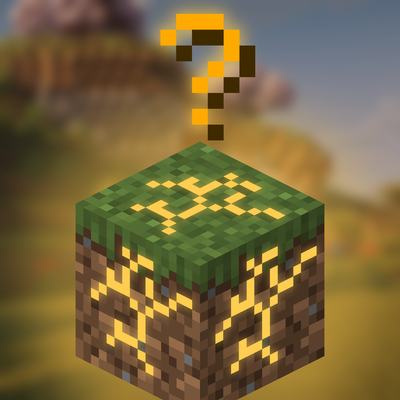
CurseForge · Minecraft mod
Lucky Block Worlds
Disguised Lucky Blocks generate throughout the world! Be careful where you mine!
Choose a version Pick your version below, then grab the matching file.
Quick answer
Which Lucky Block Worlds release should I use?
Latest stable file luckyblockworld-1.2.1+neoforge-26.3.jar
Game version 26.3
Loader NeoForge
Lucky Block Worlds luckyblockworld-1.2.1+neoforge-26.3.jar targets 26.3 with NeoForge. The project page does not say whether this file belongs on the client, dedicated server, or both. No extra mods listed for this file.
Where it goes
Is Lucky Block Worlds required on the client, server, or both?
The project page does not say whether this file belongs on the client, dedicated server, or both.
Client Source doesn’t say
Dedicated server Source doesn’t say
Loader for this release NeoForge
Required install it here Optional supported, not mandatory Not supported do not install here Source doesn’t say do not assume
The source does not explicitly classify this release as client-only or server-only.
What else does Lucky Block Worlds luckyblockworld-1.2.1+neoforge-26.3.jar need?
luckyblockworld-1.2.1+neoforge-26.3.jar. Change the file and its required mods may change too.
This file does not list any required mods. Do not add a library just because a different file uses it.
This file does not list any required or optional mods.
Before you install it
Add Lucky Block Worlds without breaking your instance.
Built for Lucky Block Worlds luckyblockworld-1.2.1+neoforge-26.3.jar. Pick another file and the loader, install side or required mods may change.
- 01
Stick to this file
Use luckyblockworld-1.2.1+neoforge-26.3.jar. It targets 26.3 with NeoForge; another release may have different loader, side or dependency requirements.
- 02
Bring the mods it needs
This file does not list any required mods. Do not add a library just because a different file uses it.
- 03
Put it on the correct side
The project page does not say whether this file belongs on the client, dedicated server, or both.
- 04
Pick the file you checked
Use the “Get this file” button beside luckyblockworld-1.2.1+neoforge-26.3.jar. It opens that exact file at the source.
About this project
What does Lucky Block Worlds add?
**Lucky Block World:**Lucky Block World introduces lucky blocks in a fun and non invasive way to your Minecraft world. Instead of having to craft or replace blocks in your world with generated ones, Lucky Block World tags existing blocks after generation with one of five luck tiers: very unlucky, unlucky, neutral, lucky, and very lucky.
Compatibility:
Lucky Block World uses a non invasive method and should allow for custom mod compatibility due to the tagging occuring after world generation. It also allows for any block to be tagged that is breakable, whether it is vanilla or modded, so be careful when you decide to take that villager's crafting table.
Lucky Events:
Lucky Block World has a 5 tier system with over 140 events and growing, some are more fair than others but should allow for a semi-balanced amount of fun vs. challenge. Blocks currently have a .5% chance to receive a tag that is then given a weighted change to be lucky/unlucky, followed by neutral, followed by very lucky/very unlucky. After this the event that occurs is random from the pool of events in a tier. Events can be fully customized in the config to have higher/lower chances of every tier/event/world gen tagging. Custom events are almost working and will be 100% ready in the next update.
DISCLAIMER :
Testing was done on my own and not all situations were tested, if you find any issues regarding generation, events, compatibility, multiplayer, performance, etc. or just have ideas for future updates or would like to see a different loader/version let me know!
Project description from CurseForge.
Pick your setup
Lucky Block Worlds by Minecraft version and loader
Choose the version and loader you play, then open the matching release.
Minecraft version
26.2
2 loader buildsMinecraft version
26.1.2
2 loader buildsMinecraft version
26.1
2 loader buildsMinecraft version
1.21.1-Snapshot
1 loader buildMinecraft version
1.21.1
2 loader buildsMinecraft version
1.20.1
2 loader buildsCheck the dependencies, then try the file in a copied instance before changing a world you care about.
Recent files
Lucky Block Worlds versions and loaders
luckyblockworld-1.2.1+neoforge-26.3.jar
11 Oct 2026
Client Source doesn’t say Server Source doesn’t say Dependencies No extras listed Listed on Release listing
Check the 26.3 · NeoForge setup NeoForge26.3 release
luckyblockworld-1.2.1+fabric-26.3.jar
11 Oct 2026
Client Source doesn’t say Server Source doesn’t say Dependencies 1 required · 1 unchecked Listed on Release listing
Check the 26.3 · Fabric setup Fabric26.3 release
luckyblockworld-1.2.1+neoforge-26.2.jar
11 Oct 2026
Client Source doesn’t say Server Source doesn’t say Dependencies No extras listed Listed on Release listing
Check the 26.2 · NeoForge setup NeoForge26.2 release
luckyblockworld-1.2.1+fabric-26.2.jar
11 Oct 2026
Client Source doesn’t say Server Source doesn’t say Dependencies 1 required · 1 unchecked Listed on Release listing
Check the 26.2 · Fabric setup Fabric26.2 release
luckyblockworld-1.2.1+neoforge-26.1.2.jar
11 Oct 2026
Client Source doesn’t say Server Source doesn’t say Dependencies No extras listed Listed on Release listing
Check the 26.1.2 · NeoForge setup NeoForge26.1.2 release
luckyblockworld-1.2.1+fabric-26.1.2.jar
11 Oct 2026
Client Source doesn’t say Server Source doesn’t say Dependencies 1 required · 1 unchecked Listed on Release listing
Check the 26.1.2 · Fabric setup Fabric26.1.2 release
luckyblockworld-1.2.1+neoforge-26.1.jar
11 Oct 2026
Client Source doesn’t say Server Source doesn’t say Dependencies No extras listed Listed on Release listing
Check the 26.1 · NeoForge setup NeoForge26.1 release
luckyblockworld-1.2.1+fabric-26.1.jar
11 Oct 2026
Client Source doesn’t say Server Source doesn’t say Dependencies 1 required · 1 unchecked Listed on Release listing
Check the 26.1 · Fabric setup Fabric26.1 release
luckyblockworld-1.2.1+neoforge-1.21.1.jar
11 Oct 2026
Client Source doesn’t say Server Source doesn’t say Dependencies No extras listed Listed on Release listing
Check the 1.21.1 · NeoForge setup 1.21.1NeoForge release
luckyblockworld-1.2.1+fabric-1.21.1.jar
11 Oct 2026
Client Source doesn’t say Server Source doesn’t say Dependencies 1 required · 1 unchecked Listed on Release listing
Check the 1.21.1 · Fabric setup Fabric1.21.1 release
luckyblockworld-1.2.1+fabric-1.20.1.jar
11 Oct 2026
Client Source doesn’t say Server Source doesn’t say Dependencies 1 required · 1 unchecked Listed on Release listing
Check the 1.20.1 · Fabric setup Fabric1.20.1 release
luckyblockworld-1.2.1+forge-1.20.1.jar
11 Oct 2026
Client Source doesn’t say Server Source doesn’t say Dependencies No extras listed Listed on Release listing
Check the 1.20.1 · Forge setup 1.20.1Forge release
Looking for an older file? The official CurseForge project page is in Resources.
 mod
CurseForge + Modrinth · Minecraft
D.Difficulty+
An Addon for Dungeon Difficulty that adds level ranges, damage type resistance to mobs or players, custom zone effects.
 mod
CurseForge + Modrinth · Minecraft
InventoryExchange
InventoryExchange is a Minecraft mod that extends player inventory management and integrates with ProjectE’s EMC & knowledge systems to provide a creative-like experience while in survival mode.
 mod
CurseForge + Modrinth · Minecraft
Player Animation Library More Rotation
A library that extends Player Animation Library and bendable-cuboids with improved player animation rotation, bend deformation, and playback sync support.