Minecraft version
Back to mods 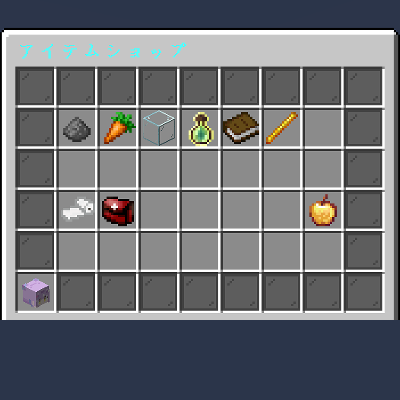
CurseForge · Minecraft mod
Plugin Stlye Shop
A customizable plugin-style GUI shop mod featuring dynamic pricing and team integration.
Choose a version Pick your version below, then grab the matching file.
Quick answer
Which Plugin Stlye Shop release matches 1.20.1 Forge?
Best match for your filters plugin_style_shop-1.20.1-0.1.0-bata.5.jar
Game version 1.20.1
Loader Forge
Plugin Stlye Shop plugin_style_shop-1.20.1-0.1.0-bata.5.jar targets 1.20.1 with Forge. The project page does not say whether this file belongs on the client, dedicated server, or both. No extra mods listed for this file.
Where it goes
Is Plugin Stlye Shop required on the client, server, or both?
The project page does not say whether this file belongs on the client, dedicated server, or both.
Client Source doesn’t say
Dedicated server Source doesn’t say
Loader for this release Forge
Required install it here Optional supported, not mandatory Not supported do not install here Source doesn’t say do not assume
The source does not explicitly classify this release as client-only or server-only.
What else does Plugin Stlye Shop plugin_style_shop-1.20.1-0.1.0-bata.5.jar need?
plugin_style_shop-1.20.1-0.1.0-bata.5.jar on 1.20.1 Forge. Every mod below is checked against that same setup.
This file does not list any required mods. Do not add a library just because a different file uses it.
This file does not list any required or optional mods.
Before you install it
Add Plugin Stlye Shop without breaking your instance.
Built for Plugin Stlye Shop plugin_style_shop-1.20.1-0.1.0-bata.5.jar on 1.20.1 Forge. Pick another file and the loader, install side or required mods may change.
- 01
Stick to this file
Use plugin_style_shop-1.20.1-0.1.0-bata.5.jar. It targets 1.20.1 with Forge; another release may have different loader, side or dependency requirements.
- 02
Bring the mods it needs
This file does not list any required mods. Do not add a library just because a different file uses it.
- 03
Put it on the correct side
The project page does not say whether this file belongs on the client, dedicated server, or both.
- 04
Pick the file you checked
Use the “Get this file” button beside plugin_style_shop-1.20.1-0.1.0-bata.5.jar. It opens that exact file at the source.
About this project
What does Plugin Stlye Shop add?
Plugin Style Shop
Server-like GUI Shops for Forge
Plugin Style Shop brings the polished user experience of Spigot/Bukkit server shops to the Minecraft Forge platform. It provides a secure, menu-based GUI where items act as buttons. Clicking an item triggers a transaction instantly without the risk of item theft or messy inventory management.
This mod is perfect for modpack creators, RPG servers, and map makers who need a robust economy system with advanced features like team-based inflation and NBT support.
Key Features
1. Advanced Dynamic Pricing
Create an economy that reacts to supply and demand. Prices can automatically increase (inflation) or decrease based on purchase history.
- Math Modes:
- Linear: Price increases by a fixed amount per purchase (e.g., +50 Gold).
- Exponential: Price multiplies per purchase (e.g., x1.1 per buy).
- Power: Price increases based on a power curve.
- Configurable Limits: Set minimum and maximum prices to prevent the economy from breaking.
2. Team System Integration
Fully integrated with Minecraft's vanilla Scoreboard Teams.
- Team Scoping: You can set price inflation to be shared among a team. If the "Red Team" buys a lot of swords, the price increases only for the Red Team.
- Team Color Items: Items can automatically change color (e.g., Wool, Concrete) to match the buyer's team color.
3. Flexible Currency & Rewards
- Currency: Use Scoreboard values (Points, Money) or physical Items.
- NBT Support: Supports strict NBT matching. You can require a specific "Golden Coin" with custom lore as currency, not just any gold nugget.
- Command Rewards: Sell permissions, potion effects, or teleports by executing commands upon purchase.
How to Use & Configuration
1. In-Game Setup
To create a shop, you simply need an entity with the specific tag pss_shop.
Basic Shop (Default): Summon a villager that opens the default.json shop.
/summon villager ~ ~ ~ {Tags:["pss_shop"], NoAI:1b, CustomName:'"Shopkeeper"'}
Multiple Shops: To open a specific file (e.g., weapons.json), add a second tag in the format pss_shop:filename.
/summon villager ~ ~ ~ {Tags:["pss_shop", "pss_shop:weapons"], NoAI:1b}
2. Configuration Files
Config files are located at: config/plugin_style_shop/shops/. You can create as many JSON files as you need.
JSON Structure Example
Here is how to configure a dynamic price item in default.json:
{
  "title": "Server Market",
  "size": 27,
  "items": [
    {
      "slot": 13,
      "display": {
        "item": "minecraft:diamond_sword",
        "name": "§bInflation Sword",
        "lore": [
          "§7The more you buy,",
          "§7the more expensive it gets!",
          "§eCurrent Price: %price% Points"
        ]
      },
      "cost": {
        "type": "SCORE",
        "target": "money",
        "base_amount": 100,
        "scaling": {
          "mode": "EXPONENTIAL",
          "factor": 1.2,
          "scope": "TEAM",
          "clamp": { "min": 100, "max": 5000 }
        }
      },
      "reward": {
        "type": "ITEM",
        "item": "minecraft:diamond_sword",
        "count": 1
      }
    }
  ]
}
3. Configuration Breakdown
display: Visual settings.- Use
%price%inloreto show the calculated cost. - Set
custom_display_typeto"team_color_item"to make the item match the player's team color (requires a white base item likewhite_wool).
- Use
cost:type:"SCORE"(Scoreboard) or"ITEM"(Physical Item) or"NONE".target: The objective name for Scoreboard currency.
scaling(Dynamic Pricing):scope:"PLAYER": Counts per individual."TEAM": Counts per Vanilla Team."GLOBAL": Counts for the whole server.
reward:type:"ITEM"or"COMMAND".- For commands, use the list format
"commands": ["command1", "command2"]. Use%player%as a placeholder.
4. Admin Commands
/pss reload: Reloads all JSON configurations instantly. (Requires OP)
Project description from CurseForge.
Pick your setup
Plugin Stlye Shop by Minecraft version and loader
Choose the version and loader you play, then open the matching release.
Check the dependencies, then try the file in a copied instance before changing a world you care about.
Recent files
Plugin Stlye Shop versions and loaders
plugin_style_shop-1.20.1-0.1.0-bata.5.jar
17 Dec 2025
Client Source doesn’t say Server Source doesn’t say Dependencies No extras listed Listed on Release listing
Check the 1.20.1 · Forge setup 1.20.1Forge release
plugin_style_shop-1.20.1-0.1.0-bata.4.jar
17 Dec 2025
Client Source doesn’t say Server Source doesn’t say Dependencies No extras listed Listed on Release listing
Check the 1.20.1 · Forge setup 1.20.1Forge beta
plugin_style_shop-1.20.1-0.1.0-bata.3.jar
7 Dec 2025
Client Source doesn’t say Server Source doesn’t say Dependencies No extras listed Listed on Release listing
Check the 1.20.1 · Forge setup 1.20.1Forge beta
plugin_style_shop-1.20.1-0.1.0-bata.2.jar
7 Dec 2025
Client Source doesn’t say Server Source doesn’t say Dependencies No extras listed Listed on Release listing
Check the 1.20.1 · Forge setup 1.20.1Forge beta
plugin_style_shop-1.20.1-0.1.0-bata.1.jar
7 Dec 2025
Client Source doesn’t say Server Source doesn’t say Dependencies No extras listed Listed on Release listing
Check the 1.20.1 · Forge setup 1.20.1Forge beta
Looking for an older file? The official CurseForge project page is in Resources.
 mod
CurseForge · Minecraft
Death Reminder
Saves your last death location and guides you back with a compact HUD, directional arrow, and live distance. Client-side mod with persistent markers for each world or server.
 mod
CurseForge · Minecraft
Iter RPG Bug Fixes
Comprehensive bug fixes, dedicated server crash prevention, anti-dupe hardening, modular tool & map visibility support, and performance optimizations for Iter RPG.
 mod
CurseForge · Minecraft
Last One Core
Makes Confluence prefixes configurable: editable prefix pools, compatible attributes, item eligibility, prefix selection, and rarity/crit behavior.