Fabric API Needed by cbbg 🥬 cbbg 1.5.0+mc26.3-fabric
requiredMatching file found Matched file: [26.3] Fabric API 0.165.0+26.3
CurseForge · Minecraft mod
color banding be gone - Remove pesky color banding from Minecraft
Quick answer
cbbg 🥬 cbbg 1.5.0+mc26.3-fabric targets 26.3 with Fabric. The project page does not say whether this file belongs on the client, dedicated server, or both. All 1 required mods have matching files.
Where it goes
The project page does not say whether this file belongs on the client, dedicated server, or both.
The source does not explicitly classify this release as client-only or server-only.
cbbg 1.5.0+mc26.3-fabric on 26.3. Every mod below is checked against that same setup.
Install Fabric API first. We found matching files for this game-version and loader setup.
We only count dependency files that match this setup. A file for another loader does not fill the gap.
Before you install it
Built for cbbg 🥬 cbbg 1.5.0+mc26.3-fabric on 26.3. Pick another file and the loader, install side or required mods may change.
Use cbbg 1.5.0+mc26.3-fabric. It targets 26.3 with Fabric; another release may have different loader, side or dependency requirements.
Install Fabric API first. We found matching files for this game-version and loader setup.
The project page does not say whether this file belongs on the client, dedicated server, or both.
Use the “Get this file” button beside cbbg 1.5.0+mc26.3-fabric. It opens that exact file at the source.
About this project





color banding be gone - Remove pesky color banding from Minecraft
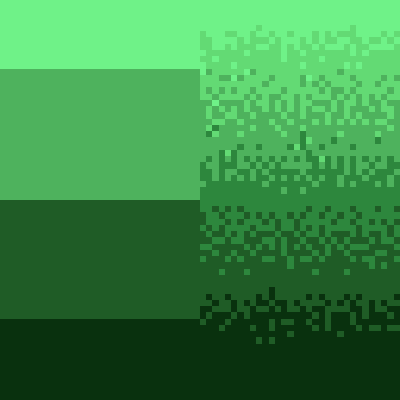
cbbg^/'kabij/^ is a client-side Fabric mod that reduces visible color banding by:
Helps reduce color banding on following:
cbbg-x.x.x.jar into your .minecraft/mods folder.This mod is client-only. It does not need to be installed on servers.
If you have Mod Menu installed, open cbbg's config screen and select:
You can also control the mod using chat commands (useful if Mod Menu is not installed):
/cbbg mode: View the current mode./cbbg mode set <mode>: Set the mode. Valid modes are ENABLED, DISABLED, DEMO.Config file: .minecraft/config/cbbg.json
Example:
{
  "mode": "ENABLED"
}
Valid values: ENABLED, DISABLED, DEMO.
Project description from CurseForge.
Pick your setup
Choose the version and loader you play, then open the matching release.
Check the dependencies, then try the file in a copied instance before changing a world you care about.
Recent files
cbbg-1.5.0+mc26.3-fabric.jar
13 Oct 2026
cbbg-1.4.2+mc26.3-fabric.jar
5 Oct 2026
cbbg-1.4.1+mc26.3-fabric.jar
2 Oct 2026
Looking for an older file? The official CurseForge project page is in Resources.
 mod
modA Minecraft mod that adds giant swords and shields to the game. A re-make of the original Asgard Shield, made popular by the 1.5 modpack Hexxit.
 mod
modThis mod adds more shapes for many vanilla blocks, including shapes that do not exist in vanilla Minecraft, like vertical slabs, vertical stairs or quarter pieces. Most of the blocks have vanilla behaviours, like what their base block behaves.
 mod
modThis is an unofficial continuation of OfflineSkins originally created by zlainsama (LainMI), ported and maintained by VoreZ