Minecraft version
Back to mods 
CurseForge · Minecraft mod
Practical Gamerules
Adds items to toggle gamerules in game without commands. Intended as a Modpack utility or for players who want to play purely without commands.
Choose a version Pick your version below, then grab the matching file.
Quick answer
Which Practical Gamerules release should I use?
Latest stable file practical-gamerules-1.0.0.jar
Game version 1.21.11
Loader Fabric
Practical Gamerules practical-gamerules-1.0.0.jar targets 1.21.11 with Fabric. The project page does not say whether this file belongs on the client, dedicated server, or both. No extra mods listed for this file.
Where it goes
Is Practical Gamerules required on the client, server, or both?
The project page does not say whether this file belongs on the client, dedicated server, or both.
Client Source doesn’t say
Dedicated server Source doesn’t say
Loader for this release Fabric
Required install it here Optional supported, not mandatory Not supported do not install here Source doesn’t say do not assume
The source does not explicitly classify this release as client-only or server-only.
What else does Practical Gamerules practical-gamerules-1.0.0.jar need?
practical-gamerules-1.0.0.jar. Change the file and its required mods may change too.
This file does not list any required mods. Do not add a library just because a different file uses it.
This file does not list any required or optional mods.
Before you install it
Add Practical Gamerules without breaking your instance.
Built for Practical Gamerules practical-gamerules-1.0.0.jar. Pick another file and the loader, install side or required mods may change.
- 01
Stick to this file
Use practical-gamerules-1.0.0.jar. It targets 1.21.11 with Fabric; another release may have different loader, side or dependency requirements.
- 02
Bring the mods it needs
This file does not list any required mods. Do not add a library just because a different file uses it.
- 03
Put it on the correct side
The project page does not say whether this file belongs on the client, dedicated server, or both.
- 04
Pick the file you checked
Use the “Get this file” button beside practical-gamerules-1.0.0.jar. It opens that exact file at the source.
About this project
What does Practical Gamerules add?
Practical Gamerules is a simplistic mod that adds items that toggle common gamerules.
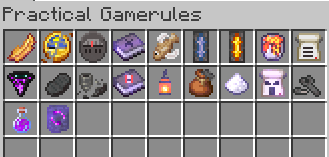
Items that toggle expirimental gamerules(Currently the Governor Removal Kit) must have their expiriments enabled in a world in order for the item to work.
Certain items also modify numeric gamerules. For example, the Enchanted Sugar item will increase the tick rate to up to five times the original rate if multiple are used. All items also have recipes, and can be toggled on/off individually in the config for balancing reasons.
To reverse the effect of a gamerule, there exists the Reversal Tablet.
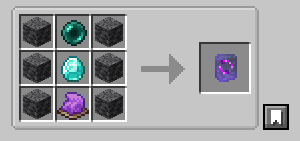
With the tablet in your offhand, use any gamerule to revert the effect that it had. This will send numeric gamerule items back one iteration instead of completely returning the value to normal.
Project description from CurseForge.
Pick your setup
Practical Gamerules by Minecraft version and loader
Choose the version and loader you play, then open the matching release.
Check the dependencies, then try the file in a copied instance before changing a world you care about.
Recent files
Practical Gamerules versions and loaders
practical-gamerules-1.0.0.jar
22 Dec 2025
Client Source doesn’t say Server Source doesn’t say Dependencies No extras listed Listed on Release listing
Check the 1.21.11 · Fabric setup Fabric1.21.11 release
Looking for an older file? The official CurseForge project page is in Resources.
 mod
CurseForge · Minecraft
Pigeon Express
Send letters and item parcels with carrier pigeons, a searchable address book, and personal medieval mailboxes.
 mod
CurseForge · Minecraft
Samurai Dynasty: Legends of Feudal Japan
Feudal Japan RPG: katana combos and parries, ninja parkour, dragon-wing elytra you wear over full armor, sakura forests, shrines and pagodas, and oni, tengu and kitsune to fight or befriend.
 mod
CurseForge · Minecraft
CustomFishing
CustomFishing is a CraftTweaker addon that allows users to add fishing conditions using scripts. For example, you can set a 50% chance of catching an apple when fishing in lava.