YetAnotherConfigLib Needed by Reliable EMI Fabric 1.21.1 - 4.0.2
requiredMatching file found Matched file: 3.8.2 for fabric 1.21.1

CurseForge · Minecraft mod
A mod adding many configurable features to EMI!
Quick answer
Reliable EMI Fabric 1.21.1 - 4.0.2 targets 1.21.1 with Fabric. The project page does not say whether it belongs on the client. The project page does not say whether it belongs on the dedicated server. All 5 required mods have matching files.
Where it goes
The project page does not say whether it belongs on the client. The project page does not say whether it belongs on the dedicated server.
The source does not explicitly classify this release as client-only or server-only.
Reliable EMI Fabric 1.21.1 - 4.0.2. Change the file and its required mods may change too.
Install YetAnotherConfigLib, EMI, YetAnotherConfigLib (YACL), Fabric API and 1 more first. We found matching files for this game-version and loader setup. 2 come through another mod in the chain.
2 extra mods were pulled in by other dependencies. Indented rows show who needs each one. We only count dependency files that match this setup. A file for another loader does not fill the gap.
Before you install it
Built for Reliable EMI Fabric 1.21.1 - 4.0.2. Pick another file and the loader, install side or required mods may change.
Use Reliable EMI Fabric 1.21.1 - 4.0.2. It targets 1.21.1 with Fabric; another release may have different loader, side or dependency requirements.
Install YetAnotherConfigLib, EMI, YetAnotherConfigLib (YACL), Fabric API and 1 more first. We found matching files for this game-version and loader setup. 2 come through another mod in the chain.
The project page does not say whether it belongs on the client. The project page does not say whether it belongs on the dedicated server.
Use the “Get this file” button beside Reliable EMI Fabric 1.21.1 - 4.0.2. It opens that exact file at the source.
About this project



Reliable EMI (REMI) is an addon for EMI, adding a variety of useful features,
improvements,
and customization options to enhance your recipe viewing experience!
REMI provides the following enhancements:
#tag_id.REMI offers extensive configuration options to tweak the interface to your needs. You can configure the mod via the
in-game config screen with YACL installed or by editing the configuration file
directly.
You can define new custom stack groups or modify existing ones using standard JSON files.
REMI loads stack groups from the config/remi/stack_groups directory. For example, to create a custom group, create a
JSON file in config/remi/stack_groups/my_group.json.
JSON Structure:
| Field | Type | Description |
|---|---|---|
id |
String | A unique identifier (e.g., "mypack:currency"). |
name |
String (Optional) | A translation key or string for the group's name (e.g., "mypack.group.currency" or "Currency"). |
type |
String | Determines how the group is built. Can be "remi:group", "remi:tag", or "remi:regex". |
enabled |
Boolean (Optional) | Set to false to disable this group. |
priority |
Integer (Optional) | Controls match order when an item could belong to multiple groups. Higher values are checked first (default 0). |
contents |
List | (For remi:group) A list of items or tags to include. |
exclusions |
List | (For remi:group/remi:regex) Items to remove from the group (useful when using broad tags or regexes). |
regex |
String | (For remi:group/remi:regex) A regular expression pattern used to match item IDs dynamically. |
regexes |
List (Optional) | (For remi:group) Like regex, but accepts a list of multiple patterns. |
Example: Creating a shiny things group (standard list)
{
  "id": "mypack:shiny_things",
  "type": "remi:group",
  "contents": [
    "minecraft:diamond",
    "minecraft:emerald",
    "minecraft:gold_ingot",
    "#c:glass_blocks"
  ],
  "exclusions": [
    "minecraft:purple_stained_glass"
  ]
}
Example: Creating a group using Regex
You can use the "remi:regex" type to dynamically group items based on their naming patterns. The example below groups
all items that end in _sword (from any namespace):
{
  "id": "mypack:swords",
  "type": "remi:regex",
  "regex": ".*:.*_sword",
  "name": "Swords"
}
Virtual Objects (Fluids, Modifiers, etc.):
Reliable EMI also supports grouping non-item objects such as Fluids, JEED effects, etc. To do this,
prefix the entry with its EMI registry type using the format <type>:<namespace>:<path>.
Example: Creating a special group
{
  "id": "mypack:basic_fluids",
  "name": "mypack.stack_group.basic_fluids",
  "type": "remi:group",
  "contents": [
    "fluid:minecraft:water",
    "fluid:minecraft:lava",
    "jeed:effect:minecraft:speed"
  ]
}
All stack groups are easily togglable using the in-game config screen, in the Stack Groups category.
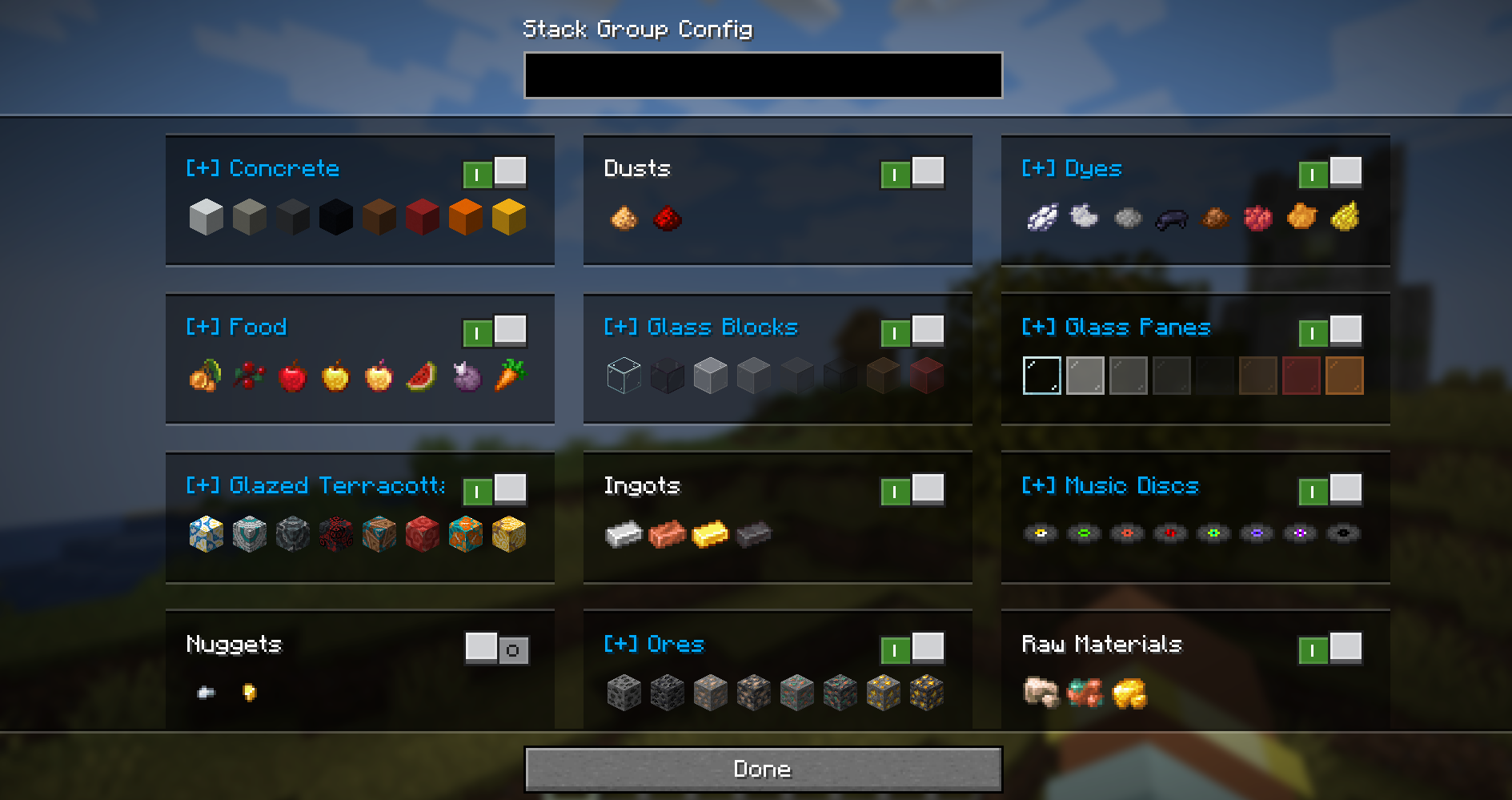
To disable a default stack group, you can also override its definition. Create a file with the same
path/ID as the default group and set "enabled": false.
Example: Disabling the spawn eggs group
File: config/remi/stack_groups/spawn_eggs.json
{
  "enabled": false
}

Project description from CurseForge.
Pick your setup
Choose the version and loader you play, then open the matching release.
Check the dependencies, then try the file in a copied instance before changing a world you care about.
Recent files
remi-fabric-1.21.1-4.0.2.jar
2 Aug 2026
remi-neoforge-1.21.1-4.0.2.jar
2 Aug 2026
remi-fabric-1.21.1-4.0.1.jar
30 Jul 2026
remi-neoforge-1.21.1-4.0.1.jar
30 Jul 2026
remi-fabric-1.21.1-4.0.0.jar
30 Jul 2026
remi-neoforge-1.21.1-4.0.0.jar
30 Jul 2026
emixx-fabric-1.21.1-3.5.1.jar
28 Jul 2026
emixx-neoforge-1.21.1-3.5.1.jar
28 Jul 2026
emixx-fabric-1.21.1-3.5.0.jar
27 Jul 2026
emixx-neoforge-1.21.1-3.5.0.jar
27 Jul 2026
emixx-fabric-1.21.1-3.4.0.jar
26 Jul 2026
emixx-neoforge-1.21.1-3.4.0.jar
26 Jul 2026
Looking for an older file? The official CurseForge project page is in Resources.
 mod
modA collection of developer tools for building modpacks and datapacks. Pull textures/models out of resource packs, dump lang entries, search datapacks, and copy item IDs: all without leaving the game!
 mod
modA growing collection of quality-of-life tweaks, bug fixes, and cross-mod integrations for modpack creators!
 mod
modEasily permanent vanilla and modded effects to players, util for modpacks.